But sometimes, they disappear slowly, like this kind of web address:
http://username:password@example.com/somewhere
If you’ve not seen a URL like that before, that’s fine, because the answer to the question “Can I still use HTTP Basic Auth in URLs?” is, I’m afraid: no, you probably can’t.
But by way of a history lesson, let’s go back and look at what these URLs were, why they died out, and how web
browsers handle them today. Thanks to Ruth who asked the original question that inspired this post.
Basic authentication
The early Web wasn’t built for authentication. A resource on the Web was theoretically accessible to all of humankind: if you didn’t want it in the public eye, you didn’t put
it on the Web! A reliable method wouldn’t become available until the concept of state was provided by Netscape’s invention of HTTP
cookies in 1994, and even that wouldn’t see widespread for several years, not least because implementing a CGI (or
similar) program to perform authentication was a complex and computationally-expensive option for all but the biggest websites.
A simplified view of the form-and-cookie based authentication system used by virtually every website today, but which was too computationally-expensive for many sites in the 1990s.
1996’s HTTP/1.0 specification tried to simplify things, though, with the introduction of the WWW-Authenticate header. The idea was that when a browser tried to access something that required
authentication, the server would send a 401 Unauthorized response along with a WWW-Authenticate header explaining how the browser could authenticate
itself. Then, the browser would send a fresh request, this time with an Authorization: header attached providing the required credentials. Initially, only “basic
authentication” was available, which basically involved sending a username and password in-the-clear unless SSL (HTTPS) was in use, but later, digest authentication and a host of others would appear.
For all its faults, HTTP Basic Authentication (and its near cousins) are certainly elegant.
Webserver software quickly added support for this new feature and as a result web authors who lacked the technical know-how (or permission from the server administrator) to implement
more-sophisticated authentication systems could quickly implement HTTP Basic Authentication, often simply by adding a .htaccessfile to the relevant directory.
.htaccess files would later go on to serve many other purposes, but their original and perhaps best-known purpose – and the one that gives them their name – was access
control.
Credentials in the URL
A separate specification, not specific to the Web (but one of Tim Berners-Lee’s most important contributions to it), described the general structure of URLs as follows:
At the time that specification was written, the Web didn’t have a mechanism for passing usernames and passwords: this general case was intended only to apply to protocols that
did have these credentials. An example is given in the specification, and clarified with “An optional user name. Some schemes (e.g., ftp) allow the specification of a user
name.”
But once web browsers had WWW-Authenticate, virtually all of them added support for including the username and password in the web address too. This allowed for
e.g. hyperlinks with credentials embedded in them, which made for very convenient bookmarks, or partial credentials (e.g. just the username) to be included in a link, with the
user being prompted for the password on arrival at the destination. So far, so good.
Encoding authentication into the URL provided an incredible shortcut at a time when Web round-trip times were much longer owing to higher latencies and no keep-alives.
This is why we can’t have nice things
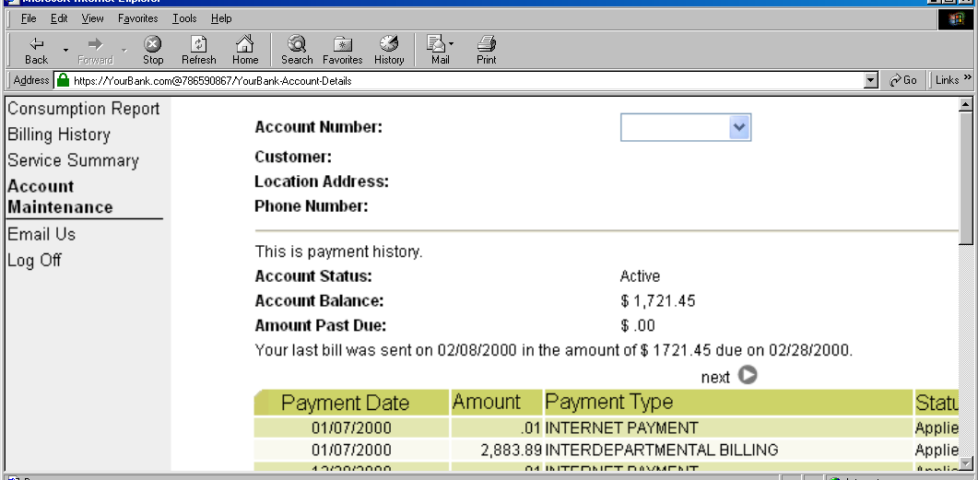
The technique fell out of favour as soon as it started being used for nefarious purposes. It didn’t take long for scammers to realise that they could create links like this:
https://YourBank.com@HackersSite.com/
Everything we were teaching users about checking for “https://” followed by the domain name of their bank… was undermined by this user interface choice. The poor victim would
actually be connecting to e.g. HackersSite.com, but a quick glance at their address bar would leave them convinced that they were talking to YourBank.com!
Theoretically: widespread adoption of EV certificates coupled with sensible user interface choices (that were never made) could
have solved this problem, but a far simpler solution was just to not show usernames in the address bar. Web developers were by now far more excited about forms and
cookies for authentication anyway, so browsers started curtailing the “credentials in addresses” feature.
Users trained to look for “https://” followed by the site they wanted would often fall for scams like this one: the real domain name is after the @-sign. (This attacker is
also using dword notation to obfuscate their IP address; this
dated technique wasn’t often employed alongside this kind of scam, but it’s another historical oddity I enjoy so I’m shoehorning it in.)
(There are other reasons this particular implementation of HTTP Basic Authentication was less-than-ideal, but this reason is the big one that explains why things had to change.)
One by one, browsers made the change. But here’s the interesting bit: the browsers didn’t always make the change in the same way.
How different browsers handle basic authentication in URLs
Let’s examine some popular browsers. To run these tests I threw together a tiny web application that outputs
the Authorization: header passed to it, if present, and can optionally send a 401 Unauthorized response along with a WWW-Authenticate: Basic realm="Test Site" header in order to trigger basic authentication. Why both? So that I can test not only how browsers handle URLs containing credentials when an authentication request is received, but how they handle them when one is not. This is relevant because
some addresses – often API endpoints – have optional HTTP authentication, and it’s sometimes important for a user agent (albeit typically a library or command-line one) to pass credentials without
first being prompted.
In each case, I tried each of the following tests in a fresh browser instance:
Go to http://<username>:<password>@<domain>/optional (authentication is optional).
Go to http://<username>:<password>@<domain>/mandatory (authentication is mandatory).
Experiment 1, then f0llow relative hyperlinks (which should correctly retain the credentials) to /mandatory.
Experiment 2, then follow relative hyperlinks to the /optional.
I’m only testing over the http scheme, because I’ve no reason to believe that any of the browsers under test treat the https scheme differently.
Chromium desktop family
Chrome 93 and Edge 93 both immediately suppressed the username and password from the address bar, along with the “http://” as we’ve come to expect of them. Like the “http://”, though,
the plaintext username and password are still there. You can retrieve them by copy-pasting the entire address.
Opera 78 similarly suppressed the username, password, and scheme, but didn’t retain the username and password in a way that could be copy-pasted out.
Authentication was passed only when landing on a “mandatory” page; never when landing on an “optional” page. Refreshing the page or re-entering the address with its credentials did not
change this.
Navigating from the “optional” page to the “mandatory” page using only relative links retained the username and password and submitted it to the server when it became mandatory,
even Opera which didn’t initially appear to retain the credentials at all.
Navigating from the “mandatory” to the “optional” page using only relative links, or even entering the “optional” page address with credentials after visiting the “mandatory” page, does
not result in authentication being passed to the “optional” page. However, it’s interesting to note that once authentication has occurred on a mandatory page, pressing enter at
the end of the address bar on the optional page, with credentials in the address bar (whether visible or hidden from the user) does result in the credentials being passed to
the optional page! They continue to be passed on each subsequent load of the “optional” page until the browsing session is ended.
Firefox desktop
Firefox 91 does a clever thing very much in-line with
its image as a browser that puts decision-making authority into the hands of its user. When going to the “optional” page first it presents a dialog, warning the user that they’re going
to a site that does not specifically request a username, but they’re providing one anyway. If the user says that no, navigation ceases (the GET request for the page takes place the same
either way; this happens before the dialog appears). Strangely: regardless of whether the user selects yes or no, the credentials are not passed on the “optional” page. The credentials
(although not the “http://”) appear in the address bar while the user makes their decision.
Similar to Opera, the credentials do not appear in the address bar thereafter, but they’re clearly still being stored: if the refresh button is pressed the dialog appears again. It does
not appear if the user selects the address bar and presses enter.
Similarly, going to the “mandatory” page in Firefox results in an informative dialog warning the user
that credentials are being passed. I like this approach: not only does it help protect the user from the use of authentication as a tracking technique (an old technique that I’ve not
seen used in well over a decade, mind), it also helps the user be sure that they’re logging in using the account they mean to, when following a link for that purpose. Again, clicking
cancel stops navigation, although the initial request (with no credentials) and the 401 response has already occurred.
Visiting any page within the scope of the realm of the authentication after visiting the “mandatory” page results in credentials being sent, whether or not they’re included in the
address. This is probably the most-true implementation to the expectations of the standard that I’ve found in a modern graphical browser.
Safari desktop
Safari 14 never displays or uses credentials provided via the web address, whether or not
authentication is mandatory. Mandatory authentication is always met by a pop-up dialog, even if credentials were provided in the address bar. Boo!
Once passed, credentials are later provided automatically to other addresses within the same realm (i.e. optional pages).
Older browsers
Let’s try some older browsers.
From version 7 onwards – right up to the final version 11 – Internet Explorer fails to even recognise
addresses with authentication credentials in as legitimate web addresses, regardless of whether or not authentication is requested by the server. It’s easy to assume that this is yet
another missing feature in the browser we all love to hate, but it’s interesting to note that credentials-in-addresses is permitted for ftp:// URLs…
…and if you go back a little way, Internet Explorer 6 and below supported credentials in the address bar pretty
much as you’d expect based on the standard. The error message seen in IE7 and above is a deliberate design
decision, albeit a somewhat knee-jerk reaction to the security issues posed by the feature (compare to the more-careful approach of other browsers).
These older versions of IE even (correctly) retain the credentials through relative hyperlinks, allowing them to be passed when
they become mandatory. They’re not passed on optional pages unless a mandatory page within the same realm has already been encountered.
Pre-Mozilla Netscape behaved the same way. Truly this was the de facto standard for a long period on the Web, and the varied approaches we see today are the
anomaly. That’s a strange observation to make, considering how much the Web of the 1990s was dominated by incompatible implementations of different Web features (I’ve written about the <blink> and <marquee> tags before, which was perhaps the most-visible division between
the Microsoft and Netscape camps, but there were many, many more).
Interestingly: by Netscape 7.2 the browser’s behaviour had evolved
to be the same as modern Firefox’s, except that it still displayed the credentials in the address bar for all to see.
Now here’s a real gem: pre-Chromium Opera. It would send credentials to “mandatory” pages and remember them for the
duration of the browsing session, which is great. But it would also send credentials when passed in a web address to “optional” pages. However, it wouldn’t remember
them on optional pages unless they remained in the address bar: this feels to me like an optimum balance of features for power users. Plus, it’s one of very few browsers that
permitted you to change credentials mid-session: just by changing them in the address bar! Most other browsers, even to this day, ignore changes to HTTP Authentication credentials, which was sometimes be a source of frustration back in the day.
Finally, classic Opera was the only browser I’ve seen to mask the password in the address bar, turning it into a series of asterisks. This ensures the user knows that a
password was used, but does not leak any sensitive information to shoulder-surfers (the length of the “masked” password was always the same length, too, so it didn’t even leak the
length of the password). Altogether a spectacular design and a great example of why classic Opera was way ahead of its time.
The Command-Line
Most people using web addresses with credentials embedded within them nowadays are probably working with code, APIs,
or the command line, so it’s unsurprising to see that this is where the most “traditional” standards-compliance is found.
I was unsurprised to discover that giving curl a username and password in the URL meant that
username and password was sent to the server (using Basic authentication, of course, if no authentication was requested):
However, wgetdid catch me out. Hitting the same addresses with wget didn’t result in the credentials being sent
except where it was mandatory (i.e. where a HTTP 401 response and a WWW-Authenticate: header was received on the initial attempt). To force wget to
send credentials when they haven’t been asked-for requires the use of the --http-user and --http-password switches:
lynx does a cute and clever thing. Like most modern browsers, it does not submit credentials unless specifically requested, but if
they’re in the address bar when they become mandatory (e.g. because of following relative hyperlinks or hyperlinks containing credentials) it prompts for the username and password,
but pre-fills the form with the details from the URL. Nice.
What’s the status of HTTP (Basic) Authentication?
HTTP Basic Authentication and its close cousin Digest Authentication (which overcomes some of the security limitations of running Basic Authentication over an
unencrypted connection) is very much alive, but its use in hyperlinks can’t be relied upon: some browsers (e.g. IE, Safari)
completely munge such links while others don’t behave as you might expect. Other mechanisms like Bearer see widespread use in APIs, but nowhere else.
The WWW-Authenticate: and Authorization: headers are, in some ways, an example of the best possible way to implement authentication on the Web: as an
underlying standard independent of support for forms (and, increasingly, Javascript), cookies, and complex multi-part conversations. It’s easy to imagine an alternative
timeline where these standards continued to be collaboratively developed and maintained and their shortfalls – e.g. not being able to easily log out when using most graphical browsers!
– were overcome. A timeline in which one might write a login form like this, knowing that your e.g. “authenticate” attributes would instruct the browser to send credentials using an
Authorization: header:
In such a world, more-complex authentication strategies (e.g. multi-factor authentication) could involve encoding forms as JSON. And single-sign-on systems would simply involve the browser collecting a token from the authentication provider and passing it on to the
third-party service, directly through browser headers, with no need for backwards-and-forwards redirects with stacks of information in GET parameters as is the case today.
Client-side certificates – long a powerful but neglected authentication mechanism in their own right – could act as first class citizens directly alongside such a system, providing
transparent second-factor authentication wherever it was required. You wouldn’t have to accept a tracking cookie from a site in order to log in (or stay logged in), and if your
browser-integrated password safe supported it you could log on and off from any site simply by toggling that account’s “switch”, without even visiting the site: all you’d be changing is
whether or not your credentials would be sent when the time came.
The Web has long been on a constant push for the next new shiny thing, and that’s sometimes meant that established standards have been neglected prematurely or have failed to evolve for
longer than we’d have liked. Consider how long it took us to get the <video> and <audio> elements because the “new shiny” Flash came to dominate,
how the Web Payments API is only just beginning to mature despite over 25 years of ecommerce on the Web, or how we still can’t
use Link: headers for all the things we can use <link> elements for despite them being semantically-equivalent!
The new model for Web features seems to be that new features first come from a popular JavaScript implementation, and then eventually it evolves into a native browser feature: for
example HTML form validations, which for the longest time could only be done client-side using scripting languages. I’d love
to see somebody re-think HTTP Authentication in this way, but sadly we’ll never get a 100% solution in JavaScript alone: (distributed SSO is almost certainly off the table, for example, owing to cross-domain limitations).
Or maybe it’s just a problem that’s waiting for somebody cleverer than I to come and solve it. Want to give it a go?
Hey @LloydsBank! 2009 called and asked if you’re done sending your customers links to unencrypted HTTP endpoints yet. How do you feel about switching this to a HTTPS link rather than
relying on an interceptable/injectable HTTP request?
Cellebrite makes software to automate physically extracting and indexing data from mobile devices. They exist within the grey – where enterprise branding joins together with the
larcenous to be called “digital intelligence.” Their customer list has included authoritarian regimes in Belarus, Russia, Venezuela, and China; death squads in Bangladesh; military
juntas in Myanmar; and those seeking to abuse and oppress in Turkey, UAE, and elsewhere. A few months ago, they announced
that they added Signal support to their software.
Their products have often been linked to the persecution of imprisoned journalists and activists around the world, but less has been written about what their software actually
does or how it works. Let’s take a closer look. In particular, their software is often associated with bypassing security, so let’s take some time to examine the security of
their own software.
Recently Moxie, co-author of the Signal Protocol, came into possession of a Cellebrite Extraction Device (phone cracking kit used by law enforcement as well as by oppressive regimes who
need to clamp down on dissidents) which “fell off a truck” near him. What an amazing coincidence! He went on to report, this week, that he’d partially reverse-engineered the system,
discovering copyrighted code from Apple – that’ll go down well! – and, more-interestingly, unpatchedvulnerabilities. In a demonstration video, he goes on to show that
a carefully crafted file placed on a phone could, if attacked using a Cellebrite device, exploit these vulnerabilities to take over the forensics equipment.
Obviously this is a Bad Thing if you’re depending on that forensics kit! Not only are you now unable to demonstrate that the evidence you’re collecting is complete and accurate, because
it potentially isn’t, but you’ve also got to treat your equipment as untrustworthy. This basically makes any evidence you’ve collected inadmissible in many courts.
Moxie goes on to announce a completely unrelated upcoming feature for Signal: a minority of functionally-random installations will create carefully-crafted files on their
devices’ filesystem. You know, just to sit there and look pretty. No other reason:
In completely unrelated news, upcoming versions of Signal will be periodically fetching files to place in app storage. These files are never used for anything inside Signal and never
interact with Signal software or data, but they look nice, and aesthetics are important in software. Files will only be returned for accounts that have been active installs for some
time already, and only probabilistically in low percentages based on phone number sharding. We have a few different versions of files that we think are aesthetically pleasing, and
will iterate through those slowly over time. There is no other significance to these files.
Max has produced a list of “naughty strings”: things you might try injecting into your systems along with any fuzz testing you’re doing to check for common errors in escaping,
processing, casting, interpreting, parsing, etc. The copy above is heavily truncated: the list is long!
It’s got a lot of the things in it that you’d expect to find: reserved keywords and filenames, unusual or invalid unicode codepoints, tests for the Scunthorpe Problem, and so on. But perhaps my favourite entry is this one, a test for “human injection”:
# Human injection
#
# Strings which may cause human to reinterpret worldview
If you're reading this, you've been in a coma for almost 20 years now. We're trying a new technique. We don't know where this message will end up in your dream, but we hope it works.
Please wake up, we miss you.
VPNs have long been essential online tools that provide security, freedom, and most importantly, privacy. Each day, hundreds of millions of internet users connect to a VPN to
prevent their online activities from being tracked and monitored so that they can privately access web resources. In other words, the very purpose of a VPN is to prevent the
type of surveillance that Google engages in on a massive and unprecedented scale.
Google knows this, and in their whitepaper discussing VPN by Google One, Google acknowledges that VPN usage is becoming mainstream and that “up to 25% of all internet users accessed a VPN within the
last month of 2019.” Increasing VPN usage unfortunately poses a significant problem for Google, by making it more difficult to track users across the internet, mine their data, and
target them with advertisements. In short, VPNs undermine Google’s power.
…
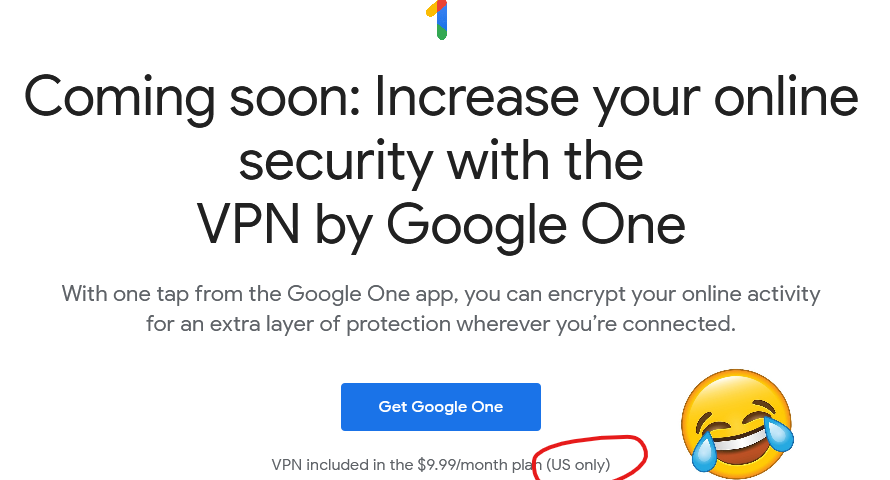
So yeah, it turns out that Google are launching a VPN service. I just checked,
and it’s not available to me anyway because it’s US-only (apparently nobody explained to Google the irony of having a VPN service that’s geofenced), but that’s pretty academic because I wasn’t going to touch it with a barge pole in the first place.
Is it 1 April already, Google?
Google already collect data on your browsing habits if you use their products. And I’m not just talking about Chrome, which of course continues to track you using your Google Account even after you log out and clear your cookies, and Google’s ubiquitous Web
tools, but also the tracking pixels hidden on every other website thanks to Google Analytics, AdWords, reCAPTCHA, Google Fonts, and the like. Sure, you can use e.g. uMatrix to stop all of these (although I’m in need of a
replacement), but that’s not a solution for, y’know, normal people. Container tabs help and you should
absolutely use them, but they don’t quite go far enough. It’s a challenge.
Switch to their VPN, though, and they’re suddenly able to track all of your browsing activity, in any browser on your
device. And probably many of the desktop applications you run, too, as most of them “phone home” for updates or functionality. And because it’s a paid-for VPN service, this data can be instantly linked to your real-world identity. By a company that’s demonstrated its willingness to misuse that data for their own benefit (or for the benefit of overreaching law enforcement agencies). Yeah: no deal,
Google.
Perhaps the only company I’d trust less to provide a VPN service would be Facebook, because you just know they’d be
doing so exclusively to undermine individual privacy. Oh wait;
that’s exactly what they did. Sigh.
I scratched an itch of mine this week and wanted to share the results with you, in case you happen to be one of the few dozen other people on Earth who will cry “finally!” to discover
that this is now a thing.
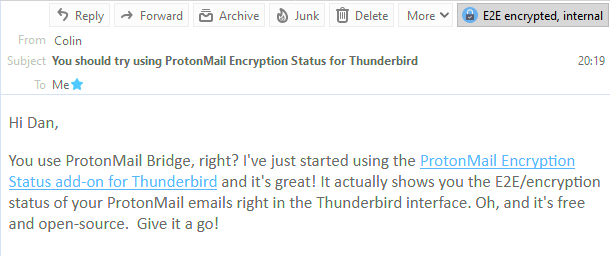
In the top right corner of this email, you can see that it was sent with end-to-end encryption from another ProtonMail user.
I’ve used ProtonMail as my primary personal email provider for about four years, and I love it. Seamless PGP/GPG for proper end-to-end encryption, privacy as standard, etc. At first, I used their web and mobile app interfaces but over time
I’ve come to rediscover my love affair with “proper” email clients, and I’ve been mostly using Thunderbird for my desktop mail. It’s been
great: lightning-fast search, offline capabilities, and thanks to IMAP (provided by ProtonMail Bridge) my mail’s still just as accessible when I fall-back on the web or mobile clients because I’m out and about.
But the one thing this set-up lacked was the ability to easily see which emails had been delivered encrypted versus those which had merely been delivered “in the clear” (like
most emails) and then encrypted for storage on ProtonMail’s servers. So I fixed it.
There are fundamentally four states a Thunderbird+ProtonMail Bridge email can be in, and here’s how I represent them.
I’ve just released my first ever Thunderbird plugin. If you’re using
ProtonMail Bridge, it adds a notification to the corner of every email to say whether it was encrypted in transit or not. That’s all.
And of course it’s open source with a permissive license (and a doddle to compile using your
standard operating system tools, if you want to build it yourself). If you’re using Thunderbird and ProtonMail Bridge you should give it a whirl. And if you’re not then… maybe you
should consider it?
Everything you see when you use “Inspect Element” was already downloaded to your computer, you just hadn’t asked Chrome to show it to you yet. Just like how the cogs were already in
the watch, you just hadn’t opened it up to look.
But let us dispense with frivolous cog talk. Cheap tricks such as “Inspect Element” are used by programmers to try and understand how the website works. This is ultimately futile:
Nobody can understand how websites work. Unfortunately, it kinda looks like hacking the first time you see it.
A few folks wrote to me to mention something I missed: security.
When you use code you didn’t author, you’re taking a risk. You’re trusting that the third-party code does not have security issues, that the author has good intent.
…
Chris makes a very good point, especially for those developers of the npm install every-damn-thing persuasion: getting an enormous framework that you don’t completely
understand just because you need a small portion of its features is bad security practice. And the target is a juicy one: a bad actor who finds (or introduces) a vulnerability in
a big and widely-used library has a whole lot of power. Security concerns are a major part of why I go vanilla/stdlib where possible.
But as always with security the answer isn’t so clear-cut and simple, and I’d argue that it’s dangerous to encourage people to write their own solutions as a matter of course, for
security reasons. For a start, you should never roll your own cryptographic libraries because
you’re almost certainly going to fuck it up: an undetectable and easy-to-make mistake in your crypto implementation can lead to a catastrophic cascade and completely undermine the value
of your cryptography. If you’re smart enough about crypto to implement crypto properly, you should contribute towards one of the major libraries. And if you’re not smart enough about
crypto (and if you’re not sure, then you’re not), you should use one of those libraries. And even then you should take care to integrate and use it properly: people have been
tripped over before by badly initialised keys or the use of the wrong kind of cipher for their use-case. Crypto
is hard enough that even experts fuck it up and important enough that you can’t afford to get it wrong.
The same rule applies to a much lesser extent to other parts of your application, and especially for beginner developers. Implementing an authentication/authorisation system isn’t
hard, but it’s another thing where getting it wrong can have disastrous consequences. Beginner (and even intermediate) developers routinely make mistakes with this kind of
feature: unhashed, reversibly-encrypted, or incorrectly-hashed (wrong algorithm, no salt, etc.) passwords, badly-thought-out password reset strategies, incompletely applied access
controls, etc. I’m confident that Chris and I would be in agreement that the best approach is for a developer to learn to implement these things properly and then do so. But if
having to learn to implement them properly is a barrier to getting started, I’d rather than a beginner developer instead use a tried-and-tested off-the-shelf like Devise/Warden.
Other examples of things that beginner/intermediate developers sometimes get wrong might be XSS protection and SQL parameter escaping. And again, for languages that don’t have safety features built in, a framework can fill the gap. Rolling your own
DOM whitelisting code for a social application is possible, but using a solution like DOMPurify is almost-certainly going to be more-secure for most developers because, you guessed it, this is another area where it’s
easy to make a mess of things.
My inclination is to adapt Chris’s advice on this issue, to instead say that for the best security:
Ideally: understand what all your code does, for example because you wrote it yourself.
However: if you’re not confident in your ability to implement something securely (and especially with cryptography), use an off-the-shelf library.
If you use a library: use the usual rules (popularity, maintenance cycle, etc.) to filter the list, but be sure to use the library with the smallest possible footprint –
the best library should (a) do only the one specific task you need done, and no more, and (b) be written in a way that lends itself to you learning from it, understanding it, and
hopefully being able to maintain it yourself.
Starting in Edge 82.0.425.0 Canary, a new flag is available.
…
…
This is a good move; a relatively simple innovation that’s sure to help end-user security. If you can’t see what’s different above without following the link through to the original
article, here’s the short version: an upcoming version of Edge will allow you to authorise a specific site to open a particular application to handle a link… without
having to compromise by choosing either to (a) see the security dialog every single time (which teaches users to “just click OK”) or (b) allow the dialog to be suppressed for links that
open a particular application (which makes it easier for bad guys to make poisonous links).
So you’ll be able to, for example, say “slack.com can open Slack for me, but other websites have to ask”. Nice.
I hope that other browser manufacturers follow suit, especially on mobile where the web/web-launched-native-app boundary has never been fuzzier.
This is part of a series of posts on computer terminology whose popular meaning – determined by surveying my friends – has significantly
diverged from its original/technical one. Read more evolving words…
Anticipatory note: based on the traffic I already get to my blog and the keywords people search for, I imagine that some people will end up here looking to
learn “how to become a hacker”. If that’s your goal, you’re probably already asking the wrong question, but I direct you to Eric S. Raymond’s Guide/FAQ on the subject. Good luck.
Few words have seen such mutation of meaning over their lifetimes as the word “silly”. The earliest references, found in Old English, Proto-Germanic, and Old Norse and presumably having
an original root even earlier, meant “happy”. By the end of the 12th century it meant “pious”; by the end of the 13th, “pitiable” or “weak”; only by the late 16th coming to mean
“foolish”; its evolution continues in the present day.
The Monty Python crew were certainly the experts on the contemporary use of the word.
But there’s little so silly as the media-driven evolution of the word “hacker” into something that’s at least a little offensive those of us who probably would be
described as hackers. Let’s take a look.
Hacker
What people think it means
Computer criminal with access to either knowledge or tools which are (or should be) illegal.
What it originally meant
Expert, creative computer programmer; often politically inclined towards information transparency, egalitarianism, anti-authoritarianism, anarchy, and/or decentralisation of
power.
The Past
The earliest recorded uses of the word “hack” had a meaning that is unchanged to this day: to chop or cut, as you might describe hacking down an unruly bramble. There are clear links
between this and the contemporary definition, “to plod away at a repetitive task”. However, it’s less certain how the word came to be associated with the meaning it would come to take
on in the computer labs of 1960s university campuses (the earliest references seem to come from
around April 1955).
There, the word hacker came to describe computer experts who were developing a culture of:
sharing computer resources and code (even to the extent, in extreme
cases, breaking into systems to establish more equal opportunity of access),
learning everything possible about humankind’s new digital frontiers (hacking to learn, not learning to hack)
discovering and advancing the limits of computers: it’s been said that the difference between a non-hacker and a hacker is that a non-hacker asks of a new gadget “what does it do?”,
while a hacker asks “what can I make it do?”
What the media generally refers to as “hackers” would be more-accurately, within the hacker community, be called crackers; a subset of security hackers, in turn a subset of
hackers as a whole. Script kiddies – people who use hacking tools exclusively for mischief without fully understanding what they’re doing – are a separate subset on their own.
It is absolutely possible for hacking, then, to involve no lawbreaking whatsoever. Plenty of hacking involves writing (and sharing) code, reverse-engineering technology and systems you
own or to which you have legitimate access, and pushing the boundaries of what’s possible in terms of software, art, and human-computer interaction. Even among hackers with a specific
interest in computer security, there’s plenty of scope for the legal pursuit of their interests: penetration testing, security research, defensive security, auditing, vulnerability
assessment, developer education… (I didn’t say cyberwarfare because 90% of its
application is of questionable legality, but it is of course a big growth area.)
Hackers have a serious image problem, and the best way to see it is to search on your favourite stock photo
site for “hacker”. If you don’t use a laptop in a darkened room, wearing a hoodie and optionally mask and gloves, you’re not a real hacker. Also, 50% of all text should be
green, 40% blue, 10% red.
So what changed? Hackers got famous, and not for the best reasons. A big tipping point came in the early 1980s when hacking group The
414s broke into a number of high-profile computer systems, mostly by using the default password which had never been changed. The six teenagers responsible were arrested by the
FBI but few were charged, and those that were were charged only with minor offences. This was at least in part because
there weren’t yet solid laws under which to prosecute them but also because they were cooperative, apologetic, and for the most part hadn’t caused any real harm. Mostly they’d just been
curious about what they could get access to, and were interested in exploring the systems to which they’d logged-in, and seeing how long they could remain there undetected. These remain
common motivations for many hackers to this day.
Hoodie: check. Face-concealing mask: check. Green/blue code: check. Is I a l33t hacker yet?
News media though – after being excited by “hacker” ideas introduced by WarGames – rightly realised that a hacker with the
same elementary resources as these teens but with malicious intent could cause significant real-world damage. Bruce
Schneier argued last year that the danger of this may be higher today than ever before. The press ran news stories strongly associating the word “hacker” specifically with the focus
on the illegal activities in which some hackers engage. The release of Neuromancer the following year, coupled
with an increasing awareness of and organisation by hacker groups and a number of arrests on both sides of the Atlantic only fuelled things further. By the end of the decade it was
essentially impossible for a layperson to see the word “hacker” in anything other than a negative light. Counter-arguments like The
Conscience of a Hacker (Hacker’s Manifesto) didn’t reach remotely the same audiences: and even if they had, the points they made remain hard to sympathise with for those outside of
hacker communities.
‘Nuff said.
A lack of understanding about what hackers did and what motivated them made them seem mysterious and otherworldly. People came to make the same assumptions about hackers that
they do about magicians – that their abilities are the result of being privy to tightly-guarded knowledge rather than years of practice – and this
elevated them to a mythical level of threat. By the time that Kevin Mitnick was jailed in the mid-1990s, prosecutors were able to successfully persuade a judge that this “most dangerous
hacker in the world” must be kept in solitary confinement and with no access
to telephones to ensure that he couldn’t, for example, “start a nuclear war by whistling into a pay phone”. Yes, really.
Whistling into a phone to start a nuclear war? That makes CSI: Cyber seem realistic [watch].
The Future
Every decade’s hackers have debated whether or not the next decade’s have correctly interpreted their idea of “hacker ethics”. For me, Steven Levy’s tenets encompass them best:
Access to computers – and anything which might teach you something about the way the world works – should be unlimited and total.
All information should be free.
Mistrust authority – promote decentralization.
Hackers should be judged by their hacking, not bogus criteria such as degrees, age, race, or position.
You can create art and beauty on a computer.
Computers can change your life for the better.
Given these concepts as representative of hacker ethics, I’m convinced that hacking remains alive and well today. Hackers continue to be responsible for many of the coolest and
most-important innovations in computing, and are likely to continue to do so. Unlike many other sciences, where progress over the ages has gradually pushed innovators away from
backrooms and garages and into labs to take advantage of increasingly-precise generations of equipment, the tools of computer science are increasingly available to individuals.
More than ever before, bedroom-based hackers are able to get started on their journey with nothing more than a basic laptop or desktop computer and a stack of freely-available
open-source software and documentation. That progress may be threatened by the growth in popularity of easy-to-use (but highly locked-down) tablets and smartphones, but the barrier to
entry is still low enough that most people can pass it, and the new generation of ultra-lightweight computers like the Raspberry Pi are doing
their part to inspire the next generation of hackers, too.
That said, and as much as I personally love and identify with the term “hacker”, the hacker community has never been less in-need of this overarching label. The diverse variety
of types of technologist nowadays coupled with the infiltration of pop culture by geek culture has inevitably diluted only to be replaced with a multitude of others each describing a
narrow but understandable part of the hacker mindset. You can describe yourself today as a coder, gamer, maker, biohacker, upcycler,cracker, blogger, reverse-engineer, social engineer, unconferencer, or one of dozens of other terms that more-specifically ties you to your
community. You’ll be understood and you’ll be elegantly sidestepping the implications of criminality associated with the word “hacker”.
The original meaning of “hacker” has also been soiled from within its community: its biggest and perhaps most-famous
advocate‘s insistence upon linguistic prescriptivism came under fire just this year after he pushed for a dogmatic interpretation of the term “sexual assault” in spite of a victim’s experience.
This seems to be absolutely representative of his general attitudes towards sex, consent,
women, and appropriate professional relationships. Perhaps distancing ourselves from the old definition of the word “hacker” can go hand-in-hand with distancing ourselves from some of
the toxicity in the field of computer science?
(I’m aware that I linked at the top of this blog post to the venerable but also-problematic Eric S. Raymond; if anybody can suggest an equivalent resource by another
author I’d love to swap out the link.)
Verdict: The word “hacker” has become so broad in scope that we’ll never be able to rein it back in. It’s tainted by its associations with both criminality, on one
side, and unpleasant individuals on the other, and it’s time to accept that the popular contemporary meaning has won. Let’s find new words to define ourselves, instead.
…why would cookies ever need to work across domains? Authentication, shopping carts and all that good stuff can happen on the same domain. Third-party cookies, on the other hand,
seem custom made for tracking and frankly, not much else.
…
Then there’s third-party JavaScript.
In retrospect, it seems unbelievable that third-party JavaScript is even possible. I mean, putting arbitrary code—that can then inject
even more arbitrary code—onto your website? That seems like a security nightmare!
I imagine if JavaScript were being specced today, it would almost certainly be restricted to the same origin by default.
…
Jeremy hits the nail on the head with third-party cookies and Javascript: if the Web were invented today, there’s no way that these potentially privacy and security-undermining features
would be on by default, globally. I’m not sure that they’d be universally blocked at the browser level as Jeremy suggests, though: the Web has always been about empowering developers,
acting as a playground for experimentation, and third-party stuff does provide benefits: sharing a login across multiple subdomains, for example (which in turn can exist as a
security feature, if different authors get permission to add content to those subdomains).
Instead, then, I imagine that a Web re-invented today would treat third-party content a little like we treat CORS or we’re
beginning to treat resource types specified by Content-Security-Policy and Feature-Policy headers. That is, website owners would need to “opt-in” to which third-party domains could be
trusted to provide content, perhaps subdivided into scripts and cookies. This wouldn’t prohibit trackers, but it would make their use less of an assumed-default (develolpers would have
to truly think about the implications of what they were enabling) and more transparent: it’d be very easy for a browser to list (and optionally block, sandbox, or anonymise) third-party
trackers could potentially target them, on a given site, without having to first evaluate any scripts and their sources.
I was recently inspired by Dave Rupert to remove
Google Analytics from this blog. For a while, there’ll have been no third-party scripts being delivered on this site at all, except through iframes (for video embedding etc., which
is different anyway because there’s significantly less scope leak). Recently, I’ve been experimenting with Jetpack because I get it for free through
my new employer, but I’m always looking for ways to improve how well my site “stands alone”: you can block all third-party resources
and this site should still work just fine (I wonder if I can add a feature to my service worker to allow visitors to control exactly what third party content they’re exposed to?).
That moment when you realise, to your immense surprise, that the research you’ve spent most of the year on might actually demonstrate the thing you set out to test after all. 😲
Screw you, null hypothesis.
This is part of a series of posts on computer terminology whose popular meaning – determined by surveying my friends – has significantly
diverged from its original/technical one. Read more evolving words…
A few hundred years ago, the words “awesome” and “awful” were synonyms. From their roots, you can see why: they mean “tending to or causing awe” and “full or or characterised by awe”,
respectively. Nowadays, though, they’re opposites, and it’s pretty awesome to see how our language continues to evolve. You know what’s awful, though? Computer viruses. Right?
“Oh no! A virus has stolen all my selfies and uploaded them to a stock photos site!”
You know what I mean by a virus, right? A malicious computer program bent on causing destruction, spying on your online activity, encrypting your files and ransoming them back to you,
showing you unwanted ads, etc… but hang on: that’s not right at all…
Virus
What people think it means
Malicious or unwanted computer software designed to cause trouble/commit crimes.
What it originally meant
Computer software that hides its code inside programs and, when they’re run, copies itself into other programs.
The Past
Only a hundred and thirty years ago it was still widely believed that “bad air” was the principal cause of disease. The idea that tiny germs could be the cause of infection was only
just beginning to take hold. It was in this environment that the excellent scientist Ernest Hankin travelled around
India studying outbreaks of disease and promoting germ theory by demonstrating that boiling water prevented cholera by killing the (newly-discovered) vibrio cholerae bacterium.
But his most-important discovery was that water from a certain part of the Ganges seemed to be naturally inviable as a home for vibrio cholerae… and that boiling this
water removed this superpower, allowing the special water to begin to once again culture the bacterium.
Hankin correctly theorised that there was something in that water that preyed upon vibrio cholerae; something too small to see with a microscope. In doing so, he was probably
the first person to identify what we now call a bacteriophage: the most common kind of virus. Bacteriophages were briefly seen as exciting for their medical potential. But then
in the 1940s antibiotics, which were seen as far more-convenient, began to be manufactured in bulk, and we stopped seriously looking at “phage therapy” (interestingly, phages are seeing a bit of a resurgence as antibiotic resistance becomes increasingly problematic).
It took until the development of the scanning electron microscope in the mid-20th century before we’d actually “see” a virus.
But the important discovery kicked-off by the early observations of Hankin and others was that viruses exist. Later, researchers would discover how these viruses
work1:
they inject their genetic material into cells, and this injected “code” supplants the unfortunate cell’s usual processes. The cell is “reprogrammed” – sometimes after a dormant
period – to churns out more of the virus, becoming a “virus factory”.
Let’s switch to computer science. Legendary mathematician John von Neumann, fresh from showing off his expertise in
calculating how shaped charges should be used to build the first atomic bombs, invented the new field of cellular autonoma. Cellular autonoma are computationally-logical,
independent entities that exhibit complex behaviour through their interactions, but if you’ve come across them before now it’s probably because you played Conway’s Game of Life, which made the concept popular decades after their invention. Von Neumann was very interested
in how ideas from biology could be applied to computer science, and is credited with being the first person to come up with the idea of a self-replicating computer program which would
write-out its own instructions to other parts of memory to be executed later: the concept of the first computer virus.
This is a glider factory… factory. I remember the first time I saw this pattern, in the 1980s, and it sank in for me that cellular autonoma must logically be capable of any
arbitrary level of complexity. I never built a factory-factory-factory, but I’ll bet that others have.
Retroactively-written lists of early computer viruses often identify 1971’s Creeper as the first computer virus:
it was a program which, when run, moved (later copied) itself to another computer on the network and showed the message “I’m the creeper: catch me if you can”. It was swiftly followed
by a similar program, Reaper, which replicated in a similar way but instead of displaying a message attempted to
delete any copies of Creeper that it found. However, Creeper and Reaper weren’t described as viruses at the time and would be more-accurately termed
worms nowadays: self-replicating network programs that don’t inject their code into other programs. An interesting thing to note about them, though, is that – contrary
to popular conception of a “virus” – neither intended to cause any harm: Creeper‘s entire payload was a relatively-harmless message, and Reaper actually tried to do
good by removing presumed-unwanted software.
Another early example that appears in so-called “virus timelines” came in 1975. ANIMAL presented as a twenty
questions-style guessing game. But while the user played it would try to copy itself into another user’s directory, spreading itself (we didn’t really do directory permissions back
then). Again, this wasn’t really a “virus” but would be better termed a trojan: a program which pretends to be something that it’s not.
“Malware? Me? No siree… nothing here but this big executable horse.”
It took until 1983 before Fred Cooper gave us a modern definition of a computer virus, one which – ignoring usage by laypeople –
stands to this day:
A program which can ‘infect’ other programs by modifying them to include a possibly evolved copy of itself… every program that gets infected may also act as a virus and thus the
infection grows.
This definition helps distinguish between merely self-replicating programs like those seen before and a new, theoretical class of programs that would modify host programs such
that – typically in addition to the host programs’ normal behaviour – further programs would be similarly modified. Not content with leaving this as a theoretical, Cooper wrote the
first “true” computer virus to demonstrate his work (it was never released into the wild): he also managed to prove that there can be no such thing as perfect virus detection.
(Quick side-note: I’m sure we’re all on the same page about the evolution of language here, but for the love of god don’t say viri. Certainly don’t say virii.
The correct plural is clearly viruses. The Latin root virus is a mass noun and so has no plural, unlike e.g.
fungus/fungi, and so its adoption into a count-noun in English represents the creation of a new word which should therefore, without a precedent to the
contrary, favour English pluralisation rules. A parallel would be bonus, which shares virus‘s linguistic path, word ending, and countability-in-Latin: you wouldn’t say
“there were end-of-year boni for everybody in my department”, would you? No. So don’t say viri either.)
No, no, no, no, no. The only wholly-accurate part of this definition is the word “program”.
Viruses came into their own as computers became standardised and commonplace and as communication between them (either by removable media or network/dial-up connections) and Cooper’s
theoretical concepts became very much real. In 1986, The Virdim method brought infectious viruses to the DOS platform, opening up virus writers’ access to much of the rapidly growing business and home computer markets.
The Virdim method has two parts: (a) appending the viral code to the end of the program to be infected, and (b) injecting early into the program a call to the appended code. This
exploits the typical layout of most DOS executable files and ensures that the viral code is run first, as an infected program
loads, and the virus can spread rapidly through a system. The appearance of this method at a time when hard drives were uncommon and so many programs would be run from floppy disks
(which could be easily passed around between users) enabled this kind of virus to spread rapidly.
For the most part, early viruses were not malicious. They usually only caused harm as a side-effect (as we’ve already seen, some – like Reaper – were intended to be not just
benign but benevolent). For example, programs might run slower if they’re also busy adding viral code to other programs, or a badly-implemented virus might
even cause software to crash. But it didn’t take long before viruses started to be used for malicious purposes – pranks, adware, spyware, data ransom, etc. – as well as to carry
political messages or to conduct cyberwarfare.
XKCD already explained all of this in far fewer words and a diagram.
The Future
Nowadays, though, viruses are becoming less-common. Wait, what?
Yup, you heard me right: new viruses aren’t being produced at remotely the same kind of rate as they were even in the 1990s. And it’s not that they’re easier for security software to
catch and quarantine; if anything, they’re less-detectable as more and more different types of file are nominally “executable” on a typical computer, and widespread access to
powerful cryptography has made it easier than ever for a virus to hide itself in the increasingly-sprawling binaries that litter modern computers.
Soo… I click this and all the viruses go away, right? Why didn’t we do this sooner?
The single biggest reason that virus writing is on the decline is, in my opinion, that writing something as complex as a a virus is longer a necessary step to illicitly getting your
program onto other people’s computers2!
Nowadays, it’s far easier to write a trojan (e.g. a fake Flash update, dodgy spam attachment, browser toolbar, or a viral free game) and trick people into running it… or else to write a
worm that exploits some weakness in an open network interface. Or, in a recent twist, to just add your code to a popular library and let overworked software engineers include it in
their projects for you. Modern operating systems make it easy to have your malware run every time they boot and it’ll quickly get lost amongst the noise of all the
other (hopefully-legitimate) programs running alongside it.
In short: there’s simply no need to have your code hide itself inside somebody else’s compiled program any more. Users will run your software anyway, and you often don’t even
have to work very hard to trick them into doing so.
Verdict: Let’s promote use of the word “malware” instead of “virus” for popular use. It’s more technically-accurate in the vast majority of cases, and it’s actually a
more-useful term too.
Footnotes
1 Actually, not all viruses work this way. (Biological) viruses are, it turns out, really
really complicated and we’re only just beginning to understand them. Computer viruses, though, we’ve got a solid understanding of.
2 There are other reasons, such as the increase in use of cryptographically-signed
binaries, protected memory space/”execute bits”, and so on, but the trend away from traditional viruses and towards trojans for delivery of malicious payloads began long before these
features became commonplace.
I’ve just cleared out my desk at the Bodleian in anticipation of my imminent departure and discovered that I’ve managed to
successfully keep not only my P60s but also every payslip I’ve ever received in the 8½ years I’ve worked there. At a stretch, I
might just end up requiring those for the current tax year but I can’t conceive of any reason I’ll ever need the preceding hundred or so of them, so the five year-old and I
shredded them all.
If you’ve ever wanted to watch five solid minutes of cross-cut shredding shot from an awkwardly placed mobile phone camera, this is the video for you. Everybody else can move along.