This is a reply to a post published elsewhere. Its content might be duplicated as a traditional comment at the original source.
…
Those .ini files seemed unimportant to a child, but they are configuration files used by several applications, including the operating system. While the Windows
Registry did exist in Windows 95, .ini files were still commonly used. When I deleted them, any application or process that relied on them failed to load and simply
crashed.
Anyone who had anything of importance on that computer lost it. Everyone except my father, who carefully kept copies of his documents on floppy disks. He knew I was up to no good.
Throughout my career, I’ve seen many people make this same mistake. When something doesn’t look important to them, they delete it. Whether it’s a programmer deleting a function that “looks stupid,” or a DBA dropping a table or a single field they assume no one will miss. It’s
all the result of the same mindset: “I don’t think this is important.”
…
Not the same thing at all, but once, early in my career, I needed to use a colleague’s computer because mine was tied-up doing something-or-other. He was off for his lunch, so I asked
if I could borrow his and carry on testing the system I’d been developing from there.
My tests involved making a ton of CSV files, uploading them into a tool, getting the mutated results back, and comparing them. Dull stuff, and it made a load of temporary files. So I
dutifully dumped all the mess I made into the Recycle Bin and, when I was finished and returned to my own desk, I emptied the Recycle Bin.
My colleague returned and he was furious. “Did you empty my Recycle Bin?” he fumed.
“Yes,” I said, “Sorry; was that a problem?”
“I was keeping all kinds of important documents in there!” he replied.
Turns out that the software he was using to measure how much disk space he had left didn’t include the Recycle Bin in its count; after all, that could be freed-up in a moment! And so,
to “save space”, he’d taken to storing large (but important) files… in the Recycle Bin so that they didn’t take up space (at least, according to the tool he was using: obviously they
were taking up space in reality).
This guy wasn’t 10 years old. He was over twice that, a recent university graduate with a software engineering degree.
Folks at work have been encouraging to make more use of generative AI in my workflow1;
going beyond my current “fancy autocomplete” use and giving my agents more autonomy. My experience of such “vibe coding” so far has been… mixed2,
but I promised I’d revisit it.
One thing that these models are usually effective at is summarisation3. This is valuable if you’re faced with a large and unfamiliar
codebase and you’re looking to trace a particular thing but you’re not certain where it is or what it’ll be called. While they’re not always fast, these tools can
at least work in the background, which allows the developer to get on with something else while the agent trawls logs, code, and configuration to find and explain a
fuzzily-defined thing.
Recently, I had a moment which I thought might be such an instance… but it didn’t turn out quite the way I expected. Here’s the story4:
The broken dev env
I’d been drafted into an established and ongoing project to provide more hands, following a coworker’s departure last week. This project touches parts of our (sprawling,
microsevices-based) infrastructure that I hadn’t looked at before, so there was a lot I didn’t yet know.
I picked an issue that had belonged to my former colleague that QA had rejected and set out to retrace their steps: to replicate the problem that the QA engineers had identified and in
doing so learn more about the underlying process. I spun up my development environment and tried to follow the steps.
The process failed… but much earlier than QA had said it would. Clearly my development environment was at fault, or at least not representative of their setup.
But I couldn’t even get as far as their problem before my frontend barfed out an error message. Sigh! Probably there’s some configuration I’ve missed somewhere in the myriad
microservices, or else the data I’m testing with isn’t a fair reflection on what they’re doing as-standard.
Following some staff changes, I have no teammates on this side of the Atlantic who could help me decipher this: a “quick question on Slack” wouldn’t solve this one until hours
from now. It was time to start debugging!
But… maybe Claude could help? It’s got access to almost all the same code, logs, tools and browser windows I do. I started typing:
✨ What’s up next, Dan?
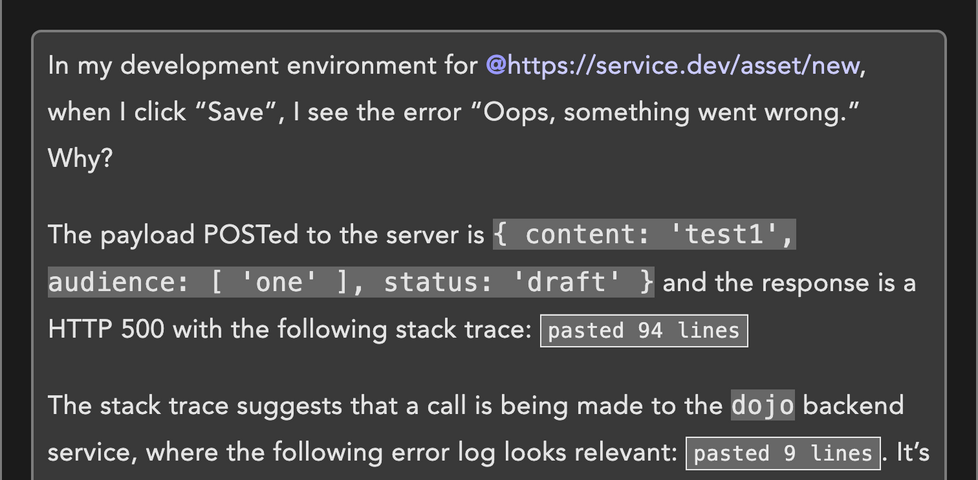
In my development environment for https://service.dev/asset/new, when I click “Save”, I see the error “Oops, something went wrong.”
Why?
Context is key
It’s quite possible that Claude would have gone away, had a “think”, done some tests, and then come back to me with a believable answer. It might even have been correct, and I’d have
been able to short-cut my way back to productivity (and I’d have time to make a mug of coffee and finish reading my emails while it did so). Then, I’d just have to check that it was
right, make the change, and get on with things.
But I realised that it’d probably work faster (and cheaper, and using less energy) if it had slightly more context from the get-go, so I elaborated. The first thing I’d
want to know if I were debugging this is what was actually happening behind the scenes. I dipped into my browser’s Network debugger and extracted the relevant output, adding it to my
prompt:
✨ What’s up next, Dan?
In my development environment for https://service.dev/asset/new, when I click “Save”, I see
the error “Oops, something went wrong.” Why?The payload POSTed to the server is { content: 'test1', audience: [ 'one' ], status: 'draft' } and
the response is a HTTP 500 with the following stack trace: pasted 94 lines
That’s more like it, now I could let it get on with its work. But wait…
Rubberducking
There’s a concept in computer programming called “rubberducking”. The name comes from an anecdote in The Pragmatic Programmer about a developer who, when stuck on a problem, would
explain the code line-by-line to a rubber duck. The thinking is that talking-through a problem, even to someone (or something) who doesn’t understand it, can lead the speaker to
insights they were otherwise missing.
I’ve done it myself many, many times: recruiting a convenient colleague or friend and talking them through the technical problem I was faced with, and inviting them to ask me to go
into greater detail if I seemed to be skimming over anything, and I can promise that it can work.
The panel above is part of a series in which a sorceress called Cepper who’s
coerced by her university into using Avian Intelligence (“AI”) – a robotic parrot5 that her headmaster insists is the future of magic. She experiments with it, finds it
occasionally useful but more-often frustrating, attempts to implement her own local version but find that troublesome in different ways, and eventually settles on using
an inanimate rubber duck instead. I get it, Cepper!
Let’s put that distraction aside for a moment and get back to the story of my broken development environment.
Clues in the stack trace
The top entry in the stack trace was an unsuccessful call to a different microservice, so I figured I’d pull its logs too, in order to further help direct
the AI in the right direction6:
✨ What’s up next, Dan?
In my development environment for https://service.dev/asset/new, when I click “Save”, I see
the error “Oops, something went wrong.” Why?The payload POSTed to the server is { content: 'test1',
audience: [ 'one' ], status: 'draft' } and the response is a HTTP 500 with the following stack trace: pasted 94 linesThe stack
trace suggests that a call is being made to the dojo backend service, where the following error log looks relevant: pasted 9
lines
I haven’t tried it, but I’m pretty confident that the LLM, after much number-crunching and a little warming-up of some datacentre somewhere, would get to the answer. But again, I found
something niggling inside me: the second-from top line in the dojo logs suggested that a connection was being made to a further, deeper microservice.
I should pull its logs too, I figured.
The final puzzle piece
As an aide mémoire – in a way I’ve taken to doing when taking notes or when talking to AI – I first typed what I was going to provide. This is
useful if, for example, somebody distracts me at a key moment: it means you’ve got a jumping-off point predefined by my past self:
✨ What’s up next, Dan?
In my development environment for https://service.dev/asset/new, when I click “Save”, I see
the error “Oops, something went wrong.” Why?The payload POSTed to the server is { content: 'test1',
audience: [ 'one' ], status: 'draft' } and the response is a HTTP 500 with the following stack trace: pasted 94 linesThe stack
trace suggests that a call is being made to the dojo backend service, where the following error log looks relevant: pasted 9
lines. It’s calling osiris, which says:
I dipped into the directory for
osiris, and before I even got to the logs I spotted a problem: that microservice was on an old feature branch. How odd! I switched to the main branch and… everything
started working.
The entire event took only a few minutes. I’d find some information, type it into Claude’s input field, realise that more information could be valuable, and repeat.
By the time I’d finished describing the problem, I’d discovered the solution. That’s the essence of successful rubberducking. I didn’t need the AI at all.
All I needed was the illusion of something that might be able to help if I just talked through what I was thinking.
I don’t know what the moral is, here.
I wonder if I’d have been as effective had I just typed into my text editor. I suppose I would have, but I wonder if I’d have been motivated to do so in the first place? I’ve tried
rubberducking before by talking to an imaginary person, but I’ve never tried typing to one7; maybe I should start?
Footnotes
1 I’m pretty sure every engineering department nowadays has it’s rabid fanboys, but I’m
pleased that for the most part my colleagues take a more-pragmatic and realistic outlook: balancing the potential benefits of LLM-assisted coding with its many shortfalls,
downsides, and risks.
3 So long as what you’ve got them summarising is something you can later verify!
4 I’ve taken huge liberties with the strict factual accuracy to make this more-readable as
well as to to not-expose things I probably oughtn’t. So before you swoop in to criticise my prompt-fu (not that I asked you, but I know there’s somebody out there who’s thinking about
doing this right now), please note that none of the text in this page are what I actually wrote to the AI; it’s a figurative example.
6 I’d had an experience just the previous week in which it’d gone off on completely the
wrong track, attempting to change code in order to “fix” what was ultimately a configuration or data problem, and so I thought it might be useful to give it some rails to follow, to
start with.
7 Except insofar as this AI agent is an “imaginary person”, which it possibly already a
step-too-far in implying personhood for my liking!
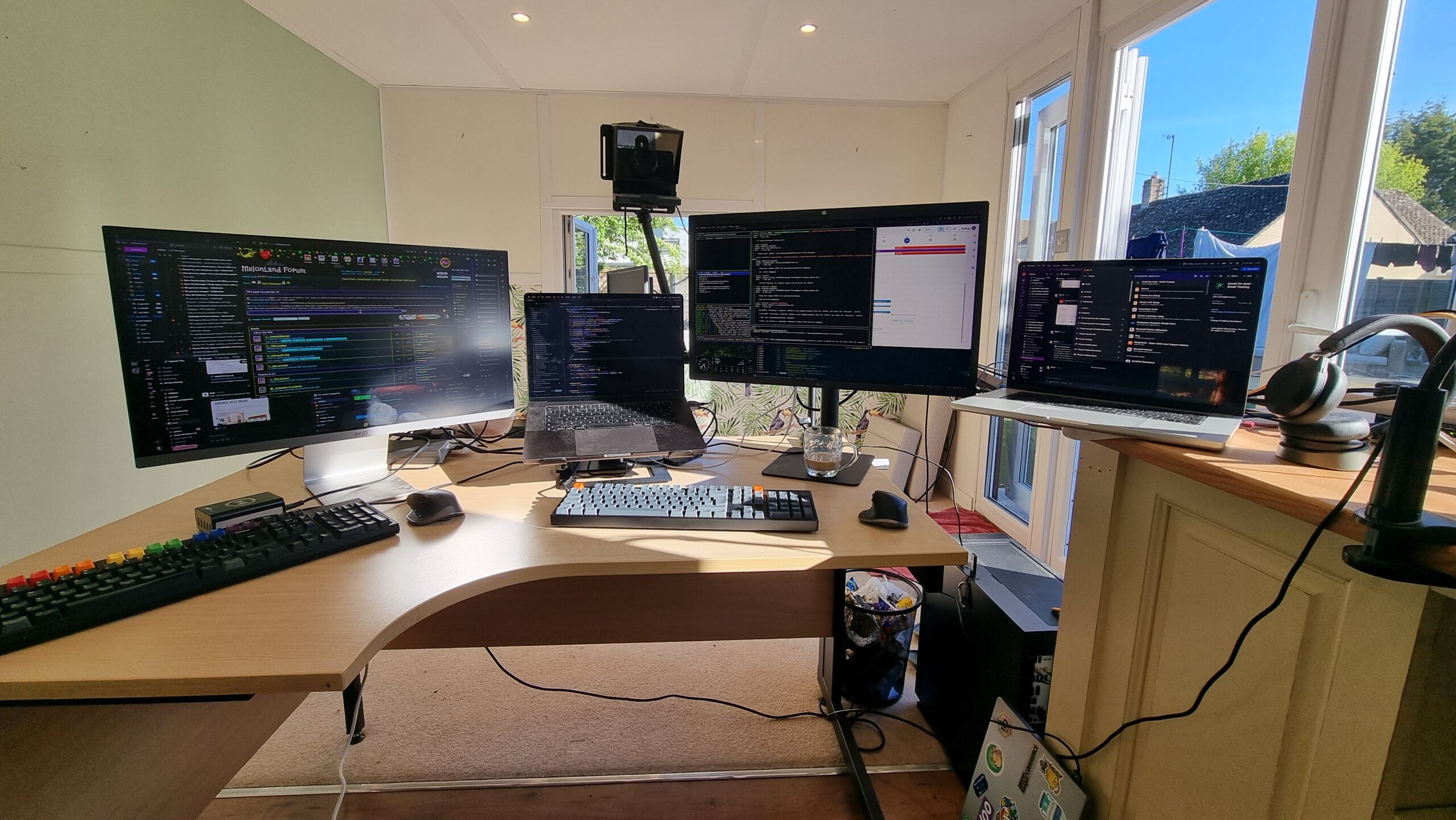
Man, I have missed having a battlestation to work at these last few months. It’s nice to sit at one again, even if it’s only a ‘chicory
battlestation’.
On Friday, I said goodbye to a colleague as she left us after most of a decade with the company. Then this morning, all hell broke loose on some production servers.
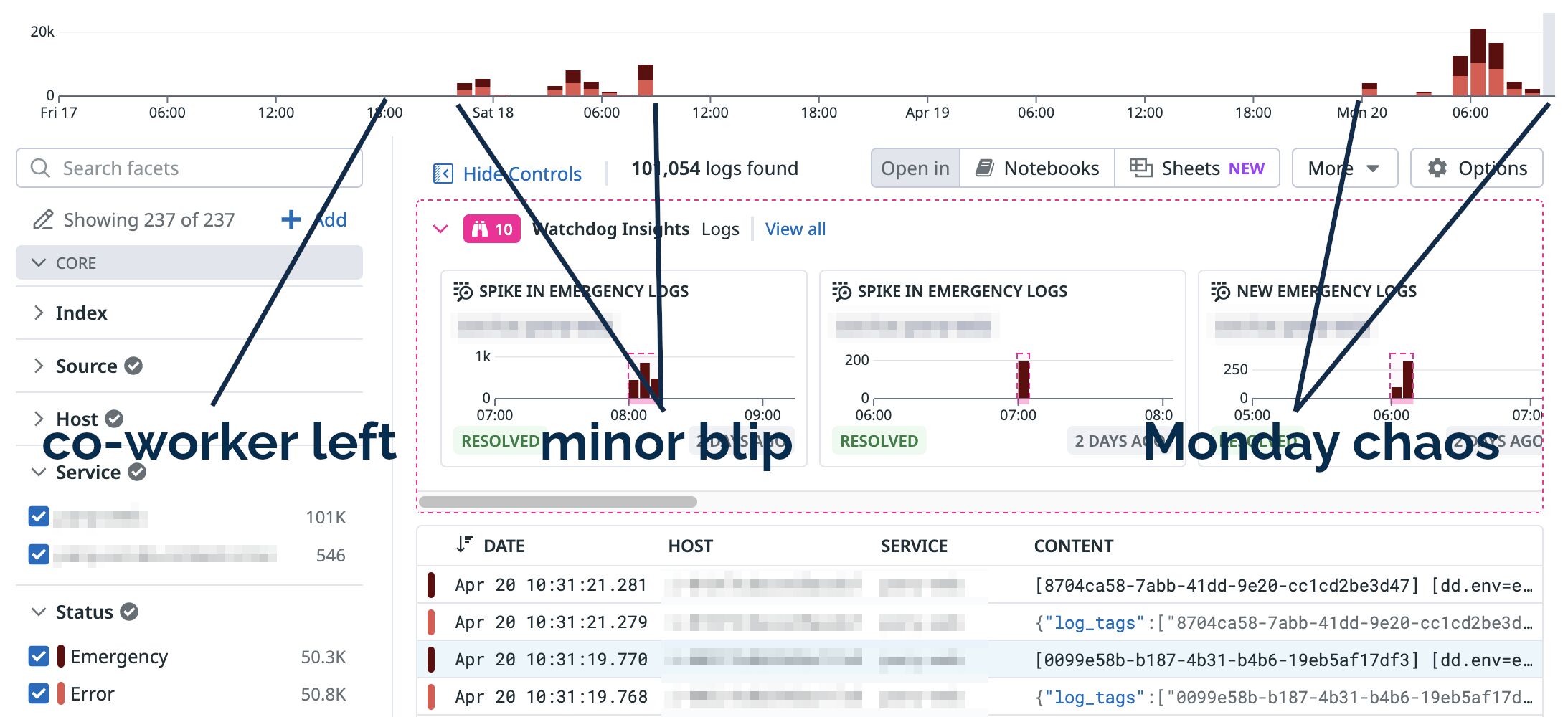
It turns out that the API key that connected our application to our feature flag management platform was associated with her account, and hadn’t shown up in the exit audit.
Let this be your reminder to go check where, if anywhere, your applications are using person-specific keys where they should be using generic ones!
Now that we’ve finished our move into the Chicory House, I
have for the first time in over two months been able to set up my preferred coding environment… with a proper monitor on a proper desk with a proper office chair. Bliss!
Jeremy Keith posted his salary history last week. I absolutely agree with him that employers exploit
the information gap created by opaque salary advertisement, and I think that our industry of software engineering is especially troublesome for this.
So I’m joining him (and others) in choosing to share my salary history. I’ve set up a new page for that purpose, but here’s the summary of its
initial state:
Understand
A few understandings and caveats:
For most of my career I’ve described myself as a “Full-Stack Web Applications Developer”, but I’ve worked outside of every one of those words and my job titles have often been more
like “CMS Developer” or “Senior Engineer (Security)”.
My specialisms and “hot areas” are security engineering, web standards, performance, and accessibility.
When I worked multiple roles in a year, I’ve tried to capture that, but there’ll be some fuzziness around the edges.
The salaries are rounded slightly to make nice readable numbers.
I’ve not always worked full-time; all salaries are translated into “full-time equivalent”1.
I’ve only included jobs that fit into my software engineering career2.
If the table below looks out-of-date then I’ve probably just forgotten to update it. Let me know!
Ad-hoc and hard to estimate.
Alongside full-time study.
What does that look like?
I drew a graph, but I don’t like it. Mostly because I don’t see my salary as a “goal” to aim for or some kind of “score”.
It’s gone up; it’s gone down; but I’ve always been more-motivated by what I’m working on, with whom, and for what purpose than I have been on how much I get paid for it3.
But if you want to see:
I’m not sure to what degree my career looks typical or not. But I guess I also don’t care! My motivations are probably different than most (a little-more idealistic, a little-less
capitalistic), I’d guess.
Footnotes
1 i.e. what I’d have earned if I had worked full-time
2 That summer back in college that I worked in a factory building striplight fittings
doesn’t appear, for example!
3 Pro-tip if you’re looking at my CV and pitching me an opportunity:
mention what you expect to pay, sure, but if you’re trying to win me over then tell me about the problems I’ll be solving and how that’ll make the world a better
place. That’s how you motivate me to accept your offer!
I’ve lived in a LOT of different places these last few months while we’ve been arranging a place to live for the next six months or so of our house repairs. Each new AirBnB has had its
pros and cons (and each hasn’t felt like “home”).
But man, I really like the “garden office” at our current one. So nice to work in the sun!
(I don’t like the slow WiFi as much, but yeah… pros and cons!)
Last night I was chatting to my friend (and fellow Three Rings volunteer) Ollie about our respective
workplaces and their approach to AI-supported software engineering, and it echoed conversations I’ve had with other friends. Some workplaces, it seems, are leaning so-hard into
AI-supported software development that they’re berating developers who seem to be using the tools less than their colleagues!
That’s a problem for a few reasons, principal among them that AI does not
make you significantly faster but does make you learn less.1. I stand by the statement that AI isn’t useless, and I’ve experimented with it for years. But I certainly wouldn’t feel very comfortable
working somewhere that told me I was underperforming if, say, my code contributions were less-likely than the average to be identifiably “written by an AI”.
Even if you’re one of those folks who swears by your AI assistant, you’ve got to admit that they’re not always the best choice.
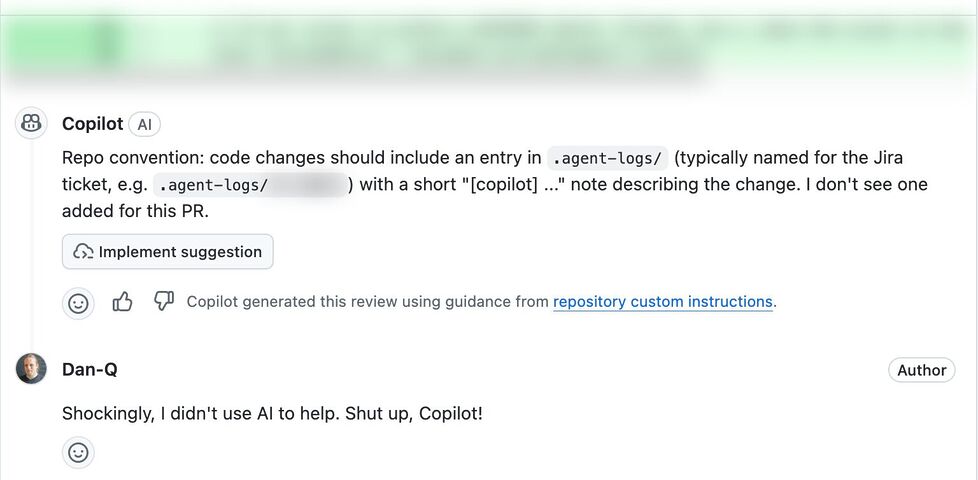
I ran into something a little like what Ollie described when an AI code reviewer told me off for not describing how my AI agent assisted me with the code change… when no AI had been
involved: I’d written the code myself.2
I spoke to another friend, E, whose employers are going in a similar direction. E joked that at current rates they’d have to start tagging their (human-made!) commits with fake
AI agent logs in order to persuade management that their level of engagement with AI was correct and appropriate.3
Supposing somebody like Ollie or E or anybody else I spoke to did feel the need to “fake” AI agent logs in order to prove that they were using AI “the right way”… that sounds
like an excuse for some automation!
I got to thinking: how hard could it be to add a git hook that added an AI agent’s “logging” to each commit, as if the work had been done by a
robot?4
Turns out: pretty easy…
To try out my idea, I made two changes to a branch. When I committed, imaginary AI agent ‘frantic’ took credit, writing its own change log. Also: asciinema + svg-term remains awesome.
Here’s how it works (with source code!). After you make a commit, the post-commit hook creates a file in
.agent-logs/, named for your current branch. Each commit results in a line being appended to that file to say something like [agent] first line of your commit
message, where agent is the name of the AI agent you’re pretending that you used (you can even configure it with an array of agent names and it’ll pick one at
random each time: my sample code uses the names agent, stardust, and frantic).
There’s one quirk in my code. Git hooks only get the commit message (the first line of which I use as the imaginary agent’s description of what it did) after the commit has
taken place. Were a robot really used to write the code, it’d have updated the file already by this point. So my hook has to do an --amend commit, to
retroactively fix what was already committed. And to do that without triggering itself and getting into an infinite loop, it needs to use a temporary environment variable.
Ignoring that, though, there’s nothing particularly special about this code. It’s certainly more-lightweight, faster-running, and more-accurate than a typical coding LLM.
Sure, my hook doesn’t attempt to write any of the code for you; it just makes it look like an AI did. But in this instance: that’s a feature, not a
bug!
Footnotes
1 That research comes from Anthropic. Y’know, the company who makes Claude, one of the
most-popular AIs used by programmers.
3 Using “proportion of PRs that used AI” as a metric for success seems to me to be just
slightly worse than using “number of lines of code produced”. And, as this blog post demonstrates, the
former can be “gamed” just as effectively as the latter (infamously) could.
4 Obviously – and I can’t believe I have to say this – lying to your employer isn’t a
sensible long-term strategy, and instead educating them on what AI is (if anything) and isn’t good for in your workflow is a better solution in the end. If you read this blog post and
actually think for a moment hey, I should use this technique, then perhaps there’s a bigger problem you ought to be addressing!
Today, an AI review tool used by my workplace reviewed some code that I wrote, and incorrectly claimed that it would introduce a bug because a global variable I created could “be
available to multiple browser tabs” (that’s not how browser JavaScript works).
Just in case I was mistaken, I explained to the AI why I thought it was wrong, and asked it to explain itself.
To do so, the LLM wrote a PR to propose adding some code to use our application’s save mechanism to pass the data back, via the server, and to any other browser tab, thereby creating
the problem that it claimed existed.
This isn’t even the most-efficient way to create this problem. localStorage would have been better.
So in other words, today I watched an AI:
(a) claim to have discovered a problem (that doesn’t exist),
(b) when challenged, attempt to create the problem (that wasn’t needed), and
(c) do so in a way that was suboptimal.
Humans aren’t perfect. A human could easily make one of these mistakes. Under some circumstances, a human might even have made two of these mistakes. But to make all three? That took an
AI.
What’s the old saying? “To err is human, but to really foul things up you need a computer.”
Highlight of my workday was debugging an issue that turned out to be nothing like what the reporter had diagnosed.
The report suggested that our system was having problems parsing URLs with colons in the pathname, suggesting perhaps an encoding issue. It wasn’t until I took a deep dive into the logs
that I realised that this was a secondary characteristic of many URLs found in customers’ SharePoint installations. And many of those URLs get redirected. And SharePoint often uses
relative URLs when it sends redirections. And it turned out that our systems’ redirect handler… wasn’t correctly handling relative URLs.
It all turned into a hundred line automated test to mock SharePoint and demonstrate the problem… followed by a tiny two-line fix to the actual code. And probably the
most-satisfying part of my workday!
As I lay in bed the other night, I became aware of an unusually-bright LED, glowing in the corner of my room1. Lying still in the dark, I noticed
that as I looked directly at the light meant that I couldn’t see it… but when I looked straight ahead – not at it – I could make it out.
In my bedroom the obstruction was the corner of my pillow, not a nondescript black rectangle. Also: my eyeball was firmly within my skull and not floating freely in a white void.
This phenomenon seems to be most-pronounced when the thing you’re using a single eye to looking at something small and pointlike (like an LED), and where there’s an obstacle closer to
your eye than to the thing you’re looking at. But it’s still a little spooky2.
It’s strange how sometimes you might be less-able to see something that you’re looking directly at… than something that’s only in your peripheral vision.
I’m now at six months since I started working for Firstup.3 And as I continue to narrow my focus on the specifics of the
company’s technology, processes, and customers… I’m beginning to lose a sight of some of the things that were in my peripheral vision.
I’ve not received quite so many articles of branded clothing and other swap from my new employer as I did from my previous, but getting useful ‘swag’ still feels cool.
I’m a big believer in the idea that folks who are new to your group (team, organisation, whatever) have a strange superpower that fades over time: the ability to look at “how you work”
as an outsider and bring new ideas. It requires a certain boldness to not just accept the status quo but to ask “but why do we do things this way?”. Sure, the answer will
often be legitimate and unchallengeable, but by using your superpower and raising the question you bring a chance of bringing valuable change.
That superpower has a sweet spot. A point at which a person knows enough about your new role that they can answer the easy questions, but not so late that they’ve become accustomed to
the “quirks” that they can’t see them any longer. The point at which your peripheral vision still reveals where there’s room for improvement, because you’re not yet so-focussed on the
routine that you overlook the objectively-unusual.
I feel like I’m close to that sweet spot, right now, and I’m enjoying the opportunity to challenge some of Firstup’s established patterns. Maybe there are things I’ve learned or
realised over the course of my career that might help make my new employer stronger and better? Whether not not that turns out to be the case, I’m enjoying poking at the edges to find
out!
Footnotes
1 The LED turned out to be attached to a laptop charger that was normally connected in
such a way that it wasn’t visible from my bed.
2 Like the first time you realise that you have a retinal blind spot and that your brain
is “filling in” the gaps based on what’s around it, like Photoshop’s “smart remove” tool is running within your head.
on YouTube (also as a “short”, for people who are too lazy to rotate
their phone screen to horizontal and/or don’t have the attention span for more than three minutes of content)
This post is also available as a video. If you'd prefer to watch/listen to
me talk about this topic, give it a look.
I am tired. For a couple of years I’ve been blaming it on iron-poor blood, lack of vitamins, diet, and a dozen other maladies. But now I’ve found out the real reason: I’m tired
because I’m overworked.
The population of the UK is 69 million1, of which the latest census has 37 million “of working age”2.
According to the latest statistics, 4,215,913 are unemployed3, leaving 32,784,087 people to do all the work.
19.2 million are in full time education4, 856,211 in the armed
forces5, and collectively central, regional, and local government employs 4.987 million6. This leaves just 12,727,876
to do all of the real work.
Long term disabilities affect 6.9 million7. 393,000 are on visas that prohibit them from working8, and 108,0859 are working their way through the
asylum process.
Of the remaining 339,791 people, a hundred thousand are in prison10 and 239,789 are in hospital11.
That leaves just two people to do all the work that keeps this country on its feet.
You and me.
And you’re sitting reading this.
This joke originally appeared aeons ago. I first saw it in a chain email in around 199612, when I adapted it from a US-centric version to a more
British one and re-circulated it among some friends… taking the same kinds of liberties with the numbers that are required to make the gag work.
And now I’ve updated it with some updated population statistics13.
12 In fact, I rediscovered it while looking through an old email backup from 1997,
which inspired this blog post.
13 Using the same dodgy arithmetic, cherry-picking, double-counting, wild
over-estimations, and hand-waving nonsense. Obviously this is a joke. Oh god, is somebody on the satire-blind Internet of 2026 going to assume any of these numbers are
believable? (They’re not.) Or think I’m making some kind of political point? (I’m not.) What a minefield we live in, nowadays.