Aside from their predictable subject lines and verbiage, there’s also one other thing that these [recent, AI generated] spam emails have in common: 99.9% come from GMail accounts.
Once in a blue moon one will come from yahoo or aol or some other general mail service, but they are a rarity. Almost all of them are GMail. One one hand, congrats to Google, I
suppose, for cornering the stand-alone email market so completely that even scammers are impressed with its ease of use. Surely that is some sort of sign of success.
On the other hand, if you are a person who relies on GMail as your primary email, this means that if you are trying to send me mail, you now run a much higher chance of being
deposited into my spam folder. So much of the email I get from GMail accounts at this point is spam that an actual Gmail email, from an actual person, is statistically
relatively rare. To be fair, if you write that email to me yourself with your own little fingers, your chances of hitting my actual inbox are pretty decent. But if you used GMail’s
onboard “AI” to “help” you write that email, you are likely going directly to the spam folder. The GMail spam filter is now trained to recognize “AI” slop sentences, even those
written by GMail itself. Yes, there is probably irony there.
…
GMail’s been going gradually downhill for many years. It’s been a slow decline, compared to many enshittified services, but it’s still very-clearly happening. Aside from the
long-established privacy/big data concerns – especially if you use any other Google services, or fail to block their Web trackers – they’ve just devolved into a service that doesn’t
“wow” like it did when it was launched. It’s slow, it’s clunky, and it increasingly shovels AI down your throat, whether you want it or not.
If you own a domain name, you should already be using that as the domain of your email address, of course. This detaches your email address from any specific provider, which makes
it much easier to change your email provider whenever you like: it puts the power in your hands. You can do this whether you’re using GMail or any other
provider.
(If you don’t own a domain name, then perhaps you should.)
But beyond that: if you’re using GMail as your primary personal email service, you should shop around. Don’t let the weight of the inertia of your inbox stop you: there are plenty of
ways to back that up, move it around, or just retain it as an archive in-place if you have no other choice.
I switched to Proton about ten or eleven years ago and I haven’t looked back. Are they perfect? No. Are they better than GMail? Absolutely; for me at
least. But there are plenty of other options available for those for whom Proton is, perhaps, too-security-conscious. And switching to almost any of them reduces the risk
that your messages start going to your recipients’ spam folders, as more and more spammers move to GMail for its AI features, which produce junk mail faster than ever before.
Earlier this year, for reasons of privacy/love of selfhosting, I moved the DanQ.me mailing list from Mailchimp to Listmonk (there’s a blog post about how I set it up), relaying
outbound messages via an SMTP server provided by my domain registrar, Gandi.
I assume that you knew that you can get an email, no more than once per day or once per week (your choice!) of what I get up to online, right? Email not your jam: there are plenty of other options too!
And because I learned a few things while doing so, I wrote this blog post so that next time I have to configure Postfix + DKIM, I’ll know where to find a guide. If it helps you in the meantime, that’s just a bonus.
If the first rule of computing is “never roll your own crypto” (based on Schneier’s Law), the second
rule might be “don’t run your own mailserver”. I don’t have a good picture to illustrate that, so here’s a photo of my dog playing tug-of-war.
Postfix
Running your own mailserver is a pain. I used to do it for all of my email, but – like many other nerds – when spam reached its peak and deliverability became an issue, I gave
up and oursourced it1.
Fun fact: when I’m at my desktop, I use a classic desktop email application for my personal email, like it’s the 90s or something2.
Luckily, I don’t need it to do much. I just need a mail transfer agent with an (unauthenticated, but local-only) SMTP endpoint: something that Listmonk can dump emails into, which will then reach out to the mailservers representing each of the recipients and
relay them on. A default install of Postfix does all that out-of-the-box, so I ran sudo apt install postfix, accepted all the default
options, and put the details into Listmonk.
Listmonk makes adding an SMTP server very easy, and even includes a quick “test connection” link with which you can try
out your settings.
Next, I tweaked my DNS configuration to add an SPF record, and tested it.
This ought to have been enough to achieve approximate parity with what Gandi had been providing me with. Not bad.
You really can’t be doing without an SPF record as a minimum these days.
I sent a test email to a Gmail account, where I noticed two problems:
It turns out that since the last time I ran a mailserver “for real”, the use of TLS for inter-server communication has
become… basically mandatory. You don’t strictly have to do it, but if you don’t, some big email providers will put scary security warnings on your messages. This is a good thing.
The first problem was that Postfix on Debian isn’t configured by-default to use opportunistic TLS when talking to other
mailservers. That’s a bit weird, but I’m sure there’s a good reason for it. The solution was to add smtp_tls_security_level = may to my
/etc/postfix/main.cf.
The second problem was that without a valid DKIM signature on them, about half of my test emails were going straight to the
spam folder. Again, it seems that since the last time I seriously ran a mailserver 20 years ago, this has become something that isn’t strictly required… but your emails aren’t
going to get through if you don’t.
I’ve put it off this long, but I think it’s finally time for me to learn some practical DKIM.
Understanding DKIM
What’s DKIM, then?
I’ve already got an elementary understanding of how DKIM works, which I’ll summarise below.
A server that wants to send email from a domain generates a cryptographic keypair.
The public part of the key is published using DNS. The private part is kept securely on the server.
When the server relays mail on behalf of a user, it uses the private key to sign the message body and a stated subset of the headers3,
and attaches the signature as an email header.
When a receiving server (or, I suppose, a client) receives mail, it can check the signature by acquiring the public key via DNS and validating the signature.
In this way, a recipient can be sure that an email received from a domain was sent with the authorisation of the owner of that domain. Properly-implemented, this is a strong mitigation
against email spoofing.
OpenDKIM
To set up my new server to sign outgoing mail, I installed OpenDKIM and its keypair generator using sudo apt install opendkim
opendkim-tools. It’s configuration file at /etc/opendkim.conf needed the following lines added to it:
# set up a socket for Postfix to connect to:
Socket inet:12301@localhost
# set up a file to specify which IPs/hosts can send through us without authentication and get their messages signed:
ExternalIgnoreList refile:/etc/opendkim/TrustedHosts
InternalHosts refile:/etc/opendkim/TrustedHosts
# set up a file to specify which selector/domain are used to each incoming email address:
SigningTable refile:/etc/opendkim/SigningTable
# set up a file to specify which signing key to use for each selector/domain:
KeyTable refile:/etc/opendkim/KeyTable
Into /etc/opendkim/TrustedHosts I put a list of local IPs/domains that would have their emails signed by this server. Mine looks like this (in this example I’m using
example.com as my domain name, and default as the selector for it: the selector can be anything you like, it only matters if you’ve got multiple
mailservers signing mail for the same domain). Note that 192.168.0.0/16 is the internal subnet on which my sending VM will
run.
/etc/opendkim/SigningTable maps email addresses (I’m using a wildcard) to the subdomain whose TXT record will hold the public key for the signature. This also goes on to
inform the KeyTable which private key to use:
*@example.com default._domainkey.example.com
And then /etc/opendkim/KeyTable says where to find the private key for that:
The public key needs publishing via DNS. Conveniently, when you create a keypair using its tools, OpenDKIM provides a sample (in
BIND-style) for you to copy-paste from or adapt: look in /etc/opendkim/keys/example.com/default.txt!
Gandi’s DNS “Simple View” is great for one-off and quick operations, but I really appreciate that they have a BIND-style syntax “Advanced View” for when I’m making bigger and
more-complex DNS configuration changes.
Once we’ve restarted both services (sudo service postfix restart; sudo service opendkim restart), we can test it!
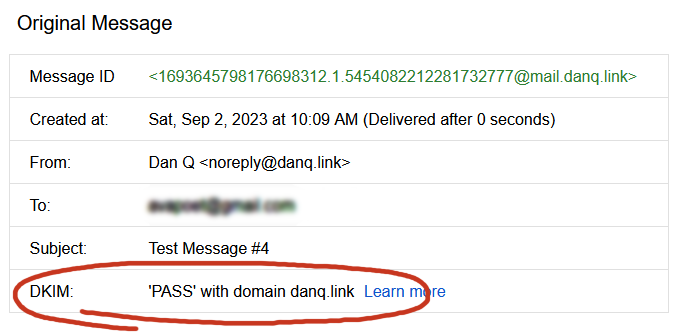
Once the major email providers – who have the worst spam problem to deal with – say that your email signature looks good, you’re good.
So I learned something new today.
If you, too, love to spend your Saturday mornings learning something new, have a look at those subscription
options to decide how you’d like to hear about whatever I get up to next.
Footnotes
1 I still outsource my personal email, and I sing the praises of the excellent folks
behind ProtonMail.
2 My desktop email client also doubles as my newsreader, because, yes, of course
you can still find me on USENET. Which, by the way, is undergoing a mini-revival…
3 Why doesn’t DKIM sign
all the headers in an email? Because intermediary servers and email clients will probably add their own headers, thereby invalidating the signature! DKIM gets used to sign the From: header, for obvious reasons, and ought to be used for other headers whose tampering could be
significant such as the Date: and Subject:, but it’s really up to the signing server to choose a subset.
This technique’s about a decade old, but a lot of people still aren’t using it, and
I can’t help but suspect that can only be because they didn’t know about it yet, so let’s revisit:
You have a GMail account, right? Or else Google for Domains? Suppose your email address is dan@gmail.com… did you know that also means that you own:
dan+smith@gmail.com
dan+something@gmail.com
dan+anything-really@gmail.com
d.an@gmail.com
d..a..n@gmail.com
…
You have a practically infinite number of GMail addresses. Just put a plus sign (+) after your name but before the @-sign and then type anything you like there, and the
email will still reach you. You can also insert as many full stops (.) as you like, anywhere in the first half of your email address, and they’ll still reach you, too. And
that’s really, really useful.
Often, you end up having to give your email address to companies that you don’t necessarily trust…
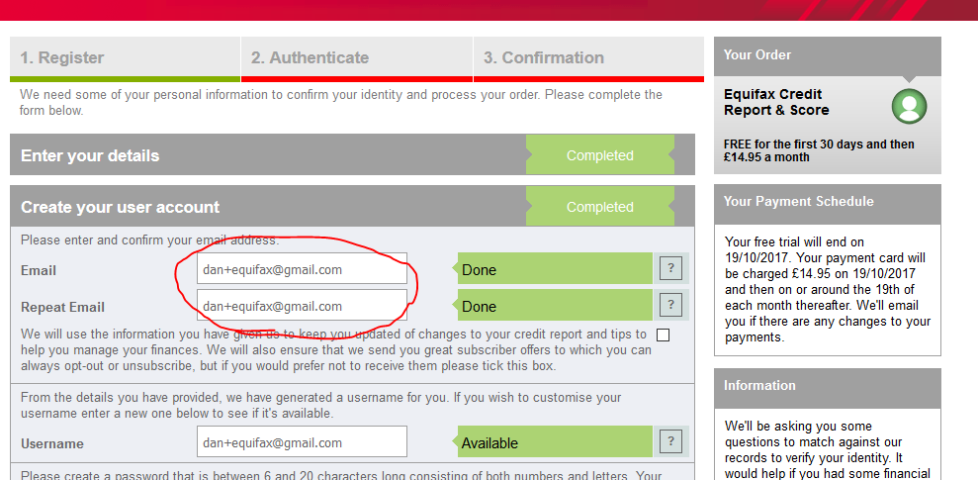
When you’re asked to give your email address to a company, don’t give them your email address. Instead, give them a mutated form of your email address that will still
work, but that identifies exactly who you gave it to. So for example you might give the email address dan+amazon@gmail.com to Amazon, the email address
dan+twitter@gmail.com to Twitter, and the email address dan+pornhub@gmail.com to… that other website you have an account on.
Why is this a clever idea? Well, there are a few reasons:
If the company sells your email address to spammers, or hackers steal their database, you’ll know who to blame by the email address they’re sending to. I’ve actually caught
out an organisation in this way who were illegally reselling their mailing lists to third parties.
If you start getting unwanted mail from somebody (whether because spammers got the email or because you don’t like what the company is sending to you), you can easily block
them. Even if you can’t unsubscribe or just because they make it hard to do so, you can just set up a filter to
automatically discard anything that comes to that email address in future.
If you feel like organising your life better, you can set up filters for that, too: it doesn’t matter what address a company sends from, so long as you know what address
they’re sending to, so you can easily have filters that e.g. automatically forward copies of the mortgage statement that come to dan+yourbank@gmail.com to your
spouse, or automatically label anything coming to
dan+someshop@gmail.com with the label “Shopping”.
If you’re signing up just to get a freebie and you don’t trust them not to spam you afterwards, you don’t need to use a throwaway: just receive the goodies from them and them block
them at the source.
Certainly, you can have… THIS email address.
I know that some people get some of these benefits by maintaining a ‘throwaway’ email address. But it’s far more-convenient to use the email address you already have (you’re
already logged-in to it and you use it every day)! And if you ever do want a true ‘throwaway’, you’re generally better using Mailinator: when you’re asked for your email address, just mash the keyboard and then put @mailinator.com on the end, to get e.g.
dsif9tsnev4y8594es87n65y4@mailinator.com. Copy the first half of the email address to the clipboard, and then when you’re done signing up to whatever spammy service it
is, just go to mailinator.com and paste into the box to see what they emailed you.
A handful of badly-configured websites won’t accept email addresses with plus signs in them, claiming that they’re invalid (they’re not). Personally, when I come across these I
generally just inform the owner of the site of the bug and then take my business elsewhere; that’s how important it is to me to be able to filter my email properly! But another option
is to exploit the fact that you can put as many dots in (the first part of) your GMail address as you like. So you could put d…an@gmail.com in and the email
will still reach you, and you can later filter-out emails to that address. I’ll leave it as an exercise for the reader to decide how to encode information about the service you’re
signing up to into the pattern and number of dots that you use.
The first of the two apps mentioned in this article – “Gmail Notifier” – sounds perfect, but doesn’t seem to exist any
more.
GMail Notifier + Widgets looks like it might do it (it’s designed to do different icons
depending on labels). Does anybody have any experience with this?
Or any other suggestions? I’m running CM7.1 on a HTC Sensation, in case it matters.