A cross-site scripting vulnerability (shortened to XSS, because
CSS already means other things) occurs when a website can be tricked into showing a visitor unsafe content that came from another site
visitor. Typically when we talk about an XSS attack, we’re talking about tricking a website into sending Javascript code to the user: that Javascript code can then be used to steal
cookies and credentials, vandalise content, and more.
Good web developers know to sanitise input – making anything given to their pages by a user safe before ever displaying it on a page – but even the best can forget quite how many things
really are “user input”.
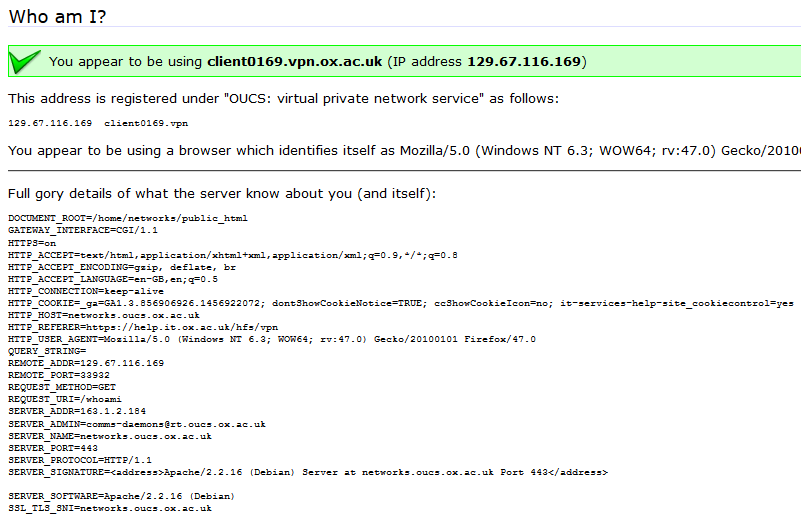
This page outputs a variety of your inputs right back at you.
Recently, I reported a vulnerability in a the University of Oxford’s IT Services‘ web pages that’s a great example of this. The page (which
isn’t accessible from the public Internet, and now fixed) is designed to help network users diagnose problems. When you connect to it, it tells you a lot of information about your
connection: what browser you’re using, your reverse DNS lookup and IP address, etc.. The developer clearly understood that XSS was a risk, because if you pass a query string to the
page, it’s escaped before it’s returned back to you. But unfortunately, the developer didn’t consider the fact that virtually anything given to you by the browser can’t be
trusted.
To demonstrate this vulnerability, I had the option of writing Perl or Javascript. For some reason, I chose Perl.
In this case, I noticed that the page would output any cookies that you had from the .ox.ac.uk domain, without escaping them. .ox.ac.uk cookies can be manipulated by anybody
who has access to write pages on the domain, which – thanks to the users.ox.ac.uk webspace – means any staff or students at the University (or, in
an escalation attack, anybody’s who’s already compromised the account of any staff member or student). The attacker can then set up a web page that sets up such a “poisoned” cookie and
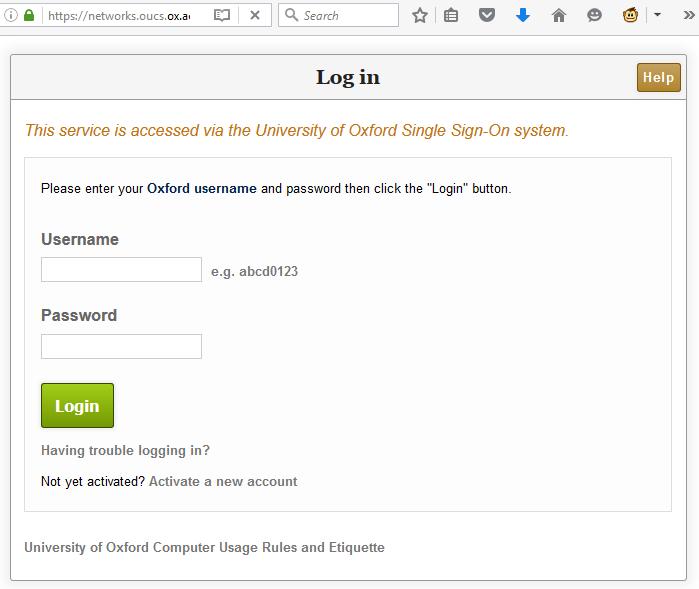
then redirects the user to the affected page and from there, do whatever they want. In my case, I experimented with showing a fake single sign-on login page, almost indistinguishable
from the real thing (it even has a legitimate-looking .ox.ac.uk domain name served over a HTTPS connection, padlock and all). At this stage, a real attacker could use a spear phishing scam to trick users into clicking a link to their page and start stealing credentials.
The padlock, the HTTPS url, and the convincing form make this page look legitimate. But it’s actually spoofed.
I’m sure that I didn’t need to explain why XSS vulnerabilities are dangerous. But I wanted to remind you all that truly anything that comes from the user’s web browser, even if
you think that you probably put it there yourself, can’t be trusted. When you’re defending against XSS attacks, your aim isn’t just to sanitise obvious user input like GET and POST
parameters but also anything that comes from a browser header including cookies and referer headers, especially if your domain name carries websites managed by many different people. In
an ideal world, Content Security Policy would mitigate all these kinds of attacks: but in our real world – sanitise
those inputs!
I’ve been a huge fan of the “hacker game” ever since I first played 1985’s Hacker on my Amstrad CPC: I’m pretty hardened to the genre, and I can confidently say that not since Uplink
has anything broken through my firewall like Hacknet did. If you’re looking for an easy-to-pick up and compelling puzzle game in a cyberpunk theme, it’s a clear winner: I got 6 hours of
thoroughly enjoyable playtime out of it, and I’m sure I’ll go back and get the same again when I find the chance to go and explore deeper.
The BBC ran a story this week about changes to the National Curriculum that’ll introduce the concepts of computing programming to children at Key Stage 1: that is, between the
ages of five and seven. I for one think that this is a very important change, long overdue in our schools. But I don’t feel that way because I think there’ll be a huge market for
computer programmers in 13+ years, when these children leave school: rather, I think that learning these programming skills provide – as a secondary benefit – an understanding of
technology that kids today lack.
Ignoring the implied gender binary (fair enough) and the resulting inefficiency (why do you need to ask two questions), this is a great example of a simple algorithm.
Last year, teacher and geek Marc Scott wrote an excellent blog post entitled Kids Can’t Use
Computers… And This Is Why It Should Worry You. In it, he spoke of an argument with a colleague who subscribed to the popular belief that children who use computers are more
technically-literate than computer-literate adults. Marc refutes this, retorting that while children today make use of computers more than most adults (and far more than was
typical during the childhood of today’s adults), they typically know far less about what Marc calls “how to use a computer”. His article is well worth reading: if you don’t have the
time you should make the time, and if you can’t do that then here’s the bottom line: competency with Facebook, YouTube, Minecraft, and even Microsoft Office does not in itself
demonstrate an understanding of “how to use a computer”. (Marc has since written a follow-up post which is also worth reading.)
If the can of Mountain Dew wasn’t clue enough, these children are coding.
An oft-used analogy is that of the automobile. A hundred years ago, very few people owned cars, but those people that did knew a lot about the maintenance and inner workings of their
cars, but today you can get by knowing very little (I’ve had car-owning friends who wouldn’t know how to change to their spare tyre after a puncture, for example). In future, the
requirements will be even less: little Annabel might be allowed to ‘drive’ without ever taking a driving test, albeit in a ‘driverless’ computerised car. A similar thing happened with computers: when I was young, few homes had a computer, but in those that did
one or more members of the family invariably knew a lot about setting up, configuring, maintaining, and often programming it. Nowadays, most of the everyday tasks that most people
do with a computer (Facebook, YouTube, Minecraft, Microsoft Office etc.) don’t need that level of knowledge. But I still think it’s important.
A future computer-literate, or just another computer “user”?
Why? Because understanding computers remains fundamental to getting the most out of them. Many of us now carry powerful general-purpose computers in our pockets (disguised as
single-purpose devices like phones) and most of us have access to extremely powerful general-purpose computers in the form of laptops and desktops (but only a handful of us use them in
a ‘general purpose’ way; for many people, they’re nothing more than a web browser and a word processor). However, we expect people to be able to understand the issues when we ask them –
via their elected officials – to make sweeping decisions that affect all of us: decisions about the censorship of the ‘net (should we do it, and to what extent, and can we expect it to
work?) or about the automation of our jobs (is it possible, is it desirable, and what role will that mean for humans?). We expect people to know how to protect themselves from threats
like malicious hackers and viruses and online scams, but we give them only a modicum of support (“be careful, and install anti-virus software”), knowing full well that most people don’t
have the foundation of understanding to follow that instruction. And increasingly, we expect people to trust that software will work in the way that it’s instructed to without
being able to observe any feedback. Unlike your car, where you may know that it’s not working when it doesn’t go (or, alarmingly, doesn’t stop) – how is the average person to know
whether their firewall is working? You can find out how fast your car can go by pressing the pedals, but how are you to know what your computer is capable of without a deeper
understanding than is commonplace?
I first started to learn to program in Locomotive BASIC. My microcomputer was ready to receive code from the second it booted: no waiting, just programming. Nowadays, there’s a huge
barrier to entry (although tools like Hackety Hack, pictured, are trying to make it easier).
A new generation of children tought to think in terms of how computers and their programs actually work – even if they don’t go on to write programs as an adult – has the
potential to usher in innovating new ways to use our technology. Just as learning a foreign language, even if you don’t go on to regularly use it, helps make you better at your native language, as well as smarter in other ways (and personally, I
think we should be teaching elementary Esperanto – or better yet, Ido – to primary school children in order to improve their linguistic skills
generally), learning the fundamentals of programming will give children a far greater awareness about computers in general. They’ll be better-able to understand how they work,
and thus why they sometimes don’t do what you expect, and better-equipped to solve problems when they see them. They’ll have the comprehension to explain what they want their computer
to be able to do, and to come up with new ideas for ways in which general-purpose computers can be used. And, I’ve no doubt, they’ll be better at expressing logical concepts in
mutually-intelligble ways, which improves human communication on the whole.
Let’s teach our kids to be able to understand computers, not just “use” them.
Last month, I volunteered myself to run a breakout session at the 2012 UAS Conference, an
annual gathering of up to a thousand Oxford University staff. I’d run a 2-minute micropresentation at the July 2011 OxLibTeachMeet called “Your Password Sucks!”, and I thought I’d probably be able to expand that into a larger 25-minute breakout session.
My expanded presentation was called “Your password: How bad guys will steal your identity”, because I wasn’t sure that I’d get away with the title “Your Password Sucks” at a larger,
more-formal event.
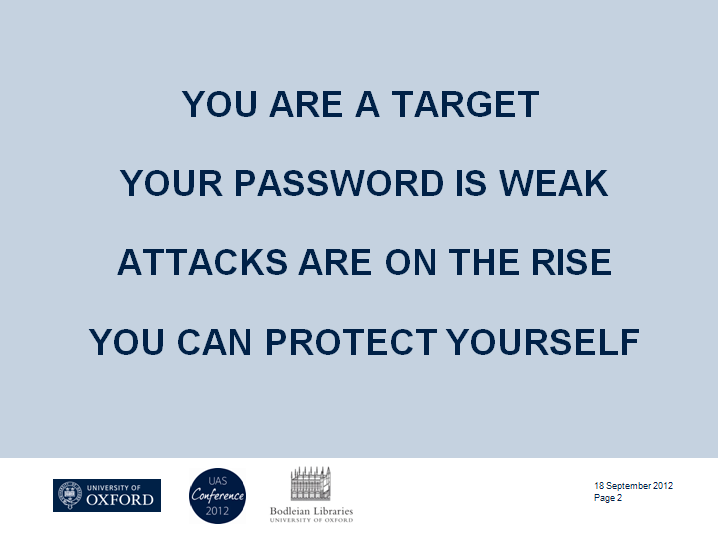
The essence of my presentation boiled down to demonstrating four points. The first was you are a target – dispelling the myth that the everyday person can consider
themselves safe from the actions of malicious hackers. I described the growth of targeted phishing attacks, and relayed the sad story of Mat Honan’s
victimisation by hackers.
The second point was that your password is weak: I described the characteristics of good passwords (e.g. sufficiently long, complex, random, and unique) and
pointed out that even among folks who’d gotten a handle on most of these factors, uniqueness was still the one that tripped people over. A quarter of people use only a single password for most or
all of their accounts, and over 50% use 5 or fewer passwords across dozens of accounts.
The four points I wanted to make through my presentation. Starting by scaring everybody ensured that I had their attention right through ’til I told them what they could do about it,
at the end.
Next up: attacks are on the rise. By a combination of statistics, anecdotes, audience participation and a theoretical demonstration of how a hacker might exploit
shared-password vulnerabilities to gradually take over somebody’s identity (and then use it as a platform to attack others), I aimed to show that this is not just a hypothetical
scenario. These attacks really happen, and people lose their money, reputation, or job over them.
Finally, the happy ending to the story: you can protect yourself. Having focussed on just one aspect of password security (uniqueness), and filling a 25-minute
slot with it, I wanted to give people some real practical suggestions for the issue of password uniqueness. These came in the form of free suggestions that they could implement today. I
suggested “cloud” options (like LastPass or 1Password), hashing options (like SuperGenPass), and “offline” technical options (like KeePass or a spreadsheet bundles into a TrueCrypt volume).
I even suggested a non-technical option involving a “master” password that is accompanied by one of several unique prefixes. The prefixes live on a Post-It Note in your wallet. Want a
backup? Take a picture of them with your mobile: they’re worthless without the master password, which lives in your head. It’s not as good as a hash-based solution, because a crafty
hacker who breaks into several systems might be able to determine your master password, but it’s “good enough” for most people and a huge improvement on using just 5 passwords
everywhere! (another great “offline” mechanism is Steve Gibson’s Off The Grid system)
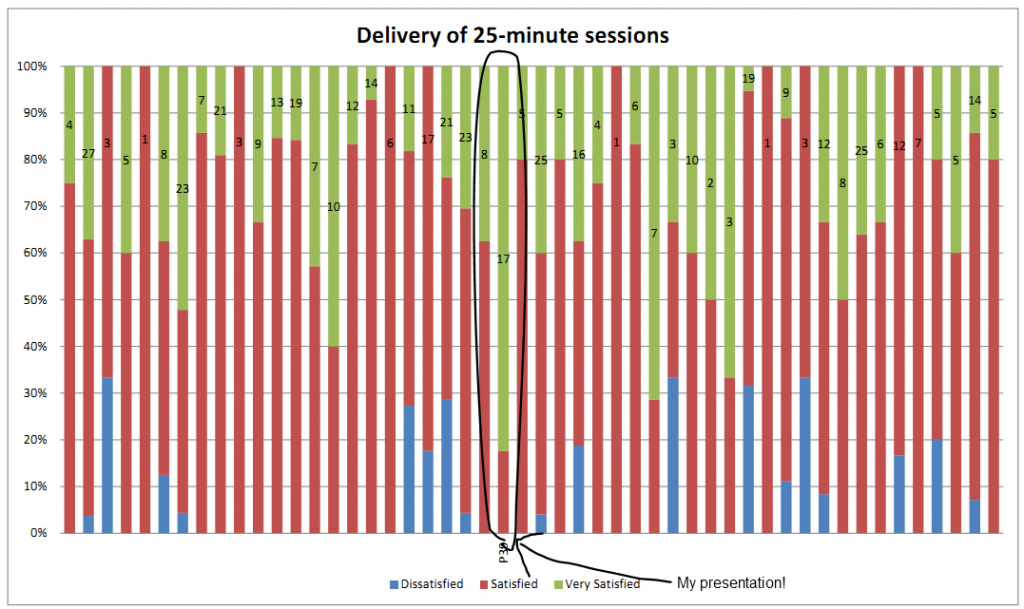
My presentation – marked on the above chart – left people “Very Satisfied” significantly more than any other of the 50 breakout sessions.
And it got fantastic reviews! That pleased me a lot. The room was packed, and eventually more chairs had to be brought in for the 70+ folks who decided that my session was “the place to
be”. The resulting feedback forms made me happy, too: on both Delivery and Content, I got more “Very Satisfied” responses than any other of the 50 breakout sessions, as well as specific
comments. My favourite was:
Best session I have attended in all UAS conferences. Dan Q gave a 5 star performance.
So yeah; hopefully they’ll have me back next year.
This blog post is about password security. If you don’t run a website and you just want to know what you should do to protect yourself, jump to the
end.
I’d like to tell you a story about a place called Internetland. Internetland is a little bit like the town or country that you live in, but there’s one really important difference: in
Internetland, everybody is afflicted with an unusual disorder called prosopagnosia, or “face-blindness”. This means that, no matter how hard they try, the inhabitants of Internetland can’t recognise each other
by looking at one another: it’s almost as if everybody was wearing masks, all the time.
Denied the ability to recognise one another on sight, the people of Internetland have to say out loud who they are when they want to be identified. As I’m sure you can imagine, it’d be
very easy for people to pretend to be one another, if they wanted. There are a few different ways that the inhabitants get around that problem, but the most-common way is that people
agree on and remember passwords to show that they really are who they claim to be.
Alice’s Antiques
Alice runs an antiques store in Internetland. She likes to be able to give each customer a personalised service, so she invites her visitors to identify themselves, if they like, when
they come up to the checkout. Having them on file means that she can contact them about special offers that might interest them, and she can keep a record of their address so that the
customer doesn’t have to tell her every time that they want a piece of furniture delivered to their house.
Some of Alice’s Antiques’ antiques.
One day, Bob came by. He found a nice desk and went to the checkout to pay for it.
“Hi,” said Alice, “Have you shopped here before?” Remember that even if he’d visited just yesterday, she wouldn’t remember him, so crippling is her face-blindness.
“No,” replied Bob, “First time.”
“Okay then,” Alice went on, “Would you like to check out ‘as a guest’, or would you like to set up an account so that I’ll remember you next time?”
Bob opted to set up an account: it’d only take a few minutes, Alice promised, and would allow him to check out faster in future. Alice gave Bob a form to fill in:
Bob filled in the form with his name, a password, and his address. He ticked the box to agree that Alice could send him a copy of her catalogue.
Alice took the form and put it into her filing cabinet.
The following week, Bob came by Alice’s Antiques again. When he got to the checkout, Alice again asked him if he’d shopped there before.
“Yes, I’ve been here before,” said Bob, “It’s me: Bob!”
Alice turned to her filing cabinet and pulled out Bob’s file. This might sound like a lot of work, but the people of Internetland are very fast at sorting through filing cabinets, and
can usually find what they’re looking for in less than a second. Alice found Bob’s file and, looking at it, challenged Bob to prove his identity:
“If you’re really Bob – tell me your password!”
“It’s swordfish1,” came the reply.
Alice checked the form and, sure, that was the password that Bob chose when he registered, so now she knew that it really was him. When he asked for a set of
chairs he’d found to be delivered, Alice was able to simply ask, “You want that delivered to 1 Fisherman’s Wharf, right?”, and Bob just nodded. Simple!
Evil Eve
That night, a burglar called Eve broke into Alice’s shop by picking the lock on the door (Alice never left money in the till, so she didn’t think it was worthwhile buying a very good
lock). Creeping through the shadows, Eve opened up the filing cabinet and copied out all of the information on all of the files. Then, she slipped back out, locking the door behind her.
Alice’s shop has CCTV – virtually all shops in Internetland do – but because it wasn’t obvious that there had been a break-in, Alice didn’t bother to check the recording.
Alice has CCTV, but she only checks the recording if it’s obvious that something has happened.
Now Eve has lots of names and passwords, so it’s easy for her to pretend to be other Internetlanders. You see: most people living in Internetland use the same password at most or all of
the places they visit. So Eve can go to any of the other shops that Bob buys from, or the clubs he’s part of, or even to his bank… and they’ll believe that she’s really him.
One of Eve’s favourite tricks is to impersonate her victim and send letters to their friends. Eve might pretend to be Bob, for example, and send a letter to his friend Charlie. The
letter might say that Bob’s short on cash, and ask if Charlie can lend him some: and if Charlie follows the instructions (after all, Charlie trusts Bob!), he’ll end up having his money
stolen by Eve! That dirty little rotter.
So it’s not just Bob who suffers for Alice’s break-in, but Charlie, too.
Bob Thinks He’s Clever
Bob thinks he’s cleverer than most people, though. Rather than use the same password everywhere he goes, he has three different passwords. The first one is his “really secure” one: it’s
a good password, and he’s proud of it. He only uses it when he talks to his bank, the tax man, and his credit card company – the stuff he thinks is really important. Then
he’s got a second password that he uses when he goes shopping, and for the clubs he joins. A third password, which he’s been using for years, he reserves for places that demand that he
chooses a password, but where he doesn’t expect to go back to: sometimes he joins in with Internetland debates and uses this password to identify himself.
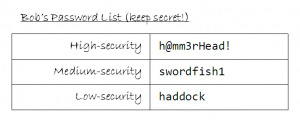
Bob’s password list. Don’t tell anybody I showed you it: Bob’ll kill me.
Bob’s approach was cleverer than most of the inhabitants of Internetland, but it wasn’t as clever as he thought. Eve had gotten his medium-security password, and this was enough to
persuade the Post Office to let her read Bob’s mail. Once she was able to do this, she went on to tell Bob’s credit card company that Bob had forgotten his password, so they sent him a
new one… which she was able to read. She was then able to use this new password to tell the credit card company that Bob had moved house, and that he’d lost his card. The credit card
company promptly sent out a new card… to Eve’s address. Now Eve was able to steal all of Bob’s money. “Muhahaha!” chortled Eve, evilly.
But even if Bob hadn’t made the mistake of using his “medium-security” password at the Post Office, Eve could have tried a different approach: Eve would have pretended to be Alice, and
asked Bob for his password. Bob would of course have responded, saying “It’s ‘swordfish1’.”
Then Eve would have done something sneaky: she’d have lied and said that was wrong. Bob would be confused, but he’d probably just think to himself, “Oh, I must have given Alice a
different password.”
“It must be ‘haddock’, then,” Bob would say.
“Nope; wrong again,” Eve would say, all the while pretending to be Alice.
“Surely it’s not ‘h@mm3rHead!’, is it?” Bob would try, one last time. And now Eve would have all of Bob’s passwords, and Bob would just be left confused.
Good Versus Eve
What went wrong in Internetland this week? Well, a few things did:
Alice didn’t look after her filing cabinet
For starters, Alice should have realised that the value of the information in her filing cabinet was worth at least as much as money would be, to the right kind of burglar. It was easy
for her to be complacent, because it wasn’t her identity that was most at risk, but that of her customers. Alice should have planned her security in line with that realisation:
there’s no 100% certain way of stopping Eve from breaking in, but Alice should have done more to make it harder for Eve (a proper lock, and perhaps a separate, second lock on the filing
cabinet), and should have made it so that Eve’s break-in was likely to be noticed (perhaps skimming through the security tapes every morning, or installing motion sensors).
But the bigger mistake that Alice made was that she kept Bob’s password in a format that Eve could read. Alice knew perfectly well that Bob would probably be using the same password in
other places, and so to protect him she ought to have kept his password encrypted in a way that would make it virtually impossible for Eve to read it. This, in combination with an
effort to insist that her customers used good, strong passwords, could have completely foiled Eve’s efforts, even if she had managed to get past the locks and CCTV un-noticed.
Here in the real world: Some of Alice’s mistakes are not too dissimilar to the recently-publicised mistakes made by LinkedIn, eHarmony, and LastFM. While these three
giants did encrypt the passwords of their users, they did so inadequately (using mechanisms not designed for passwords, by using outdated
and insecure mechanisms, and by failing to protect stolen passwords from bulk-decryption). By the way: if you have an
account with any of these providers, you ought to change your password, and also change your password anywhere else that uses the same password… and if this includes your email, change
it everywhere else, too.
Bob should have used different passwords everywhere he went
Good passwords should be long (8 characters should be an absolute minimum, now, and Bob really ought to start leaning towards 12), complex (not based on a word in any dictionary, and
made of a mixture of numbers, letters, and other characters), and not related to you (dates of birth, names of children, and the like are way out). Bob had probably heard
all of that a hundred times.
But good passwords should also be unique. You shouldn’t ever use the same password in two different places. This was Bob’s mistake, and it’s the mistake of almost everybody
else in Internetland, too. What Bob probably didn’t know was that there are tools that could have helped him to have a different password for everybody he talked to, yet still
been easier than remembering the three passwords he already remembered.
Here in the real world: There are some really useful tools to help you, too. Here are some of them:
LastPass helps you generate secure passwords, then stores encrypted versions of them on the Internet so that you can get at them
from anywhere. After a short learning curve, it’s ludicrously easy to use. It’s free for most users, or there are advanced options for paid subscribers.
KeePass does a similar thing, but it’s open source. However, it doesn’t store your encrypted passwords online (which you might
consider to be an advantage), so you have to carry a pen drive around or use a plugin to add this functionality.
SuperGenPass provides a super-lightweight approach to web browser password generation/storing. It’s easy to understand and
makes it simple to generate different passwords for every site you use, without having to remember all of those different passwords!
One approach for folks who like to “roll their own” is simply to put a spreadsheet or a text file into a TrueCrypt (or
similar) encrypted volume, which you can carry around on your pendrive. Just decrypt and read, wherever you are.
Another “manual” approach is simply to use a “master password” everywhere, prefixed or suffixed with a (say) 4-5 character modifier, that you vary from site to site. Keep your
modifiers on a Post-It note in your wallet, and back it up by taking a picture of it with your mobile phone. So maybe your Skype suffix is “8Am2%”, so when you log into Skype you type
in your master password, plus that suffix. Easy enough that you can do it even without a computer, and secure enough for most people.
Having found by coincidence a (minor, perhaps exploitable as part of a more-complex attack) security problem with the website of a major high street bank, one would think it would be
easier than it evidently is to get it reported and fixed. Several phone calls over a couple of days, and the threat of making a complaint about a representative if they didn’t escalate
me to somebody who’d actually understand what I was explaining, I’ve finally managed to get the message through to somebody. How hard was that? Too hard.
If this still doesn’t work, what’s the next step? I’m thinking (1) change banks; (2) explain why to the bank; (3) explain why to the world. Seriously, I expect better from the
people looking after my money.
And on that note: time for bed.
Edit: Meanwhile, we see that the PlayStation
Network hack may have resulted in the theft of personal information from users’ accounts. While most of the media seems to be up in arms about the fact that this might have included
credit card information, I’m most pissed-off about the fact that it might have included unencrypted passwords. Passwords should be stored using irreversible encryption: there’s
no legitimate excuse not to do this, these days (the short version for the uninterested: there is a technique which can be used to store passwords encrypted in a pretty-much
irreversible format, even if the hacker steals your entire computer: it’s very easy to do, protects against all kinds of collateral damage risks, and Sony evidently don’t do it). If any
of Sony’s users use the same password for their email account, social network accounts, online banks, etc. (and many of them will, despite strong recommendations to the contrary), the hackers
are probably already getting started with social hacking attempts against their friends, identity theft attacks, etc. Sony: you are a fail.
Hmm… as part of my ongoing work with Abnib v3.0, I’ve noticed a couple of interesting little quirks in the way that LiveJournal handles security for “friends only” and “private” posts. In fact, I’m pretty sure I’ve found a way to – for any given user – produce a list
of the times, dates, and URLs of all posts made by anybody – even ones to which I don’t have access. Not terribly disturbing news, as I still can’t get access to the content of the
posts or even the comments to them, but it’s an “opening” – a “way in” – which could potentially lead to a full-blown exploit.
For example, I can tell you that there is a post on Andy’s blog that I’m not allowed to read, that he wrote on the
17th of Januaryat about quarter past four in the afternoon (I hope you don’t mind me using you as my “guinea pig”, Andy – you’re the first person I came to who had a “recent” private
post).
The numbers near the end of LiveJournal post URLs are supposed to be semi-random to prevent people from just “guessing” their way to posts, but it turns out this isn’t necessary. I’ve
e-mailed LiveJournal to try to explain their flaw to them, but as I can’t be arsed to debug it myself (hey: not my weblog at risk, here), I don’t know yet how much of a
priority they’ll make it.
Ho hum.
Edit: Further investigations have revealed that I can easily get the title (but not the content or the comments) of any LiveJournal post, including protected
ones. For obvious reasons, I’ve now stopped using my friends’ weblogs as testbeds, and I’ve set up a couple of “play” accounts to try things out with. I wonder if I can get the content
of posts? That’d be an interesting challenge.
There’s a stunning interview you can listen to on BBC World Service with Gary McKinnon, the Briton who hacked into US military and research computers in order to hunt for evidence of
UFO activity. In the interview he talks about how he did it, what he found, and how he was caught, as well as his feelings over the
fact that he may be extradited to the US for up to a 70 year prison sentence for something which, in the UK, he couldn’t get more than four years. It’s well worth listening to. You’ll
want a copy of Real Alternative installed (like Real Player, except good).
Here’s a giggle – somebody’s found a cleverly crafted Google search string that will reveal the (unprotected) web interfaces of a particular kind of
Panasonic web-capable security camera. Just point a web browser at http://www.google.com/search?sourceid=mozclient&ie=utf-8&oe=utf-8&q=inurl%3A%22ViewerFrame%3FMode%3D%22,
then select one of the cameras (you might have to try a few before you get a working one). If you get a motorised one, you can even remotely control it! Here’s some I found earlier:
[this post has been partially damaged during a server failure on Sunday 11th July 2004, and it has been possible to recover only a part of it]
[further content was recovered on 13 October 2018]
If you’ve been on the internet for any length of time at all, you’ll probably have come across the concept of a phishing [wikipedia]
attack, or even been the target of one. The idea is that Joe Naughty sends you an e-mail, pretending to be your bank, credit card company, or whatever, and when you click the link in
the e-mail it takes you to your bank’s web site. Or that’s what you think, anyway. Actually, you’re at Joe Naughty’s web site, and it just looks like your bank’s web
site. And so he tries to trick you into giving him your bank details, so he can rob you blind.
I was recently the target of such an attack (one related to the CitiBank browser-bar scam [bbc news]). In this particular
attack, the fake site tries to trick you into thinking it is the real site by making your Internet Explorer address bar ‘disappear’, and then replaces it with a picture
of an Internet Explorer browser bar saying that you’re on the real site.
I decided that this was a particularly crude hack, and that I could do better. And …
I’m writing this from the (badly-protected: just had to go to a page with a particularly funky JavaScript to break out of their front-end browser) BBC Wales bus at the Royal Welsh Show,
where Alex and I are working on behalf of SmartData.
Suppose I’d better get back to work and let these kiddies have the ‘net connection back…
Last night was fun. After spending most of a day hacking into the BBC’s weather centre (I wanted a weather forecast XML stream, but couldn’t find a free one, so with Kit’s help I stole
one instead), he, Claire (recently returned) and I went down to the beach after midnight with a bottle of Caern O’Moor Bramble Wine and enjoyed the first cool air the town has seen in
most of a week.
I had a weird dream last night. Apparently, so did Kit. Must’ve been something in the wine.
Cool And Interesting Thing Of The Day To Do At The University Of Wales, Aberystwyth, #41:
Discover a major security flaw in the university network, that provides any user with half a brain, a computer in their room, some practice, and a lot of patience, the means to get the
password of anybody else on your local workgroup, leaving them exposed to malicious attacks, e-mail theft, use of their print quota, and all kinds of other problems. It’s such a serious
problem that I’m not going to go into further detail here, in case this e-mail gets into the hands of somebody on the network. Later, discover that this loophole has already been
discovered and is abused by at least one third year student. I’ve arranged for John (who aided me in discovering the problem) and I to meet with network services management to inform
them of the problem – simply because we feel threatened by it
The ‘cool and interesting things’ were originally published to a location at which my “friends back home” could read them, during the first few months of my time at the University
of Wales, Aberystwyth, which I started in September 1999. It proved to be particularly popular, and so now it is immortalised through the medium of my weblog.