A Selfhosted Static Site Editor

My 12-year-old was interested in learning some HTML and CSS and making her own website. If she were anybody else I’d point her at something like Nekoweb as a starter host because their web-based (VSCode-based) “Nekode” text editor makes writing your first static site simple.

But I’ve got a NAS sitting at home on a fibre connection, so I figured: I might as well just host something similar here.

Here’s how I did it:

1. DNS

I pointed her domain at my static IP, plus a subdomain for the “backend” interface. Suppose her site would be at example.net (and www.example.net) with the admin interface at admin.example.net: my DNS configuration might look like this:

@     10800 IN     A 172.66.147.243
www   10800 IN CNAME example.net.
admin 10800 IN CNAME example.net.

2. Caddy

I’ve got a Caddy webserver acting as a static server and a reverse proxy already, so I just added a new static site with a configuration like this:

example.net, www.example.net {
  root /volumes/example.net/public
  encode gzip
  templates
  file_server
}
The templates directive means that, if/when she wants to, she could use Caddy’s built-in SSI-like features. Or if she decides someday she’d prefer a static site generator then I can sort her out with shell access or something.

It probably wouldn’t be much harder to set up something like this from scratch on e.g. a Raspberry Pi: Caddy’s fast and easy to get set up.

3. Editor

I used the OpenVSCode Server Docker image to provide a browser-based VSCode interface in which she could edit HTML, CSS and JavaScript and drag-drop files from her local machine. I’m using Unraid on my NAS so I didn’t have to think much about running a new Docker container, but I guess that if I did then I’d have typed something like:

docker run -d \
  # 7890 is the port on my NAS that I'll proxy Caddy to:
  -p 7890:3000
  # /mnt/user/example.net is the path on my NAS;
  # /example.net is where it'll appear within VSCode:
  -v "/mnt/user/example.net:/example.net" \
  # this tells OpenVSCode-Server to mount the directory to begin with:
  -e OPENVSCODE_SERVER_ROOT=/example.net \
  gitpod/openvscode-server

Now all I needed to do was point Caddy at it. For the time being I simply restricted access to only “computers on my local LAN”, but it’d be easy enough to add authentication using basic auth and/or client certificates if she wanted to be able to work on her site from elsewhere:

admin.example.net {
  # Restrict access to 192.168.* LAN:
  @allowed {
    remote_ip 192.168.0.0/16
  }
  # Proxy permitted folks to the container:
  handle @allowed {
    reverse_proxy http://nas:7890
  }
  # Block everybody else:
  handle {
    abort
  }
}

That’s literally all it took to put together a web-based editing environment that publishes directly to a static website. And because it’s on my own infrastructure, it’d be trivially easy to modify it in the future if she decided to go in a different direction, e.g. a PHP site, or continuous deployment from a repo, or static site generation from a shell.

That’s all!

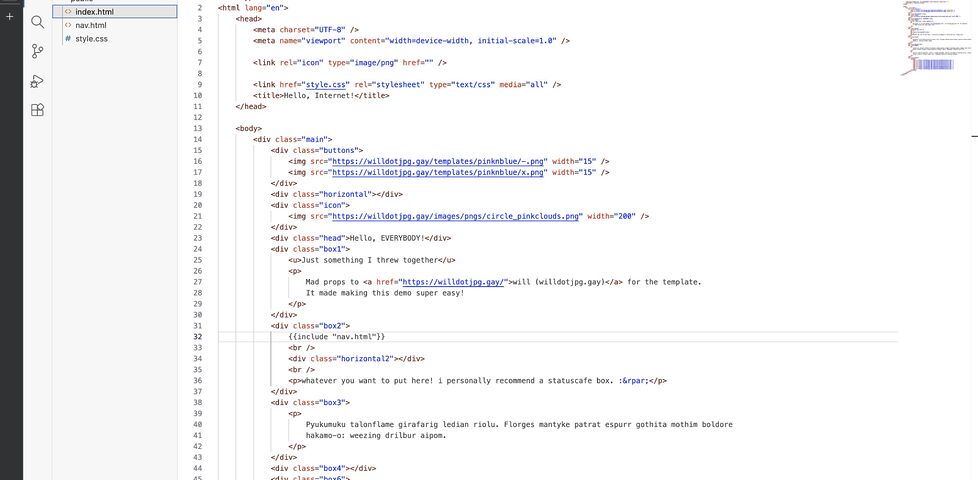
Here’s a test site I threw together using exactly this stack, demonstrating the entirely browser-based editing workflow (not shown is drag-and-drop to upload, but I promise that works too!):

Dynamically-Deployed Static Site Subdomains on Caddy

I’ve recently been experimenting with where I host my small and open-source static sites. In my latest experiment, I wanted to try a low-maintenance selfhosting solution1. Here’s what I wanted:

  • Pushing to the main branch of my GitHub/Codeberg/wherever repo would send a webook to my server.
  • Upon receiving the webhook, my server would pull the latest changes2.
  • Using a wildcard certificate, my webserver automatically mounts each project at a subdomain matching its project name3.

Here’s what I came up with:

Step 1: webhook handler

I’m using Caddy as my webserver, because despite its considerable power and versatility it’s a breeze to set up. To sort wildcard DNS later I’ll want to swap in a custom build, but to get started I just ran apt install caddy. Then I used apt install webhook to install Adnan Hajdarević’s webhook endpoint, and tied the two together in my Caddyfile:

webhook.duckling.danq.me {
  reverse_proxy localhost:9000
}
My static server’s called duckling.danq.me, so you’ll see that turn up a lot in these configs.

Then I created a webhook in a GitHub repository:

GitHub webhook pointing to https://webhook.duckling.danq.me/hooks/github-push, with a secret set and SSL verification enabled, triggered by a push event.
I generated a long random string to use as the secret, and kept a copy for later.

When you create a webhook in GitHub it immediately sends a test event, but it doesn’t quite look like a real push event so I pushed an inconsequential change to the repo to trigger another. Once you’ve got a “real” one sent, you can re-send it via the “Recent Deliveries” tab as many times as you like, to help with testing.

Then, on the server, I checked-out a copy of the code (anonymously: this is a public repository so I don’t need keys to read from it anyway) and set up my /etc/webhook.conf to expect these calls:

[
    {
      "id": "github-push",
      "execute-command": "/var/www/github-push/webhook.sh",
      "command-working-directory": "/var/www/github-push/",
      "pass-arguments-to-command": [
        {
          "source": "payload",
          "name": "repository.name"
        }
      ],
      "trigger-rule": {
        "and": [
          {
            "match": {
              "type": "payload-hash-sha256",
              "secret": "[MY SECRET KEY HERE]",
              "parameter": {
                "source": "header",
                "name": "X-Hub-Signature-256"
              }
            }
          },
          {
            "match": {
              "type": "value",
              "value": "refs/heads/main",
              "parameter": {
                "source": "payload",
                "name": "ref"
              }
            }
          }
        ]
      }
    }
  ]
  
The trigger-rule directives ensure that (a) the secret key is correct (it uses a HMAC hash across the entire JSON request, so it prevents payload tampering too) and (b) the event only triggers on pushes to the main branch. The execute-command specifies the Bash script I want to run when the webhook is triggered. The pass-arguments-to-command configuration says to send the repo name on to that script.

Now all I needed to do was write the /var/www/github-push/webhook.sh Bash script so that it pulled the latest copy of the code when triggered:

#!/bin/bash
cd /var/www/github-push/$1 && git pull

I was able to test this by pushing inconsequential changes to my codebase and watching them get replicated down to my webserver. Neat!

Step 2: low-maintenance webserver

After pointing the DNS for *.static.duckling.danq.me at my static server, I set about configuring Caddy to be able to use DNS-01 challenges to get itself wildcard SSL certificates4. Caddy can’t do DNS-01 challenges out of the box, so you either need to write your own renewal script or compile Caddy with plugins corresponding to your DNS provider. My domains’ DNS are managed by a mixture of AWS Route 53, Gandi, and Namecheap, so my xcaddy build step looked like this:

xcaddy build \
  --with github.com/caddy-dns/route53 \
  --with github.com/caddy-dns/gandi \
  --with github.com/caddy-dns/namecheap

Of course, if I’d have preferred somebody else build it for me, CaddyServer’s download configurator would have done it for me on-demand.

For Gandi and Namecheap I just need a personal access token or API key, respectively, but Route 53’s configuration is slightly more-involved: I needed to create a new user via IAM and give it permission to write DNS TXT records for the appropriate hosted zone. Fortunately the guide for the caddy-dns/route53 repo had an almost copy-pastable example.

I added the AWS access key and secret key as environment variables (like this!) into my /etc/systemd/system/multi-user.target.wants/caddy.service service definition, and then told my Caddyfile to make use of them when renewing the wildcard certificate:

*.static.duckling.danq.me {
    tls {
        dns route53 {
          access_key_id {env.AWS_ACCESS_KEY_ID}
          secret_access_key {env.AWS_SECRET_ACCESS_KEY}
        }
      }
      root * /var/www/github-push/{http.request.host.labels.4}
      file_server
    }
}
The {http.request.host.labels.4} refers to the fourth part of the domain name, when separated at the dots and counted from the right, so 0 = me, 1 = danq, 2 = duckling, 3 = static, and 4 = the part that we’re interested in. So long as I don’t store any other directories in the /var/www/github-push/ directory then this will simply map each subdomain onto its git repository name and return a 404 for any other request.

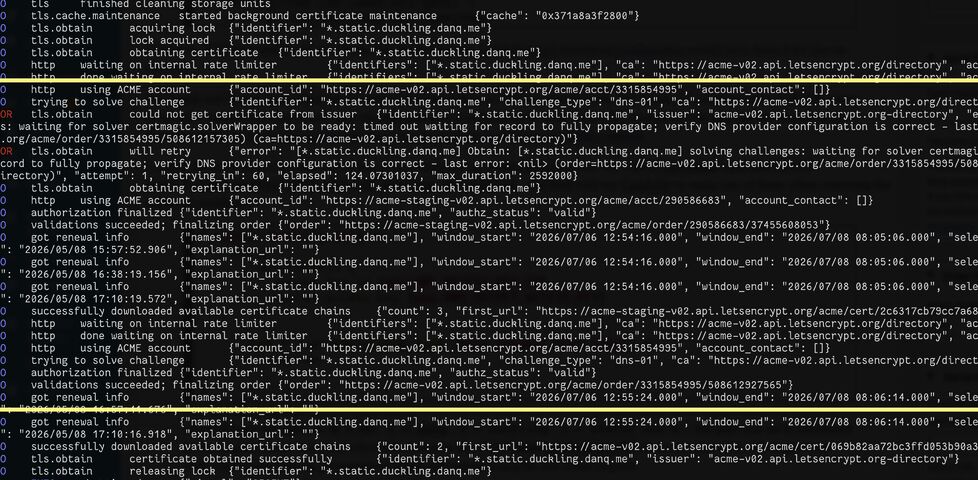
DNS-01 challenges are necessarily slower than HTTP-01/ALPN challenges, because they’re limited by DNS propogation, so it took a while before the certificate was issued. I ran Caddy in the foreground to watch the logs while it did so:

Caddy webserver logs, with a highlighted section showing a DNS-01 challenge for *.static.duckling.danq.me repeatedly fail and then eventually succeed, then a certificate chain being installed.

You can see the whole thing working (for now at least; I don’t know if I’m keeping this approach!) by going to e.g. embed-html.static.duckling.danq.me, which dynamically tracks the main branch of the embed-html repo on GitHub.

I don’t yet know if this is going to be the future forever-home of my many static site side projects, but it’s certainly been the most-satisfying experiment to run so-far.

Footnotes

1 I’ve drifted away from selfhosting simple static sites lately because I’ve accidentally broken them with configuration changes too many times! But I figured I’d be open to in-housing them again if I had a single simple architecture for them all, so I spun up a VPS and gave it a go

2 Running a build script or some other static site generation tool is out of scope for now, but I want to be able to confirm that it would be possible in the future.

3 It also needs to be possible for me to map other domain names to it, but that’s a triviality.

4 It’s absolutely possible to use tls { on_demand } to do this, but it’s better to use a wildcard certificate which can be pre-generated and doesn’t let people trick your server into making ludicrous numbers of certificate requests by hammering random subdomain names.

× ×

I guess I’m never paying DreamHost back

About twenty years ago, after a a tumultuous life, Big.McLargeHuge – the shared server of several other Abnibbers and I – finally and fatally kicked the bucket. I spun up its replacement, New.McLargeHuge, on hosting company DreamHost, and this blog (and many other sites) moved over to it1.

Screenshot of a web page listing domain names hosted on big.mclargehuge.
Wow, I’d forgotten half of these websites existed.

I only stayed with DreamHost for a few years before switching to Bytemark, with whom I was a loyal customer right up until a few years ago2, but in that time I took advantage of DreamHost’s “Refer & Earn” program, which allowed me to create referral codes that, if redeemed by others who went on to become paying customers, would siphon off a fraction of the profits as a “kickback” against my server bills. Neat!3

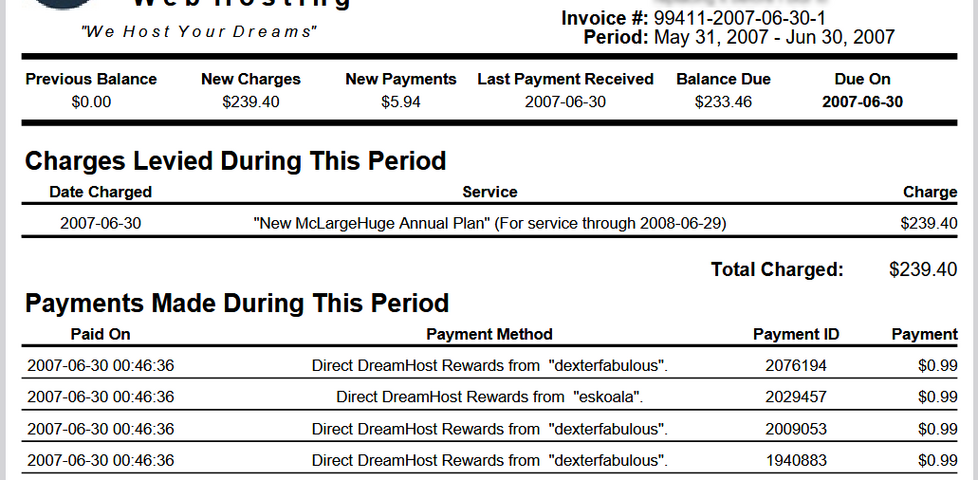
Invoice from DreamHost to Dan Q dated 30 June 2007, showing an annual renewal of New.McLargeHuge for $239.40 partially-offset by six referral payments for $0.99 each.
DreamHost’s referrals had a certain “pyramid scheme” feel in that you could get credit for the people referred by the people you referred.

A year or so after I switched to ByteMark, DreamHost decided I owed them money: probably because of a “quirk” in their systems. I disagreed with their analysis, so I ignored their request. They “suspended” my account (which I wasn’t using anyway), and that was the end of it.

Right?

But the referral fees continued to trickle in. For the last seventeen years, I’ve received a monthly email advising me that my account had been credited, off the back of a referral.

Collection of monthly emails from DreamHost advising of referral rewards of between $2.40 and $5.16.
I have no explanation as to why the amount of the referral reward fluctuates, but I can only assume that it’s the result of different people on different payment schedules?

About once a year I log in and check the balance. I was quite excited to discover that, at current rates, they’d consider me “paid-up” for my (alleged) debt by around Spring 2026!

I had this whole plan that I’d write a blog post about it when the time came. It could’ve been funny!

But it’s not to be: DreamHost emailed me last night to tell me that they’re killing their “Refer & Earn” program; replacing it with something different-but-incompatible (social media’s already having a grumble about this, I gather).

So I guess this is the only blog post you’ll get about “that time DreamHost decided I owed them money and I opted to pay them back in my referral fees over the course of eighteen years”.

No big loss.

Footnotes

1 At about the same time I moved Three Rings over from its previous host, Easily, to DreamHost too, in order to minimise the number of systems I had to keep an eye on. Oh, how different things are now, when I’ve got servers and domain registrations and DNS providers all over the damn place!

2 Bytemark have rapidly gone downhill since their acquisition by Iomart a while back, IMHO.

3 Nowadays, this blog (and several of my other projects) is hosted by Linode, whose acquisition by Akamai seems not to have caused any problems with, so that’s fab.

× × ×

Enumerating Domains

I’ve just enumerated my personal domain names. There’s a lot fewer of them than there used to be!1

Anyway: here’s the list –

I think that’s all of them, but it’s hard to be sure…

Footnotes

1 Maybe I’ve finally shaken off my habit of buying a domain name for everything. Or maybe it’s just that I’ve embraced subdomains for more stuff. Probably the latter.

Bad Names for Servers

Six or seven years ago our eldest child, then a preschooler, drew me a picture of the Internet1. I framed it and I keep it on the landing outside my bedroom – y’know, in case I get lost on the Internet and need a map:

Framed child-drawn picture showing multiple circles, connected by lines, each with a number 0 or 1 in it.
Lots of circles, all connected to one another, passing zeroes and ones around. Around this time she’d observed that I wrote my number zeroes “programmer-style” (crossed) and clearly tried to emulate this, too.

I found myself reminded of this piece of childhood art when she once again helped me with a network map, this weekend.

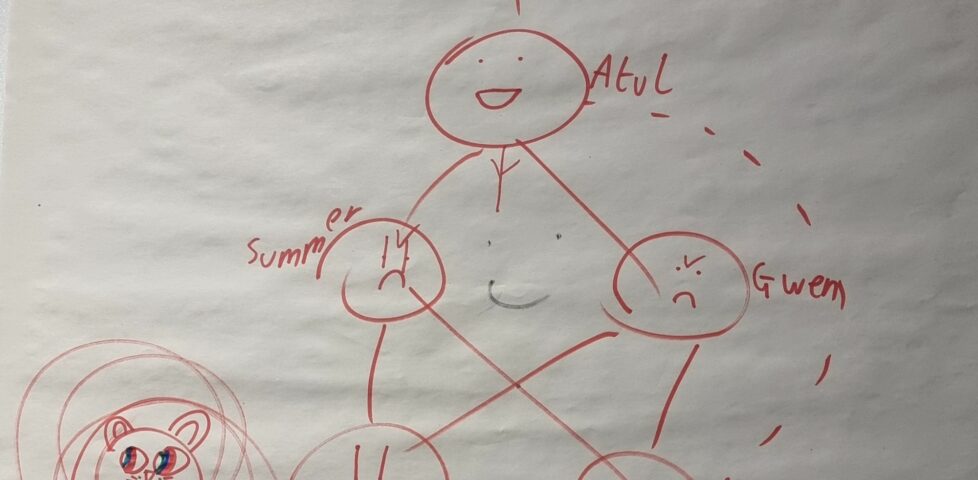
As I kick off my Automattic sabbatical I’m aiming to spend some of this and next month building a new server architecture for Three Rings. To share my plans, this weekend, I’d been drawing network diagrams showing my fellow volunteers what I was planning to implement. Later, our eldest swooped in and decided to “enhance” the picture with faces and names for each server:

Network diagram but with entities having faces and named Chungus, Atul, Summer, Gwen, Alice, Astrid, and Demmy.
I don’t think she intended it, but she’s made the primary application servers look the grumpiest. This might well fit with my experience of those servers, too.

I noted that she named the read-replica database server Demmy2, after our dog.

French Bulldog with her tongue sticking out.
You might have come across our dog before, if you followed me through Bleptember.

It’s a cute name for a server, but I don’t think I’m going to follow it. The last thing I want is for her to overhear me complaining about some possible future server problem and misinterpret what I’m saying. “Demmy is a bit slow; can you give her a kick,” could easily cause distress, not to mention “Demmy’s dying; can we spin up a replacement?”

I’ll stick to more-conventional server names for this new cluster, I think.

Footnotes

1 She spelled it “the Itnet”, but still: max props to her for thinking “what would he like a picture of… oh; he likes the Internet! I’ll draw him that!”

2 She also drew ears and a snout on the Demmy-server, in case the identity wasn’t clear to me!

× × ×

Digital Dustbusting

tl;dr: I’m tidying up and consolidating my personal hosting; I’ve made a little progress, but I’ve got a way to go – fortunately I’ve got a sabbatical coming up at work!

At the weekend, I kicked-off what will doubtless be a multi-week process of gradually tidying and consolidating some of the disparate digital things I run, around the Internet.

I’ve a long-standing habit of having an idea (e.g. gamebook-making tool Twinebook, lockpicking puzzle game Break Into Us, my Cheating Hangman game, and even FreeDeedPoll.org.uk!), deploying it to one of several servers I run, and then finding it a huge headache when I inevitably need to upgrade or move said server because there’s such an insane diversity of different things that need testing!

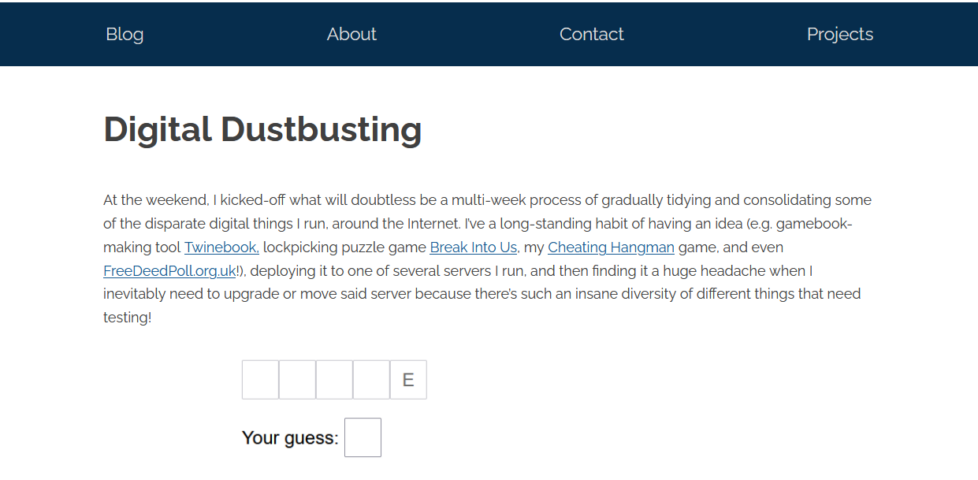
Screenshot from Cheating Hangman: I guessed an 'E', but when I guessed an 'O' I was told that there was one (the computer was thinking of 'CLOSE'), but now there isn't because it's switched to a different word that ends with 'E'.
My “cheating hangman” game spun out from my analysis of the hardest words for an optimal player to guess, which was in turn inspired by the late Nick Berry’s examination of optimal strategy.

I can simplify, I figured. So I did.

And in doing so, I rediscovered several old projects I’d neglected or forgotten about. I wonder if anybody’s still using any of them?

Hosting I’ve tidied so far…

  • Cheating Hangman is now hosted by GitHub Pages.
  • DNDle, my Wordle-clone where you have to guess the Dungeons & Dragons 5e monster’s stat block, is now hosted by GitHub Pages. Also, I fixed an issue reported a month ago that meant that I was reporting Giant Scorpions as having a WIS of 19 instead of 9.
  • Abnib, which mostly reminds people of upcoming birthdays and serves as a dumping ground for any Abnib-related shit I produce, is now hosted by GitHub Pages.
  • RockMonkey.org.uk, which doesn’t really do much any more, is now hosted by GitHub Pages.
  • EGXchange, my implementation of a digital wallet for environmentally-friendly cryptocurrency EmmaGoldCoin, which I’ve written about before, is now hosted by GitHub Pages.
  • Sour Grapes, the single-page promo for a (remote) murder mystery party I hosted during a COVID lockdown, is now hosted by GitHub Pages.
  • A convenience-page for giving lost people directions to my house is now hosted by GitHub Pages.
  • Dan Q’s Things is now automatically built on a schedule and hosted by GitHub Pages.
  • Robin’s Improbable Blog, which spun out from 52 Reflect, wasn’t getting enough traffic to justify “proper” hosting so now it sits in a Docker container on my NAS.
  • My μlogger server, which records my location based on pings from my phone, has also moved to my NAS. This has broken Find Dan Q, but I’m not sure if I’ll continue with that in its current form anyway.
  • All of my various domain/subdomain redirects have been consolidated on, or are in the process of moving to, to a tiny Linode/Akamai instance. It’s a super simple plain Nginx server that does virtually nothing except redirect people – this is where I’ll park the domains I register but haven’t found a use for yet, in future.
Screenshot showing EGXchange, saying "everybody has an EGX wallet, log in to yours now".
I was pretty proud of EGXchange.org, but I’ll be first to admit that it’s among the stupider of my throwaway domains.

It turns out GitHub pages is a fine place to host simple, static websites that were open-source already. I’ve been working on improving my understanding of GitHub Actions anyway as part of what I’ve been doing while wearing my work, volunteering, and personal hats, so switching some static build processes like DNDle’s to GitHub Actions was a useful exercise.

Stuff I’m still to tidy…

There’s still a few things I need to tidy up to bring my personal hosting situation under control:

DanQ.me

Screenshot showing this blog post.
You’re looking at it. But later this year, you might be looking at it… elsewhere?

This is the big one, because it’s not just a WordPress blog: it’s also a Gemini, Spartan, and Gopher server (thanks CapsulePress!), a Finger server, a general-purpose host to a stack of complex stuff only some of which is powered by Bloq (my WordPress/PHP integrations): e.g. code to generate the maps that appear on my geopositioned posts, code to integrate with the Fediverse, a whole stack of configuration to make my caching work the way I want, etc.

FreeDeedPoll.org.uk

Right now this is a Ruby/Sinatra application, but I’ve got a (long-running) development branch that will make it run completely in the browser, which will further improve privacy, allow it to run entirely-offline (with a service worker), and provide a basis for new features I’d like to provide down the line. I’m hoping to get to finishing this during my Automattic sabbatical this winter.

Screenshot showing freedeedpoll.org.uk
The website’s basically unchanged for most of a decade and a half, and… umm… it looks it!

A secondary benefit of it becoming browser-based, of course, is that it can be hosted as a static site, which will allow me to move it to GitHub Pages too.

Geohashing.site

When I took over running the world’s geohashing hub from xkcd‘s Randall Munroe (and davean), I flung the site together on whatever hosting I had sitting around at the time, but that’s given me some headaches. The outbound email transfer agent is a pain, for example, and it’s a hard host on which to apply upgrades. So I want to get that moved somewhere better this winter too. It’s actually the last site left running on its current host, so it’ll save me a little money to get it moved, too!

Screenshot from Geohashing.site's homepage.
Geohashing’s one of the strangest communities I’m honoured to be a part of. So it’d be nice to treat their primary website to a little more respect and attention.

My FreshRSS instance

Right now I run this on my NAS, but that turns out to be a pain sometimes because it means that if my home Internet goes down (e.g. thanks to a power cut, which we have from time to time), I lose access to the first and last place I go on the Internet! So I’d quite like to move that to somewhere on the open Internet. Haven’t worked out where yet.

Next steps

It’s felt good so far to consolidate and tidy-up my personal web hosting (and to rediscover some old projects I’d forgotten about). There’s work still to do, but I’m expecting to spend a few months not-doing-my-day-job very soon, so I’m hoping to find the opportunity to finish it then!

× × × × ×

Christmas Cheer with Bytemark

For the last eight winters, we at Three Rings have sent out Christmas cards – and sometimes mugs! – to our clients (and to special friends of the project). The first of these was something I knocked up in Photoshop in under an hour, but we’ve since expanded into having an official “company artist” in the form of our friend Ele who each year takes the ideas that the Three Rings volunteer team have come up with and adapts them into a stunning original design that we’re proud to show off to our clients.

Three Rings' 2009 Christmas card
Our first Christmas card, in 2009, was knocked-up quickly and printed only a couple of days before the Christmas posting deadline, but it kicked-off a tradition that’s grown every year since.

This year’s card is still winging its way to some of our more-distant customers, as Three Rings is used in six countries, and so it doesn’t yet appear on our gallery of previous cards. But here’s a sneak peek:

Three Rings' 2017 Christmas card
Last week, I helped stuff a little under 400 of these into envelopes and put stamps on them all for delivery to our UK customers. (Our international customers needed slightly more-careful attention.)

For most of Three Rings life, our server’s been hosted by the awesome folks at Bytemark. We had a brief dalliance with Amazon Web Services for a while but had a seriously unsatisfying experience and we eventually came crawling back to Bytemark (complete with a conveniently-timed Valentines’ Day message expressing our love for them and our apologies for our mistake). What I’m saying is that we’ve made a habit of sending seasonal greetings to our buddies at Bytemark – and this Christmas was no different – but what surprised us was what we received from them this year:

Christmas card - and cake! - from Bytemark.
Bytemark sent us not only a Christmas card but a fancy-looking fruitcake! Thanks, Bytemark!

Not only did Bytemark send us a delightful Christmas card (with a pixel-art picture of Sana literally burning the logs) but they included a fabulous-looking fruitcake. Thanks for bringing a little bit of extra cheer to our Christmas, Bytemark!

× × ×

One of my favourite hosting companies is recruiting using anonymous online interviews, in an effort to combat industry sexism

This link was originally posted to /r/girlsgonewired. See more things from Dan's Reddit account.

The original link was: https://blog.bytemark.co.uk/2015/05/20/bytemark-is-hiring-by-anonymous-interview

So, in May 2015, we made the huge decision to start an anonymous recruitment process. The biggest change compared to tradition recuiting is this – your first two interviews are truly anonymous. We conduct them over instant messaging and run our skills tests remotely too.

You won’t even have to give your real name or a CV in the initial stages. We don’t know anything about you that you don’t choose to present in the interview.

That makes us work hard for explicit goals. We want to know about your:

Most valuable skills
Ability to learn
Ability to work effectively in a team

We make decisions based on those factors. Avoiding the “X factor” of cultural fit, which we’ve seen as an excuse for all kinds of implicit and explicit bias across industries.

We also want to be respectful of your time, your enthusiasm and your interests – we’ll test not just what you know but what you can learn. Our focus is on letting you put your abilities to the fore, without fear that you’ll be judged on irrelevant things. We define the job, we define the skills, and we want to test those without bias.

Our culture comes from you, the best person for the job at the end of the process. Of course we still need to meet you, we want to meet you. But we will start our interviews on the solid foundation of anonymity. Only at the final stages will you be asked to come in for a face-to-face interview.

In Praise Of Dreamhost’s Backup System

I’ve been impressed, again, by Dreamhost, who provide hosting for this and many of my other websites. During a fit of stupidity, I accidentally rm -rf *‘d Abnib Gallery. For those of a less techy nature, I deleted it: pictures and site and all. Whoopsie.

So I thought: perhaps they have a tape backup or something. I filled in their support form, which asks lots of useful questions like “How much do you know about this?”, with options ranging from “I don’t know anything, hold me by the hand,” to “TBH, I probably know more about this than you do!” and a nice scale of rating the urgency, as well as indicating how many calls they’re dealing with right now and a link to an outstanding issues page.

Within half an hour I’d been e-mailed back by a tech support person, who explained in exactly the appropriate level of detail that hourly and daily backups (with grandfather-father-son fallbacks) of everybody’s home directory are made into their hidden .snapshot directory. I took a peep, and lo and behold there was my backup. Very impressed.

Now, if only they’d improve the reliability and speed of their Rails hosting, I’d offer them a round of oral sex.

Reply #13108

This is a reply to a post published elsewhere. Its content might be duplicated as a traditional comment at the original source.

Sian wrote:

Going to be registering a website thingy tonight to mess around with. Any hints/tips/advice from all you people who know about this stuff would be gratefully received. I am, after all, officially computer illiterate.

Register your domain name with somebody respectable (won’t rip you off or otherwise fuck up) like Easily, who’ll give you a domain name (whateveryoulike.co.uk) for as little as £9.99/2 years.

As far as hosting is concerned, I can’t say a bad word about the fantastic DreamHost, who now provide hosting for me, Paul, Claire, Matt (from SmartData), JTA & Ruth, Statto… etc. etc.

I’m not sure if it still works, but if you sign up for their Crazy Domain Insane offer ($9.95/month), paying for the first year up-front, and use the promo code “777”, they’ll give you the first YEAR for the price of the first month. Which is nice. And as it includes a free .com domain name of your choice, that’s pretty fab, too (saves you heaps of cash, no commitment to stay with them more than a year anyway, etc.). They’re pretty damn good.

Drop me an e-mail if you want any specific help/advice on such geekibits. Will see what I can do.