This video accompanies a blog post of the same title. The content is mostly the same; the blog post contains a few extra elements (especially in the footnotes!). Enjoy whichever one you choose.
Also available on YouTube and on Facebook.
This post is also available as an article. So if you'd rather read a conventional blog post of this content, you can!
This video accompanies a blog post of the same title. The content is mostly the same; the blog post contains a few extra elements (especially in the footnotes!). Enjoy whichever one you choose.
Also available on YouTube and on Facebook.
This post is also available as a video. If you'd prefer to watch/listen to me talk about this topic, give it a look.
This blog post is also available as a video. Would you prefer to watch/listen to me tell you about the video game that had the biggest impact on my life?
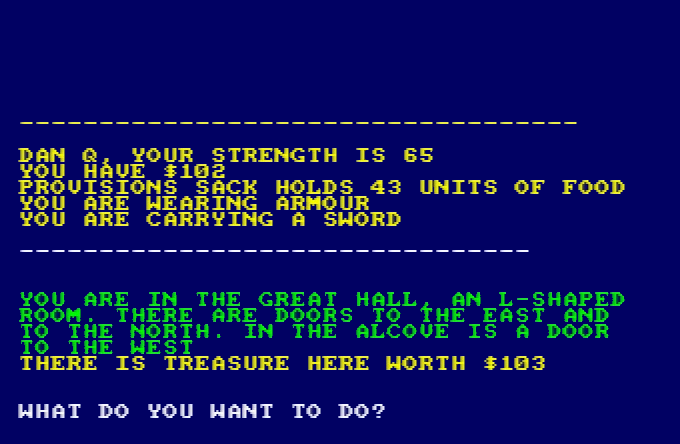
Of all of the videogames I’ve ever played, perhaps the one that’s had the biggest impact on my life1 was: Werewolves and (the) Wanderer.2
This simple text-based adventure was originally written by Tim Hartnell for use in his 1983 book Creating Adventure Games on your Computer. At the time, it was common for computing books and magazines to come with printed copies of program source code which you’d need to re-type on your own computer, printing being significantly many orders of magnitude cheaper than computer media.3
I’d been working my way through the operating manual for our microcomputer, trying to understand it all.5
[ENTER] at the end of each line.
In particular, I found myself comparing Werewolves to my first attempt at a text-based adventure. Using what little I’d grokked of programming so far, I’d put together
a series of passages (blocks of PRINT statements6)
with choices (INPUT statements) that sent the player elsewhere in the story (using, of course, the long-considered-harmful GOTO statement), Choose-Your-Own-Adventure
style.
Werewolves was… better.
Werewolves and Wanderer was my first lesson in how to structure a program.
Let’s take a look at a couple of segments of code that help illustrate what I mean (here’s the full code, if you’re interested):
10 REM WEREWOLVES AND WANDERER 20 GOSUB 2600:REM INTIALISE 30 GOSUB 160 40 IF RO<>11 THEN 30 50 PEN 1:SOUND 5,100:PRINT:PRINT "YOU'VE DONE IT!!!":GOSUB 3520:SOUND 5,80:PRINT "THAT WAS THE EXIT FROM THE CASTLE!":SOUND 5,200 60 GOSUB 3520 70 PRINT:PRINT "YOU HAVE SUCCEEDED, ";N$;"!":SOUND 5,100 80 PRINT:PRINT "YOU MANAGED TO GET OUT OF THE CASTLE" 90 GOSUB 3520 100 PRINT:PRINT "WELL DONE!" 110 GOSUB 3520:SOUND 5,80 120 PRINT:PRINT "YOUR SCORE IS"; 130 PRINT 3*TALLY+5*STRENGTH+2*WEALTH+FOOD+30*MK:FOR J=1 TO 10:SOUND 5,RND*100+10:NEXT J 140 PRINT:PRINT:PRINT:END ... 2600 REM INTIALISE 2610 MODE 1:BORDER 1:INK 0,1:INK 1,24:INK 2,26:INK 3,18:PAPER 0:PEN 2 2620 RANDOMIZE TIME 2630 WEALTH=75:FOOD=0 2640 STRENGTH=100 2650 TALLY=0 2660 MK=0:REM NO. OF MONSTERS KILLED ... 3510 REM DELAY LOOP 3520 FOR T=1 TO 900:NEXT T 3530 RETURN
...) have been added for readability/your convenience.
What’s interesting about the code above? Well…
GOSUB statements):
2610), the RNG (2620), and player
characteristics (2630 – 2660). This also makes it easy to call it again (e.g. if the player is given the option to “start over”). This subroutine
goes on to set up the adventure map (more on that later).
160: this is the “main game” logic. After it runs, each time, line 40 checks IF RO<>11 THEN 30. This tests
whether the player’s location (RO) is room 11: if so, they’ve exited the castle and won the adventure. Otherwise, flow returns to line 30 and the “main
game” subroutine happens again. This broken-out loop improving the readability and maintainability of the code.8
3520). It just counts to 900! On a known (slow) processor of fixed speed, this is a simpler way to put a delay in than
relying on a real-time clock.
The game setup gets more interesting still when it comes to setting up the adventure map. Here’s how it looks:
2680 REM SET UP CASTLE 2690 DIM A(19,7):CHECKSUM=0 2700 FOR B=1 TO 19 2710 FOR C=1 TO 7 2720 READ A(B,C):CHECKSUM=CHECKSUM+A(B,C) 2730 NEXT C:NEXT B 2740 IF CHECKSUM<>355 THEN PRINT "ERROR IN ROOM DATA":END ... 2840 REM ALLOT TREASURE 2850 FOR J=1 TO 7 2860 M=INT(RND*19)+1 2870 IF M=6 OR M=11 OR A(M,7)<>0 THEN 2860 2880 A(M,7)=INT(RND*100)+100 2890 NEXT J 2910 REM ALLOT MONSTERS 2920 FOR J=1 TO 6 2930 M=INT(RND*18)+1 2940 IF M=6 OR M=11 OR A(M,7)<>0 THEN 2930 2950 A(M,7)=-J 2960 NEXT J 2970 A(4,7)=100+INT(RND*100) 2980 A(16,7)=100+INT(RND*100) ... 3310 DATA 0, 2, 0, 0, 0, 0, 0 3320 DATA 1, 3, 3, 0, 0, 0, 0 3330 DATA 2, 0, 5, 2, 0, 0, 0 3340 DATA 0, 5, 0, 0, 0, 0, 0 3350 DATA 4, 0, 0, 3, 15, 13, 0 3360 DATA 0, 0, 1, 0, 0, 0, 0 3370 DATA 0, 8, 0, 0, 0, 0, 0 3380 DATA 7, 10, 0, 0, 0, 0, 0 3390 DATA 0, 19, 0, 8, 0, 8, 0 3400 DATA 8, 0, 11, 0, 0, 0, 0 3410 DATA 0, 0, 10, 0, 0, 0, 0 3420 DATA 0, 0, 0, 13, 0, 0, 0 3430 DATA 0, 0, 12, 0, 5, 0, 0 3440 DATA 0, 15, 17, 0, 0, 0, 0 3450 DATA 14, 0, 0, 0, 0, 5, 0 3460 DATA 17, 0, 19, 0, 0, 0, 0 3470 DATA 18, 16, 0, 14, 0, 0, 0 3480 DATA 0, 17, 0, 0, 0, 0, 0 3490 DATA 9, 0, 16, 0, 0, 0, 0
DATA statements form a “table”.
What’s this code doing?
2690 defines an array (DIM) with two dimensions9
(19 by 7). This will store room data, an approach that allows code to be shared between all rooms: much cleaner than my first attempt at an adventure with each room
having its own INPUT handler.
2700 through 2730 populates the room data from the DATA blocks. Nowadays you’d probably put that data in a
separate file (probably JSON!). Each “row” represents a room, 1 to 19. Each “column” represents the room you end up
at if you travel in a given direction: North, South, East, West, Up, or Down. The seventh column – always zero – represents whether a monster (negative number) or treasure
(positive number) is found in that room. This column perhaps needn’t have been included: I imagine it’s a holdover from some previous version in which the locations of some or all of
the treasures or monsters were hard-coded.
2850 selects seven rooms and adds a random amount of treasure to each. The loop beginning on line 2920 places each of six
monsters (numbered -1 through -6) in randomly-selected rooms. In both cases, the start and finish rooms, and any room with a treasure or monster, is
ineligible. When my 8-year-old self finally deciphered what was going on I was awestruck at this simple approach to making the game dynamic.
2970 – 2980), replacing any treasure or monster already there: the Private Meeting Room (always
worth a diversion!) and the Treasury, respectively.
2740 is cute, and a younger me appreciated deciphering it. I’m not convinced it’s necessary (it sums all of the values in
the DATA statements and expects 355 to limit tampering) though, or even useful: it certainly makes it harder to modify the rooms, which may undermine
the code’s value as a teaching aid!
Something you might notice is missing is the room descriptions. Arrays in this language are strictly typed: this array can only contain integers and not strings. But there are other reasons: line length limitations would have required trimming some of the longer descriptions. Also, many rooms have dynamic content, usually based on random numbers, which would be challenging to implement in this way.
As a child, I did once try to refactor the code so that an eighth column of data specified the line number to which control should pass to display the room description. That’s
a bit of a no-no from a “mixing data and logic” perspective, but a cool example of metaprogramming before I even knew it! This didn’t work, though: it turns out you can’t pass a
variable to a Locomotive BASIC GOTO or GOSUB. Boo!10
Werewolves and Wanderer has many faults11. But I’m clearly not the only developer whose early skills were honed and improved by this game, or who hold a special place in their heart for it. Just while writing this post, I discovered:
A decade or so later, I’d be taking my first steps as a professional software engineer. A couple more decades later, I’m still doing it.
And perhaps that adventure -the one that’s occupied my entire adult life – was facilitated by this text-based one from the 1980s.
1 The game that had the biggest impact on my life, it might surprise you to hear, is not among the “top ten videogames that stole my life” that I wrote about almost exactly 16 years ago nor the follow-up list I published in its incomplete form three years later. Turns out that time and impact are not interchangable. Who knew?
2 The game is variously known as Werewolves and Wanderer, Werewolves and
Wanderers, or Werewolves and the
Wanderer. Or, on any system I’ve been on, WERE.BAS, WEREWOLF.BAS, or WEREWOLV.BAS, thanks to the CPC’s eight-point-three filename limit.
3 Additionally, it was thought that having to undertake the (painstakingly tiresome) process of manually re-entering the source code for a program might help teach you a little about the code and how it worked, although this depended very much on how readable the code and its comments were. Tragically, the more comprehensible some code is, the more long-winded the re-entry process.
4 The CPC’s got a fascinating history in its own right, but you can read that any time.
5 One of my favourite features of home microcomputers was that seconds after you turned them on, you could start programming. Your prompt was an interface to a programming language. That magic had begun to fade by the time DOS came to dominate (sure, you can program using batch files, but they’re neither as elegant nor sophisticated as any BASIC dialect) and was completely lost by the era of booting directly into graphical operating systems. One of my favourite features about the Web is that it gives you some of that magic back again: thanks to the debugger in a modern browser, you can “tinker” with other people’s code once more, right from the same tool you load up every time. (Unfortunately, mobile devices – which have fast become the dominant way for people to use the Internet – have reversed this trend again. Try to View Source on your mobile – if you don’t already know how, it’s not an easy job!)
6 In particular, one frustration I remember from my first text-based adventure was that I’d been unable to work around Locomotive BASIC’s lack of string escape sequences – not that I yet knew what such a thing would be called – in order to put quote marks inside a quoted string!
7 “Screen editors” is what we initially called what you’d nowadays call a “text editor”: an application that lets you see a page of text at the same time, move your cursor about the place, and insert text wherever you feel like. It may also provide features like copy/paste and optional overtyping. Screen editors require more resources (and aren’t suitable for use on a teleprinter) compared to line editors, which preceeded them. Line editors only let you view and edit a single line at a time, which is how most of my first 6 years of programming was done.
8 In a modern programming language, you might use while true or similar for a
main game loop, but this requires pushing the “outside” position to the stack… and early BASIC dialects often had strict (and small, by modern standards) limits on stack height that
would have made this a risk compared to simply calling a subroutine from one line and then jumping back to that line on the next.
9 A neat feature of Locomotive BASIC over many contemporary and older BASIC dialects was its support for multidimensional arrays. A common feature in modern programming languages, this language feature used to be pretty rare, and programmers had to do bits of division and modulus arithmetic to work around the limitation… which, I can promise you, becomes painful the first time you have to deal with an array of three or more dimensions!
10 In reality, this was rather unnecessary, because the ON x GOSUB command
can – and does, in this program – accept multiple jump points and selects the one referenced by the
variable x.
11 Aside from those mentioned already, other clear faults include: impenetrable controls unless you’ve been given instuctions (although that was the way at the time); the shopkeeper will penalise you for trying to spend money you don’t have, except on food, presumably as a result of programmer laziness; you can lose your flaming torch, but you can’t buy spares in advance (you can pay for more, and you lose the money, but you don’t get a spare); some of the line spacing is sometimes a little wonky; combat’s a bit of a drag; lack of feedback to acknowledge the command you enterted and that it was successful; WHAT’S WITH ALL THE CAPITALS; some rooms don’t adequately describe their exits; the map is a bit linear; etc.
(Just want the instructions? Scroll down.)
A year and a half ago I came up with a technique for intercepting the “shuffle” operation on jigsaw website Jigidi, allowing players to force the pieces to appear in a consecutive “stack” for ludicrously easy solving. I did this partially because I was annoyed that a collection of geocaches near me used Jigidi puzzles as a barrier to their coordinates1… but also because I enjoy hacking my way around artificially-imposed constraints on the Web (see, for example, my efforts last week to circumvent region-blocking on radio.garden).
My solver didn’t work for long: code changes at Jigidi’s end first made it harder, then made it impossible, to use the approach I suggested. That’s fine by me – I’d already got what I wanted – but the comments thread on that post suggests that there’s a lot of people who wish it still worked!2 And so I ignored the pleas of people who wanted me to re-develop a “Jigidi solver”. Until recently, when I once again needed to solve a jigsaw puzzle in order to find a geocache’s coordinates.
Rather than interfere with the code provided by Jigidi, I decided to take a more-abstract approach: swapping out the jigsaw’s image for one that would be easier.
This approach benefits from (a) having multiple mechanisms of application: query interception, DNS hijacking, etc., meaning that if one stops working then another one can be easily rolled-out, and (b) not relying so-heavily on the structure of Jigidi’s code (and therefore not being likely to “break” as a result of future upgrades to Jigidi’s platform).
Watch a video demonstrating the approach:
It’s not as powerful as my previous technique – more a “helper” than a “solver” – but it’s good enough to shave at least half the time off that I’d otherwise spend solving a Jigidi jigsaw, which means I get to spend more time out in the rain looking for lost tupperware. (If only geocaching were even the weirdest of my hobbies…)
To do this yourself and simplify your efforts to solve those annoying “all one colour” or otherwise super-frustrating jigsaw puzzles, here’s what you do:
The replacement image has the following characteristics that make it easier to solve than it might otherwise be:
To solve the jigsaw, start by grouping colours together, then start combining those that belong in the same column (based on the second digit on the piece). Join whole or partial columns together as you go.
I’ve been using this technique or related ones for over six months now and no code changes on Jigidi’s side have impacted upon it at all, so it’s probably got better longevity than the previous approach. I’m not entirely happy with it, and you might not be either, so feel free to fork my code and improve it: the legiblity of the numbers is sometimes suboptimal, and the colour banding repeats on larger jigsaws which I’d rather avoid. There’s probably also potential to improve colour-recognition by making the colour bands span the gaps between rows or columns of pieces, too, but more experiments are needed and, frankly, I’m not the right person for the job. For the second time, I’m going to abandon a tool that streamlines Jigidi solving because I’ve already gotten what I needed out of it, and I’ll leave it up to you if you want to come up with an improvement and share it with the community.
1 As I’ve mentioned before, and still nobody believes me: I’m not a fan of jigsaws! If you enjoy them, that’s great: grab a bucket of popcorn and a jigsaw and go wild… but don’t feel compelled to share either with me.
2 The comments also include asuper-helpful person called Rich who’s been manually solving people’s puzzles for them, and somebody called Perdita who “could be my grandmother” (except: no) with whom I enjoyed a conversation on- and off-line about the ethics of my technique. It’s one of the most-popular comment threads my blog has ever seen.
Just in time for Robin Sloan to give up on Spring ’83, earlier this month I finally got aroud to launching STS-6 (named for the first mission of the Space Shuttle Challenger in Spring 1983), my experimental Spring ’83 server. It’s been a busy year; I had other things to do. But you might have guessed that something like this had been under my belt when I open-sourced a keygenerator for the protocol the other day.
If you’ve not played with Spring ’83, this post isn’t going to make much sense to you. Sorry.
My server is, as far as I can tell, very different from any others in a few key ways:
{{board:123}}which are
automatically converted to addresses referencing the public key of the “current” keypair for that board. This separates the concept of a board and its content template from that
board’s keypairs, making it easier to link to a board. To put it another way, STS-6 links are self-healing on the server-side (for local boards).
<link rel="next"> connections to keep them current.
I’m sure that there are those who would see this as automating something that was beautiful because it was handcrafted; I don’t know whether or not I agree, but had Spring ’83 taken off in a bigger way, it would always only have been a matter of time before somebody tried my approach.
From a design perspective, I enjoyed optimising an SVG image of my header so it could meaningfully fit into the board. It’s pretty, and it’s tolerably lightweight.
If you want to see my server in action, patch this into your favourite Spring ’83 client:
https://s83.danq.dev/10c3ff2e8336307b0ac7673b34737b242b80e8aa63ce4ccba182469ea83e0623
Without Robin’s active participation, I feel that Spring ’83 is probably coming to a dead end. It’s been a lot of fun to play with and I’d love to see what ideas the experience of it goes on to inspire next, but in its current form it’s one of those things that’s an interesting toy, but not something that’ll make serious waves.
In his last lab essay Robin already identified many of the key issues with the system (too complicated, no interpersonal-mentions, the challenge of keys-as-identifiers, etc.) and while they’re all solvable without breaking the underlying mechanisms (mentions might be handled by Webmention, perhaps, etc.), I understand the urge to take what was learned from this experiment and use it to help inform the decisions of the next one. Just as John Postel’s Quote of the Day protocol doesn’t see much use any more (although maybe if my finger server could support QotD?) but went on to inspire the direction of many subsequent “call-and-response” protocols, including HTTP, it’s okay if Spring ’83 disappears into obscurity, so long as we can learn what it did well and build upon that.
Meanwhile: if you’re looking for a hot new “like the web but lighter” protocol, you should probably check out Gemini. (Incidentally, you can find me at gemini://danq.me, but that’s something I’ll write about another day…)
This is a repost promoting content originally published elsewhere. See more things Dan's reposted.
Just wanted to share with you something I found ages ago but only just got around to mentioning – Julia Evans‘ (of Wizard Zines fame) Debugging Mysteries:
There are five mysteries here right now:
The Case of the Slow Websites
The Case of the Connection Timeout
The Case of the DNS Update that Didn’t Work
The Case of the 50ms Request
The Case of the Failed Docker ConnectionGo back to wizardzines.com
GitHub repository: jvns/twine-stories
Blog post about this project: Notes on building debugging puzzles
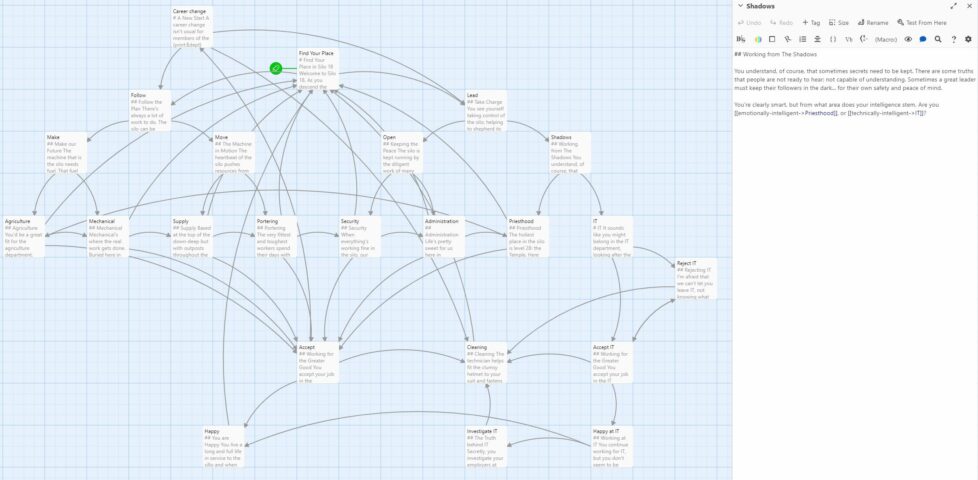
Each mystery is a Twine-powered “choose your own adventure” game in which you must diagnose the kind of issue that a software developer might, for real. I think these are potentially excellent tools for beginner programmers, not just because they provide some information about the topic of each, but because they encourage cultivating a mindset of the kind of thinking that’s required to get to the bottom of gnarly problems.
Better yet, she’s open-sourced the entire thing (and I was excited to see she wrote in Twee, which is very dear to my heart).
This post is also available as an article. So if you'd rather read a conventional blog post of this content, you can!
This video accompanies a blog post of the same title. The content is basically the same – if you prefer videos, watch this video. If you prefer blog posts, go read the blog post. You might also like to play with my Mastermind solver or view the source code.
This post is also available as a video. If you'd prefer to watch/listen to me talk about this topic, give it a look.
This blog post is also available as a video. Would you prefer to watch/listen to me tell you about how I’ve implemented a tool to help me beat the kids when we play Mastermind?
I swear that I used to be good at Mastermind when I was a kid. But now, when it’s my turn to break the code that one of our kids has chosen, I fail more often than I succeed. That’s no good!
Maybe it’s because I’m distracted; multitasking doesn’t help problem-solving. Or it’s because we’re “Super” Mastermind, which differs from the one I had as a child in that eight (not six) peg colours are available and secret codes are permitted to have duplicate peg colours. These changes increase the possible permutations from 360 to 4,096, but the number of guesses allowed only goes up from 8 to 10. That’s hard.
Or maybe it’s just that I’ve gotten lazy and I’m now more-likely to try to “solve” a puzzle using a computer to try to crack a code using my brain alone. See for example my efforts to determine the hardest hangman words and make an adverserial hangman game, to generate solvable puzzles for my lock puzzle game, to cheat at online jigsaws, or to balance my D&D-themed Wordle clone.
Hey, that’s an idea. Let’s crack the code… by writing some code!
The search space for Super Mastermind isn’t enormous, and it lends itself to some highly-efficient computerised storage.
There are 8 different colours of peg. We can express these colours as a number between 0 and 7, in three bits of binary, like this:
| Decimal | Binary | Colour |
|---|---|---|
0
|
000
|
Red |
1
|
001
|
Orange |
2
|
010
|
Yellow |
3
|
011
|
Green |
4
|
100
|
Blue |
5
|
101
|
Pink |
6
|
110
|
Purple |
7
|
111
|
White |
There are four pegs in a row, so we can express any given combination of coloured pegs as a 12-bit binary number. E.g. 100 110 111 010 would represent the
permutation blue (100), purple (110), white (111), yellow (010). The total search space, therefore, is the range of numbers from
000000000000 through 111111111111… that is: decimal 0 through 4,095:
| Decimal | Binary | Colours |
|---|---|---|
0
|
000000000000
|
Red, red, red, red |
1
|
000000000001
|
Red, red, red, orange |
2
|
000000000010
|
Red, red, red, yellow |
| ………… | ||
4092
|
|
White, white, white, blue |
4093
|
|
White, white, white, pink |
4094
|
|
White, white, white, purple |
4095
|
|
White, white, white, white |
Whenever we make a guess, we get feedback in the form of two variables: each peg that is in the right place is a bull; each that represents a peg in the secret code but isn’t in the right place is a cow (the names come from Mastermind’s precursor, Bulls & Cows). Four bulls would be an immediate win (lucky!), any other combination of bulls and cows is still valuable information. Even a zero-score guess is valuable- potentially very valuable! – because it tells the player that none of the pegs they’ve guessed appear in the secret code.
The latest versions of Javascript support binary literals and bitwise operations, so we can encode and decode between arrays of four coloured pegs (numbers 0-7) and the number 0-4,095
representing the guess as shown below. Decoding uses an AND bitmask to filter to the requisite digits then divides by the order of magnitude. Encoding is just a reduce
function that bitshift-concatenates the numbers together.
116 117 118 119 120 121 122 123 124 125 126 127 128 129 130 131 132 133 134 |
/** * Decode a candidate into four peg values by using binary bitwise operations. */ function decodeCandidate(candidate){ return [ (candidate & 0b111000000000) / 0b001000000000, (candidate & 0b000111000000) / 0b000001000000, (candidate & 0b000000111000) / 0b000000001000, (candidate & 0b000000000111) / 0b000000000001 ]; } /** * Given an array of four integers (0-7) to represent the pegs, in order, returns a single-number * candidate representation. */ function encodeCandidate(pegs) { return pegs.reduce((a, b)=>(a << 3) + b); } |
With this, we can simply:
Step 3’s the most important one there. Given a function getScore( solution, guess ) which returns an array of [ bulls, cows ] a given guess would
score if faced with a specific solution, that code would look like this (I’m convined there must be a more-performant way to eliminate candidates from the list with XOR
bitmasks, but I haven’t worked out what it is yet):
164 165 166 167 168 169 170 171 172 173 174 175 176 177 178 179 180 181 182 |
/** * Given a guess (array of four integers from 0-7 to represent the pegs, in order) and the number * of bulls (number of pegs in the guess that are in the right place) and cows (number of pegs in the * guess that are correct but in the wrong place), eliminates from the candidates array all guesses * invalidated by this result. Return true if successful, false otherwise. */ function eliminateCandidates(guess, bulls, cows){ const newCandidatesList = data.candidates.filter(candidate=>{ const score = getScore(candidate, guess); return (score[0] == bulls) && (score[1] == cows); }); if(newCandidatesList.length == 0) { alert('That response would reduce the candidate list to zero.'); return false; } data.candidates = newCandidatesList; chooseNextGuess(); return true; } |
I continued in this fashion to write a full solution (source code). It uses ReefJS for component rendering and state management, and you can try it for yourself right in your web browser. If you play against the online version I mentioned you’ll need to transpose the colours in your head: the physical version I play with the kids has pink and purple pegs, but the online one replaces these with brown and black.
Let’s try it out against the online version:
As expected, my code works well-enough to win the game every time I’ve tried, both against computerised and in-person opponents. So – unless you’ve been actively thinking about the specifics of the algorithm I’ve employed – it might surprise you to discover that… my solution is very-much a suboptimal one!
A couple of games in, the suboptimality of my solution became pretty visible. Sure, it still won every game, but it was a blunt instrument, and anybody who’s seriously thought about games like this can tell you why. You know how when you play e.g. Wordle (but not in “hard mode”) you sometimes want to type in a word that can’t possibly be the solution because it’s the best way to rule in (or out) certain key letters? This kind of strategic search space bisection reduces the mean number of guesses you need to solve the puzzle, and the same’s true in Mastermind. But because my solver will only propose guesses from the list of candidate solutions, it can’t make this kind of improvement.
Search space bisection is also used in my adverserial hangman game, but in this case the aim is to split the search space in such a way that no matter what guess a player makes, they always find themselves in the larger remaining portion of the search space, to maximise the number of guesses they have to make. Y’know, because it’s evil.
There are mathematically-derived heuristics to optimise Mastermind strategy. The first of these came from none other than Donald Knuth (legend of computer science, mathematics, and pipe organs) back in 1977. His solution, published at probably the height of the game’s popularity in the amazingly-named Journal of Recreational Mathematics, guarantees a solution to the six-colour version of the game within five guesses. Ville [2013] solved an optimal solution for a seven-colour variant, but demonstrated how rapidly the tree of possible moves grows and the need for early pruning – even with powerful modern computers – to conserve memory. It’s a very enjoyable and readable paper.
But for my purposes, it’s unnecessary. My solver routinely wins within six, maybe seven guesses, and by nonchalantly glancing at my phone in-between my guesses I can now reliably guess our children’s codes quickly and easily. In the end, that’s what this was all about.
Today I wanted to write a script that I could execute from both *nix (using Bash or a similar shell) and on Windows (from a command prompt, i.e. a batch file). I found Max Norin’s solution which works, but has a few limitations, e.g. when run it outputs either the word “off” when run in *nix or the word “goto” when run on Windows. There’s got to be a sneaky solution, right?
Here’s my improved version:
1 2 3 4 5 6 7 8 9 10 11 12 |
@goto(){ # Linux code here uname -o } @goto $@ exit :(){ @echo off rem Windows script here echo %OS% |
Mine exploits the fact that batch files can prefix commands with @ to suppress outputting them as they execute. So @goto can be a valid function name in
bash/zsh etc. but is interpreted as a literal goto command in a Windows Command Prompt. This allows me to move the echo off command –
which only has meaning to Windows – into the Windows section of the script and suppress it with @.
The file above can be saved as e.g. myfile.cmd and will execute in a Windows Command Prompt (or in MS-DOS) or your favourite *nix OS. Works in MacOS/BSD too, although
obviously any more-sophisticated script is going to have to start working around the differences between GNU and non-GNU versions of core utilities, which is always a bit of a pain!
Won’t work in sh because you can’t define functions like that.
But the short of it is you can run this on a stock *nix OS and get:
$ ./myfile.cmd GNU/Linux
And you can run it on Windows and get:
> .\myfile.cmd Windows_NT
You can’t put a shebang at the top because Windows hates it, but there might be a solution using PowerShell scripts (which use
hashes for comments: that’s worth thinking about!). In any case: if the interpreter strictly matters you’ll probably want to shell to it on line 3 with e.g. bash -c.
Why would you want such a thing? I’m not sure. But there is is, if you do.
Prior to 2018, Three Rings had a relatively simple approach to how it would use pronouns when referring to volunteers.
If the volunteer’s gender was specified as a “masculine” gender (which particular options are available depends on the volunteer’s organisation, but might include “male”, “man”, “cis man”, and “trans man”), the system would use traditional masculine pronouns like “he”, “his”, “him” etc.
If the gender was specified as a “feminine” gender (e.g .”female”, “woman”, “cis women”, “trans woman”) the system would use traditional feminine pronouns like “she”, “hers”, “her” etc.
For any other answer, no specified answer, or an organisation that doesn’t track gender, we’d use singular “they” pronouns. Simple!
This selection was reflected throughout the system. Three Rings might say:
Unfortunately, this approach didn’t reflect the diversity of personal pronouns nor how they’re applied. It didn’t support volunteer whose gender and pronouns are not conventionally-connected (“I am a woman and I use ‘them/they’ pronouns”), nor did it respect volunteers whose pronouns are not in one of these three sets (“I use ze/zir pronouns”)… a position it took me an embarrassingly long time to fully comprehend.
So we took a new approach:
From 2018 we allowed organisations to add a “Pronouns” property, allowing volunteers to select from 13 different pronoun sets. If they did so, we’d use it; failing that we’d continue to assume based on gender if it was available, or else use the singular “they”.
Three Rings‘ pronoun field always shows five personal pronouns, separated by slashes, because you can’t necessarily derive one from another. That’s one for each of five types:
Let’s see what those look like – here are the 13 pronoun sets supported by Three Rings at the time of writing:
| Subject | Object | Possessive | Reflexive/intensive | |
| Dependent | Independent | |||
| he | him | his | himself | |
| she | her | hers | herself | |
| they | them | their | theirs | themselves |
| e | em | eir | eirs | emself |
| ey | eirself | |||
| hou | hee | hy | hine | hyself |
| hu | hum | hus | humself | |
| ne | nem | nir | nirs | nemself |
| per | pers | perself | ||
| thon | thons | thonself | ||
| ve | ver | vis | verself | |
| xe | xem | xyr | xyrs | xemself |
| ze | zir | zirs | zemself | |
That’s all data-driven rather than hard-coded, by the way, so adding additional pronoun sets is very easy for our developers. In fact, it’s even possible for us to apply an additional “override” on an individual, case-by-case basis: all we need to do is specify the five requisite personal pronouns, separated by slashes, and Three Rings understands how to use them.
Behind the scenes, the developers use a (binary-gendered, for simplicity) convenience function to produce output, and the system corrects for the pronouns appropriate to the volunteer in question:
<%= @volunteer.his_her.capitalize %> account has been created for <%= @volunteer.him_her %> so <%= @volunteer.he_she %> can now log in.
The code above will, dependent on the pronouns specified for the volunteer @volunteer, output something like:
We’ve got extended functions to automatically detect cases where the use of second person pronouns might be required (“Your account has been created for you so you can now log in.”) as well as to help us handle the fact that we say “they are” but “he/she/ey/ze/etc. is“.
It’s all pretty magical and “just works” from a developer’s perspective. I’m sure most of our volunteer developers don’t think about the impact of pronouns at all when they code; they just get on with it.
Does this go far enough? Possibly not. This week, one of our customers contacted us to ask:
Is there any way to give the option to input your own pronouns? I ask as some people go by she/them or he/them and this option is not included…
You can probably see what’s happened here: some organisations have taken our pronouns property – which exists primarily to teach the system itself how to talk about volunteers – and are using it to facilitate their volunteers telling one another what their pronouns are.
What’s the difference? Well:
When a human discloses that their pronouns are “she/they” to another human, they’re saying “You can refer to me using either traditional feminine pronouns (she/her/hers etc.) or the epicene singular ‘they’ (they/their/theirs etc.)”.
But if you told Three Rings your pronouns were “she/her/their/theirs/themselves”, it would end up using a mixture of the two, even in the same sentence! Consider:
That’s some pretty clunky English right there! Mixing pronoun sets for the same person within a sentence is especially ugly, but even mixing them within the same page can cause confusion. We can’t trivially meet this customer’s request simply by adding new pronoun sets which mix things up a bit! We need to get smarter.
Ultimately, we’re probably going to need to differentiate between a more-rigid “what pronouns should Three Rings use when talking about you” and a more-flexible, perhaps optional “what pronouns should other humans use for you”? Alternatively, maybe we could allow people to select multiple pronoun sets to display but Three Rings would only use one of them (at least, one of them at a time!): “which of the following sets of pronouns do you use: select as many as apply”?
Even after this, there’ll always be more work to do.
For instance: I’ve met at least one person who uses no pronouns! By this, they actually mean they use no third-person personal pronouns (if they actually used no pronouns they wouldn’t say “I”, “me”, “my”, “mine” or “myself” and wouldn’t want others to say “you”, “your”, “yours” and “yourself” to them)! Semantics aside… for these people Three Rings should use the person’s name rather than a pronoun.
Maybe we can get there one day.
But so long as Three Rings continues to remain ahead of the curve in its respect for and understanding of pronoun use then I’ll be happy.
Our mission is to focus on volunteers and make volunteering easier. At the heart of that mission is treating volunteers with respect. Making sure our system embraces the diversity of the 65,000+ volunteers who use it by using pronouns correctly might be a small part of that, but it’s a part of it, and I for one am glad we make the effort.
As you might know if you were paying close attention in Summer 2019, I run a “URL shortener” for my personal use. You may be familiar with public URL shorteners like TinyURL and Bit.ly: my personal URL shortener is basically the same thing, except that only I am able to make short-links with it. Compared to public ones, this means I’ve got a larger corpus of especially-short (e.g. 2/3 letter) codes available for my personal use. It also means that I’m not dependent on the goodwill of a free siloed service and I can add exactly the features I want to it.
For the last nine years my link shortener has been S.2, a tool I threw together in Ruby. It stores URLs in a
sequentially-numbered database table and then uses the Base62-encoding of the primary key as the “code” part of the short URL. Aside from the fact that when I create a short link it shows me a QR code to I can
easily “push” a page to my phone, it doesn’t really have any “special” features. It replaced S.1, from which it primarily differed by putting the code at the end of the URL rather than as part of the domain name, e.g. s.danq.me/a0 rather than a0.s.danq.me: I made the switch
because S.1 made HTTPS a real pain as well as only supporting Base36 (owing to the case-insensitivity of domain names).
But S.2’s gotten a little long in the tooth and as I’ve gotten busier/lazier, I’ve leant into using or adapting open source tools more-often than writing my own from scratch. So this week I switched my URL shortener from S.2 to YOURLS.
One of the things that attracted to me to YOURLS was that it had a ready-to-go Docker image. I’m not the biggest fan of Docker in general, but I do love the convenience of being able to deploy applications super-quickly to my household NAS. This makes installing and maintaining my personal URL shortener much easier than it used to be (and it was pretty easy before!).
Another thing I liked about YOURLS is that it, like S.2, uses Base62 encoding. This meant that migrating my links from S.2 into YOURLS could be done with a simple cross-database
INSERT... SELECT statement:
INSERT INTO yourls.yourls_url(keyword, url, title, `timestamp`, clicks) SELECT shortcode, url, title, created_at, 0 FROM danq_short.links
But do you know what’s a bigger deal for my lifestack than my URL shortener? My RSS reader! I’ve written about it a lot, but I use RSS for just about everything and my feed reader is my first, last, and sometimes only point of contact with the Web! I’m so hooked-in to my RSS ecosystem that I’ll use my own middleware to add feeds to sites that don’t have them, or for which I’m not happy with the feed they provide, e.g. stripping sports out of BBC News, subscribing to webcomics that don’t provide such an option (sometimes accidentally hacking into sites on the way), and generating “complete” archives of series’ of posts so I can use my reader to track my progress.
One of S.1/S.2’s features was that it exposed an RSS feed at a secret URL for my reader to ingest. This was great, because it meant I could “push” something to my RSS reader to read or repost to my blog later. YOURLS doesn’t have such a feature, and I couldn’t find anything in the (extensive) list of plugins that would do it for me. I needed to write my own.
I could have written a YOURLS plugin. Or I could have written a stack of code in Ruby, PHP, Javascript or
some other language to bridge these systems. But as I switched over my shortlink subdomain s.danq.me to its new home at danq.link, another idea came to me. I
have direct database access to YOURLS (and the table schema is super simple) and the command-line MariaDB client can output XML… could I simply write an XML
Transformation to convert database output directly into a valid RSS feed? Let’s give it a go!
I wrote a script like this and put it in my crontab:
mysql --xml yourls -e \ "SELECT keyword, url, title, DATE_FORMAT(timestamp, '%a, %d %b %Y %T') AS pubdate FROM yourls_url ORDER BY timestamp DESC LIMIT 30" \ | xsltproc template.xslt - \ | xmllint --format - \ > output.rss.xml
The first part of that command connects to the yourls database, sets the output format to XML, and executes an
SQL statement to extract the most-recent 30 shortlinks. The DATE_FORMAT function is used to mould the datetime into
something approximating the RFC-822 standard for datetimes as required by
RSS. The output produced looks something like this:
<?xml version="1.0"?> <resultset statement="SELECT keyword, url, title, timestamp FROM yourls_url ORDER BY timestamp DESC LIMIT 30" xmlns:xsi="http://www.w3.org/2001/XMLSchema-instance"> <row> <field name="keyword">VV</field> <field name="url">https://webdevbev.co.uk/blog/06-2021/perfect-is-the-enemy-of-good.html</field> <field name="title"> Perfect is the enemy of good || Web Dev Bev</field> <field name="timestamp">2021-09-26 17:38:32</field> </row> <row> <field name="keyword">VU</field> <field name="url">https://webdevlaw.uk/2021/01/30/why-generation-x-will-save-the-web/</field> <field name="title">Why Generation X will save the web Hi, Im Heather Burns</field> <field name="timestamp">2021-09-26 17:38:26</field> </row> <!-- ... etc. ... --> </resultset>
We don’t see this, though. It’s piped directly into the second part of the command, which uses xsltproc to apply an XSLT to it. I was concerned that my XSLT
experience would be super rusty as I haven’t actually written any since working for my former employer SmartData back in around 2005! Back then, my coworker Alex and I spent many hours doing XML
backflips to implement a system that converted complex data outputs into PDF files via an XSL-FO intermediary.
I needn’t have worried, though. Firstly: it turns out I remember a lot more than I thought from that project a decade and a half ago! But secondly, this conversion from MySQL/MariaDB
XML output to RSS turned out to be pretty painless. Here’s the
template.xslt I ended up making:
<?xml version="1.0"?> <xsl:stylesheet xmlns:xsl="http://www.w3.org/1999/XSL/Transform" version="1.0"> <xsl:template match="resultset"> <rss version="2.0" xmlns:atom="http://www.w3.org/2005/Atom"> <channel> <title>Dan's Short Links</title> <description>Links shortened by Dan using danq.link</description> <link> [ MY RSS FEED URL ] </link> <atom:link href=" [ MY RSS FEED URL ] " rel="self" type="application/rss+xml" /> <lastBuildDate><xsl:value-of select="row/field[@name='pubdate']" /> UTC</lastBuildDate> <pubDate><xsl:value-of select="row/field[@name='pubdate']" /> UTC</pubDate> <ttl>1800</ttl> <xsl:for-each select="row"> <item> <title><xsl:value-of select="field[@name='title']" /></title> <link><xsl:value-of select="field[@name='url']" /></link> <guid>https://danq.link/<xsl:value-of select="field[@name='keyword']" /></guid> <pubDate><xsl:value-of select="field[@name='pubdate']" /> UTC</pubDate> </item> </xsl:for-each> </channel> </rss> </xsl:template> </xsl:stylesheet>
That uses the first (i.e. most-recent) shortlink’s timestamp as the feed’s pubDate, which makes sense: unless you’re going back and modifying links there’s no more-recent
changes than the creation date of the most-recent shortlink. Then it loops through the returned rows and creates an <item> for each; simple!
The final step in my command runs the output through xmllint to prettify it. That’s not strictly necessary, but it was useful while debugging and as the whole command takes
milliseconds to run once every quarter hour or so I’m not concerned about the overhead. Using these native binaries (plus a little configuration), chained together with pipes, had
already resulted in way faster performance (with less code) than if I’d implemented something using a scripting language, and the result is a reasonably elegant “scratch your
own itch”-type solution to the only outstanding barrier that was keeping me on S.2.
All that remained for me to do was set up a symlink so that the resulting output.rss.xml was accessible, over the web, to my RSS reader. I hope that next time I’m tempted to write a script to solve a problem like this I’ll remember that sometimes a chain of piped *nix
utilities can provide me a slicker, cleaner, and faster solution.
Update: Right as I finished writing this blog post I discovered that somebody had already solved this problem using PHP code added to YOURLS; it’s just not packaged as a plugin so I didn’t see it earlier! Whether or not I use this alternate approach or stick to what I’ve got, the process of implementing this YOURLS-database ➡ XML ➡ XSLT ➡ RSS chain was fun and informative.
tl;dr? Just want instructions on how to solve Jigidi puzzles really fast with the help of your browser’s dev tools? Skip to that bit.
This approach doesn’t work any more. Want to see one that still does (but isn’t quite so automated)? Here you go!
I enjoy geocaching. I don’t enjoy jigsaw puzzles. So mystery caches that require you to solve an online jigsaw puzzle in order to get the coordinates really don’t do it for me. When I’m geocaching I want to be outdoors exploring, not sitting at my computer gradually dragging pixels around!
Many of these mystery caches use Jigidi to host these jigsaw puzzles. An earlier version of Jigidi was auto-solvable with a userscript, but the service has continued to be developed and evolve and the current version works quite hard to make it hard for simple scripts to solve. For example, it uses a WebSocket connection to telegraph back to the server how pieces are moved around and connected to one another and the server only releases the secret “you’ve solved it” message after it detects that the pieces have been arranged in the appropriate relative configuration.
If there’s one thing I enjoy more than jigsaw puzzles – and as previously established there are about a billion things I enjoy more than jigsaw puzzles – it’s reverse-engineering a computer system to exploit its weaknesses. So I took a dive into Jigidi’s client-side source code. Here’s what it does:
Looking at that process, there’s an obvious weak point – the shuffling (point 3) happens client-side, and before the WebSocket sync begins. We could override the shuffling function to lay the pieces out in a grid, but we’d still have to click each of them in turn to trigger the connection. Or we could skip the shuffling entirely and just leave the pieces in their default positions.
And what are the default positions? It’s a stack with the bottom-right jigsaw piece on the top, the piece to the left of it below it, then the piece to the left of that and son on through the first row… then the rightmost piece from the second-to-bottom row, then the piece to the left of that, and so on.
That’s… a pretty convenient order if you want to solve a jigsaw. All you have to do is drag the top piece to the right to join it to the piece below that. Then move those two to the right to join to the piece below them. And so on through the bottom row before moving back – like a typewriter’s carriage return – to collect the second-to-bottom row and so on.
If you’d like to cheat at Jigidi jigsaws, this approach works as of the time of writing. I used Firefox, but the same basic approach should work with virtually any modern desktop web browser.
game/js/release.js and uncompress it by pressing the
{} button, if necessary.
return this.j ? (V.info('board-data-bytes already exists, no need to send SHUFFLE'), Promise.resolve(this.j)) : new Promise(function (d, e) {
this.j = true (this ensures that the ternary operation we set the breakpoint on will resolve to the true condition, i.e. not shuffle the pieces).
Update 2021-09-22: Abraxas observes that Jigidi have changed
their code, possibly in response to this shortcut. Unfortunately for them, while they continue to perform shuffling on the client-side they’ll always be vulnerable to this kind of
simple exploit. Their new code seems to be named not release.js but given a version number; right now it’s 14.3.1977. You can still expand it in the same way,
and find the shuffling code: right now for me this starts on line 1129:
Put a breakpoint on line 1129. This code gets called twice, so the first time the breakpoint gets hit just hit continue and play on until the second time. The second time it gets hit,
move the breakpoint to line 1130 and press continue. Then use the console to enter the code d = a.G and continue. Only one piece of jigsaw will be shuffled; the rest will
be arranged in a neat stack like before (I’m sure you can work out where the one piece goes when you get to it).
Update 2023-03-09: I’ve not had time nor inclination to re-“break” Jigidi’s shuffler, but on the rare ocassions I’ve needed to solve a Jigidi, I’ve come up with a technique that replaces a jigsaw’s pieces with ones that each show the row and column number they belong to, as well as colour-coding the rows and columns and drawing horizontal and vertical bars to help visual alignment. It makes the process significantly less-painful. It’s still pretty buggy code though and I end up tweaking it each and every time I use it, but it certainly works and makes jigsaws that lack clear visual markers (e.g. large areas the same colour) a lot easier.
I’ve written before about the trend in web development to take what the web gives you for free, throw it away, and then rebuild it in Javascript. The rebuilt version is invariably worse in many ways – less-accessible, higher-bandwidth, reduced features, more fragile, etc. – but it’s more convenient for developers. Personally, I try not to value developer convenience at the expense of user experience, but that’s an unpopular opinion lately.
In the site shown in the screenshot above, the developer took something the web gave them for free (a hyperlink), threw it away (by making it a link-to-nowhere), and rebuilt its functionality with Javascript (without thinking about the fact that you can do more with hyperlinks than click them: you can click-and-drag them, you can bookmark them, you can share them, you can open them in new tabs etc.). Ugh.
Particularly egregious are the date pickers. Entering your date of birth on a web form ought to be pretty simple: gov.uk pretty much solved it based on user testing they did in 2013.
Here’s the short of it:
<select> elements keyboard
users can still “type” to filter.
<select>s but are really funky React <div>s, is pretty terrible.
My fellow Automattician Enfys recently tweeted:
People designing webforms that require me to enter my birthdate:
I am begging you: just let me type it in.
Typing it in is 6-8 quick keystrokes. Trying to navigate a little calendar or spinny wheels back to the 1970s is time-consuming, frustrating and unnecessary.
They’re right. Those little spinny wheels are a pain in the arse if you’ve got to use one to go back 40+ years.
If there’s one thing we learned from making the worst volume control in the world, the other year, it’s that you can always find a worse UI metaphor. So here’s my attempt at making a date of birth field that’s somehow even worse than “date spinners”:
My datepicker implements a game of “higher/lower”. Starting from bounds specified in the HTML code and a random guess, it narrows-down its guess as to what your date of birth is as you click the up or down buttons. If you make a mistake you can start over with the restart button.
Amazingly, this isn’t actually the worst datepicker into which I’ve entered my date of birth! It’s cognitively challenging compared to most, but it’s relatively fast at narrowing down the options from any starting point. Plus, I accidentally implemented some good features that make it better than plenty of the datepickers out there:
<input type="date"> control, your browser takes responsibility for localising, so if you’re from one of those weird countries that prefers
mm-dd-yyyy then that’s what you should see.
It turns out that even when you try to make something terrible, so long as you’re building on top of the solid principles the web gives you for free, you can accidentally end up with something not-so-bad. Who knew?
Among Twitter’s growing list of faults over the years are various examples of its increasing divergence from open Web standards and developer-friendly endpoints. Do you remember when you used to be able to subscribe to somebody’s feed by RSS? When you could see who follows somebody without first logging in? When they were still committed to progressive enhancement and didn’t make your browser download ~5MB of Javascript or else not show any content whatsoever? Feels like a long time ago, now.
But those complaints aside, the thing that bugged me most this week was how much harder they’ve made it to programatically get access to things that are publicly accessible via web pages. Like avatars, for example!
If you’re a human and you want to see the avatar image associated with a given username, you can go to twitter.com/that-username and – after you’ve waited
a bit for all of the mandatory JavaScript to download and run (I hope you’re not on a metered connection!) – you’ll see a picture of the user, assuming they’ve uploaded one and not made
their profile private. Easy.
If you’re a computer and you want to get the avatar image, it used to be just as easy; just go to
twitter.com/api/users/profile_image/that-username and you’d get the image. This was great if you wanted to e.g. show a Facebook-style facepile of images of people who’d retweeted your content.
But then Twitter removed that endpoint and required that computers log in to Twitter, so a clever developer made
a service that fetched avatars for you if you went to e.g. twivatar.glitch.com/that-username.
But then Twitter killed that, too. Because despite what they claimed 5½ years ago, Twitter still clearly hates developers.
Recently, I needed a one-off program to get the avatars associated with a few dozen Twitter usernames.
First, I tried the easy way: find a service that does the work for me. I’d used avatars.io before but it’s died, presumably because (as I soon discovered) Twitter had made
things unnecessarily hard for them.
Second, I started looking at the Twitter API documentation but it took me in the region of 30-60 seconds before I said “fuck that noise” and decided that the set-up overhead in doing things the official way simply wasn’t justified for my simple use case.
So I decided to just screen-scrape around the problem. If a human can just go to the web page and see the image, a computer pretending to be a human can do exactly the same. Let’s do this:
/* Copyright (c) 2021 Dan Q; released under the MIT License. */ const Puppeteer = require('puppeteer'); getAvatar = async (twitterUsername) => { const browser = await Puppeteer.launch({args: ['--no-sandbox', '--disable-setuid-sandbox']}); const page = await browser.newPage(); await page.goto(`https://twitter.com/${twitterUsername}`); await page.waitForSelector('a[href$="/photo"] img[src]'); const url = await page.evaluate(()=>document.querySelector('a[href$="/photo"] img').src); await browser.close(); console.log(`${twitterUsername}: ${url}`); }; process.argv.slice(2).forEach( twitterUsername => getAvatar( twitterUsername.toLowerCase() ) );
Obviously, using this code would violate Twitter’s terms of use for automation, so… don’t, I guess?
Given that I only needed to run it once, on a finite list of accounts, I maintain that my approach was probably kinder on their servers than just manually going to every page and saving the avatar from it. But if you set up a service that uses this approach then you’ll certainly piss off somebody at Twitter and history shows that they’ll take their displeasure out on you without warning.
$ node get-twitter-avatar.js alexsdutton richove geohashing TailsteakAD LilFierce1 ninjanails
alexsdutton: https://pbs.twimg.com/profile_images/740505937039986688/F9gUV0eK_200x200.jpg
lilfierce1: https://pbs.twimg.com/profile_images/1189417235313561600/AZ2eLjAg_200x200.jpg
richove: https://pbs.twimg.com/profile_images/1576438972/2011_My_picture4_200x200.jpeg
geohashing: https://pbs.twimg.com/profile_images/877137707939581952/POzWWV2d_200x200.jpg
ninjanails: https://pbs.twimg.com/profile_images/1146364466801577985/TvCfb49a_200x200.jpg
tailsteakad: https://pbs.twimg.com/profile_images/1118738807019278337/y5WWkLbF_200x200.jpg
But it works. It was fast and easy and I got what I was looking for.
And the moral of the story is: if you make an API and it’s terrible, don’t be surprised if people screen-scape your service instead. (You can’t spell “scraping” without “API”, amirite?)
This weekend, while investigating a bug in some code that generates iCalendar (ICS) feeds, I learned about a weird quirk in the Republic of Ireland’s timezone. It’s such a strange thing (and has so little impact on everyday life) that I imagine that even most Irish people don’t even know about it, but it’s important enough that it can easily introduce bugs into the way that computer calendars communicate:
Most of Europe put their clocks forward in Summer, but the Republic of Ireland instead put their clocks backward in Winter.
If that sounds to you like the same thing said two different ways – or the set-up to a joke! – read on:
After high-speed (rail) travel made mean solar timekeeping problematic, Great Britain in 1880 standardised on Greenwich Mean Time (UTC+0) as the time throughout the island, and Ireland standardised on Dublin Mean Time (UTC-00:25:21). If you took a ferry from Liverpool to Dublin towards the end of the 19th century you’d have to put your watch back by about 25 minutes. With air travel not yet being a thing, countries didn’t yet feel the need to fixate on nice round offsets in the region of one-hour (today, only a handful of regions retain UTC-offsets of half or quarter hours).
That’s all fine in peacetime, but by the First World War and especially following the Easter Rising, the British government decided that it was getting too tricky for their telegraph operators (many of whom operated out of Ireland, which provided an important junction for transatlantic traffic) to be on a different time to London.
Ah. Hmm.
Following Irish independence, the keeping of time carried on in much the same way for a long while, which will doubtless have been convenient for families spread across the Northern Irish border. But then came the Second World War.
Summers in the 1940s saw Churchill introduce Double Summer Time which he believed would give the UK more daylight, saving energy that might otherwise be used for lighting and increasing production of war materiel.
Ireland considered using the emergency powers they’d put in place to do the same, as a fuel saving measure… but ultimately didn’t. This was possibly because aligning her time with Britain might be seen as undermining her neutrality, but was more likely because the government saw that such a measure wouldn’t actually have much impact on fuel use (it certainly didn’t in Britain). Whatever the reason, though, Britain and Northern Ireland were again out-of-sync with one another until the war ended.
From 1968 to 1971 Britain experimented with “British Standard Time” – putting the clocks forward in Summer once, to UTC+1, and then leaving them there for three years. This worked pretty well except if you were Scottish in which case you’ll have found winter mornings to be even gloomier than you were used to, which was already pretty gloomy. Conveniently: during much of this period Ireland was also on UTC+1, but in their case it was part of a different experiment. Ireland were working on joining the European Economic Community, and aligning themselves with “Paris time” year-round was an unnecessary concession but an interesting idea.
But here’s where the quirk appears: the Standard Time Act 1968, which made UTC+1 the “standard” timezone for the Republic of Ireland, was not repealed and is still in effect. Ireland could have started over in 1971 with a new rule that made UTC+0 the standard and added a “Summer Time” alternative during which the clocks are put forward… but instead the Standard Time (Amendment) Act 1971 left UTC+1 as Ireland’s standard timezone and added a “Winter Time” alternative during which the clocks are put back.
(For a deeper look at the legal history of time in the UK and Ireland, see this timeline. Certainly don’t get all your history lessons from me.)
You might rightly be thinking: so what! Having a standard time of UTC+0 and going forward for the Summer (like the UK), is functionally-equivalent to having a standard time of UTC+1 and going backwards in the Winter, like Ireland, right? It’s certainly true that, at any given moment, a clock in London and a clock in Dublin should show the same time. So why would anybody care?
Europe/Dublin, from the Perl module Data::ICal::TimeZone, is technically-incorrect
because it states that the winter time is the standard and daylight savings of +1 hour apply in the summer, rather than the opposite.
But declaring which is “standard” is important when you’re dealing with computers. If, for example, you run a volunteer rota management system that supports a helpline charity that has branches in both the UK and Ireland, then it might really matter that the computer systems involved know what each other mean when they talk about specific times.
The author of an iCalendar file can choose to embed timezone information to explain what, in that file, a particular timezone means. That timezone information might say, for example, “When I say ‘Europe/Dublin’, I mean UTC+1, or UTC+0 in the winter.” Or it might say – like the code above! – “When I say ‘Europe/Dublin’, I mean UTC+0, or UTC+1 in the summer.” Both of these declarations would be technically-valid and could be made to work, although only the first one would be strictly correct in accordance with the law.
But if you don’t include timezone information in your iCalendar file, you’re relying on the feed subscriber’s computer (e.g. their calendar software) to make a sensible interpretation.. And that’s where you run into trouble. Because in cases like Ireland, for which the standard is one thing but is commonly-understood to be something different, there’s a real risk that the way your system interprets and encodes time won’t necessarily be the same as the way somebody else’s does.
If I say I’ll meet you at 12:00 on 1 January, in Ireland, you rightly need to know whether I’m talking about 12:00 in Irish “standard” time (i.e. 11:00, because daylight savings are in effect) or 12:00 in local-time-at-the-time-of-the-meeting (i.e. 12:00). Humans usually mean the latter because we think in terms of local time, but when your international computer system needs to make sure that people are on a shift at the same time, but in different timezones, it needs to be very clear what exactly it means!
And when your daylight savings works “backwards” compared to everybody else’s… that’s sure to make a developer somewhere cry. And, possibly, blog about your weird legislation.
This is a repost promoting content originally published elsewhere. See more things Dan's reposted.
# Reserved Strings
#
# Strings which may be used elsewhere in code
undefined
undef
null
NULL…
then
constructor
\
\\
# Numeric Strings
#
# Strings which can be interpreted as numeric
0
1
1.00
$1.00
1/2
1E2…
Max has produced a list of “naughty strings”: things you might try injecting into your systems along with any fuzz testing you’re doing to check for common errors in escaping, processing, casting, interpreting, parsing, etc. The copy above is heavily truncated: the list is long!
It’s got a lot of the things in it that you’d expect to find: reserved keywords and filenames, unusual or invalid unicode codepoints, tests for the Scunthorpe Problem, and so on. But perhaps my favourite entry is this one, a test for “human injection”:
# Human injection
#
# Strings which may cause human to reinterpret worldview
If you're reading this, you've been in a coma for almost 20 years now. We're trying a new technique. We don't know where this message will end up in your dream, but we hope it works. Please wake up, we miss you.
Beautiful.