Your ‘App’ Could Have Been a Webpage (so I fixed it for you…)

Why is this an “app”?

This summer, the kids’ performing arts school are singing and dancing in a show at Disneyland. We’re all very excited, but my excitement, at least, was muted a little when I was told to install the “Travelbound” app in order to get access to the itinerary, travel arrangements, and accommodation details.

Fuck that noise. This should have been a webpage. Why do you want me to install a(nother) shitty app just to tell me something that could have been a (smaller, faster, more universally-accessible) document?

Screenshot of an Android app showing a summary itinerary: times for a 'ferry crossing', 'check in at your hotel', 'coach driver accommodation', 'disney's hotel cheyenne', and 'welcome gala', each with an attractive but generic photo.
I’m not remotely exaggerating. This app is literally text, images, and links to PDF files, delivered via the Web.

There only seem to be two things that this “app” does, that a webpage might not have, and they’re both anti-features:

  1. It reports tracking data associated with your Google Account back to the developers.
  2. It shows you advertisements (which they call “inspirations”) for other trips organised by the same agency.

Fuck. Everything. About. That.

A webpage would have been so much better. Unlike this app, a webpage can be…1

  • Copy-pastable
  • Printable
  • Saveable
  • Bookmarkable
  • Searchable
  • Usable on virtually any device
  • (Potentially) more-accessible

I’m annoyed enough… that I’m going to “fix” this app. Hold my beer.

Intercepting app traffic

It’s been a while since the last time I reverse-engineered an Android app from its network traffic, so I had to brush-up on the best way. Here’s what I ended up doing.

  1. Created a new virtual device in Android Studio’s Virtual Device Manager.
  2. Tested adb shell was working and used rootAVD to root it: ./rootAVD.sh system-images/android-33/google_apis_playstore/x86_64/ramdisk.img.2
  3. Performed a cold boot, ran Magisk, and tweaked its settings to automatically grant su access to any app that asked.3
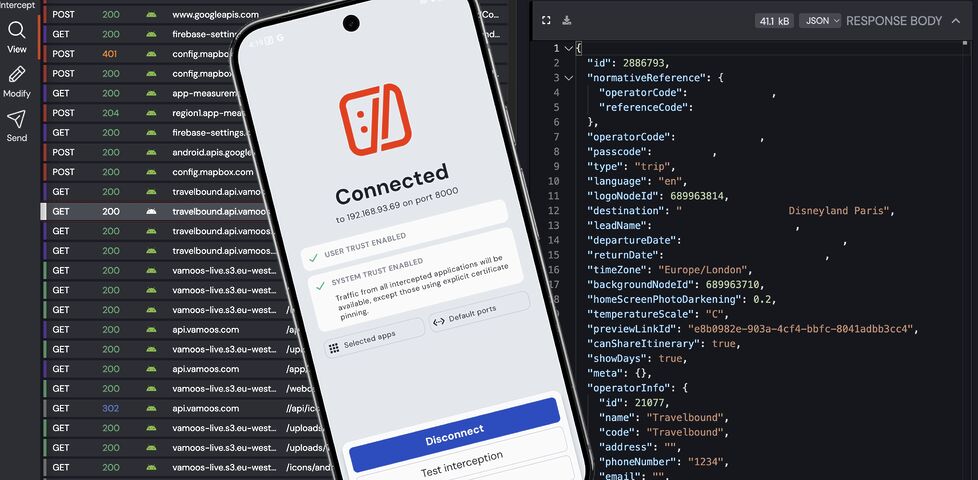
Screenshot showing the HTTP Toolkit application running on both MacOS and an emulated Android mobile, with User Trust and System Trust enabled.
All your traffic are belong to me. At this point, it’s just like running Wireshark or TCPdump.
  1. Ran HTTP Toolkit and told it to intercept AVD traffic. It installed a (fake) VPN provider, routing the phone’s traffic through the proxy.4
  2. Installed the Travelbound app from the Play Store.
  3. Configured HTTP Toolkit to proxy only the Travelbound app (more signal, less noise).

With only a couple of minutes experimentation I discovered that the app works by concatenating the username and password5 and using it in a URL of the form:

https://travelbound.api.vamoos.com/api/itineraries/{username}-{password}

This returns a pile of JSON which, with a little interpretation, can be seen to represent all of the content the app “shows”. E.g., there’s:

  • an array containing each leg of the itinerary,
  • an array containing all of the “inspirations” advertisements to show you,
  • a cross-referenced array containing all of the files (images etc.) that are referenced by the other sections, etc.
Firefox showing a JSON document, focussing on a section about 'Your Ferry Crossing' with some accompanying HTML.
They’re clearly producing HTML code anyway… so again, I ask: why isn’t this a webpage?

A little experimentation showed me that the S3 image URLs were being delivered with moderately-short expiration times, so the JSON needs re-fetching periodically even if the content hasn’t been changed.6

Turning it into something better

Now I had everything I needed to make something… better. I wrote a Ruby script that runs on a Cron schedule to pull the latest JSON and use it to build a HTML page.

I chose to have it completely skip over the “inspirations” (“overlayRows” in the data schema) and just list:

  1. the items from the itinerary and
  2. all of the files not referenced by the inspirations nor itinerary, (a lazy way to collate the PDF download links).

Then I hosted the page, protected by a password: the same one my tour group were given in the first place. I included the raw JSON it used in <details> elements so it can be checked if e.g. there are bits of the schema I didn’t see but that might appear later.

Screenshot of a simply-styled web page showing the same information about the ferry, along with a photo from its deck.
My web page isn’t as “pretty” as the app from which it “borrows” its information. But it’s a fraction of the size and gets all of the Web’s standard features for free.

Some people like an “app”, and that’s… fine, I guess. But some apps could have been a webpage. And especially where, like this one, the content they deliver is already written in HTML and delivered over HTTP… they should be a webpage, right?

I can’t understand how we got to this place with “app culture”! Software companies are happy to make their lives harder (and more expensive: deploying to the big app stores isn’t free!), in order to deliver HTML content to fewer people and with fewer features7 than if they just published directly to the Web in the first place!

There are (some) tasks for which an “app” is absolutely the right choice of medium. Travelbound is not one of them.

But at least I (and the rest of our group, whom I’ve shared it with) now get the choice about how we access this content. Either a 43MB app (ballooning to 124MB when it’s finished downloading extra content) with tracking and advertisements… or a 0.05MB web page (with an optional extra 35MB of images) that provides more features and works on more devices. I know which one I’ll be using!

Footnotes

1 And these are just the features that everybody can get behind. The webpage I ultimately ended up making to replace the app also has some user-friendly/developer-hostile features, like the fact that it removes the tracking code and doesn’t show advertisements.

2 You need to root the device in order to force applications that use Certificate Pinning to trust your man-in-the-middle proxy server. Without this, some applications – including the one I wanted to reverse-engineer – will recognise your self-signed TLS certificate as invalid and refuse to communicate.

3 Without changing this setting in Magisk, I found that HTTP Toolkit would request su access but not wait for the response, and go on to run in unprivileged mode before I had a chance to grant it!

4 Owing to Android security considerations I needed to manually install the root CA certificate it installed for me, but the instructions “just worked”.

5 The username and password is shared by an entire tour group. I’m guessing they don’t have a plan for if some credentials get leaked? Or possibly they consider all of the data they hold to be low-sensitivity enough that it doesn’t matter if it does… in which case I return to my original point: why the hell wasn’t it just a webpage in the first place?

6 Or else the images need caching locally, which seems to be what the app does, in the bloatiest possible way.

7 And, often, with worse accessibility. I’ve not audited the accessibility of this app, but there are things about it that suggest that it’d be harder to use using accessibility technologies than my plain, simple Web version.

× × × ×

Internet Services^H Provider

Do you remember when your domestic ISP – Internet Service Provider – used to be an Internet Services Provider? They were only sometimes actually called that, but what I mean is: when ISPs provided more than one Internet service? Not just connectivity, but… more.

Web page listing 'Standard Services' for dial-up and leased line connections, including: user homepages, FTP, email, usenet, IRC, email-to-fax, and fax-to-email services.
One of the first ISPs I subscribed to had a “standard services” list longer than most modern ISPs complete services list!

ISPs twenty years ago

It used to just be expected that your ISP would provide you with not only an Internet connection, but also some or all of:

  • A handful of email inboxes, plus SMTP relaying
  • Shared or private FTP storage1
  • Hosting for small Websites/homepages
  • Usenet access
  • Email-to-fax and/or fax-to-email services
  • Caching forward proxies (this was so-commonplace that it isn’t even listed in the “standard services” screenshot above)
  • One or more local nodes to IRC networks
  • Sometimes, licenses for useful Internet software
  • For leased-line (technically “broadband”, by the original definition) connections: a static IP address or IP pool
Stylish (for circa 2000) webpage for HoTMetaL Pro 6.0, advertising its 'unrivaled [sic] editing, site management and publishing tools'.
I don’t remember which of my early ISPs gave me a free license for HoTMetaL Pro, but I was very appreciative of it at the time.

ISPs today

The ISP I hinted at above doesn’t exist any more, after being bought out and bought out and bought out by a series of owners. But I checked the Website of the current owner to see what their “standard services” are, and discovered that they are:

  • A pretty-shit router2
  • Optional 4G backup connectivity (for an extra fee)
  • A voucher for 3 months access to a streaming service3

The connection is faster, which is something, but we’re still talking about the “baseline” for home Internet access then-versus-now. Which feels a bit galling, considering that (a) you’re clearly, objectively, getting fewer services, and (b) you’re paying more for them – a cheap basic home Internet subscription today, after accounting for inflation, seems to cost about 25% more than it did in 2000.4

Are we getting a bum deal?

An xternal 33.6kbps serial port dial-up modem.
Not every BBS nor ISP would ever come to support the blazing speeds of a 33.6kbps modem… but when you heard the distinctive scream of its negotiation at close to the Shannon Limit of the piece of copper dangling outside your house… it felt like you were living in the future.

Would you even want those services?

Some of them were great conveniences at the time, but perhaps not-so-much now: a caching server, FTP site, or IRC node in the building right at the end of my dial-up connection? That’s a speed boost that was welcome over a slow connection to an unencrypted service, but is redundant and ineffectual today. And if you’re still using a fax-to-email service for any purpose, then I think you have bigger problems than your ISP’s feature list!

Some of them were things I wouldn’t have recommend that you depend on, even then: tying your email and Web hosting to your connectivity provider traded one set of problems for another. A particular joy of an email address, as opposed to a postal address (or, back in the day, a phone number), is that it isn’t tied to where you live. You can move to a different town or even to a different country and still have the same email address, and that’s a great thing! But it’s not something you can guarantee if your email address is tied to the company you dial-up to from the family computer at home. A similar issue applies to Web hosting, although for a true traditional “personal home page”: a little information about yourself, and your bookmarks, it would be fine.

But some of them were things that were actually useful and I miss: honestly, it’s a pain to have to use a third-party service for newsgroup access, which used to be so-commonplace that you’d turn your nose up at an ISP that didn’t offer it as standard. A static IP being non-standard on fixed connections is a sad reminder that the ‘net continues to become less-participatory, more-centralised, and just generally more watered-down and shit: instead of your connection making you “part of” the Internet, nowadays it lets you “connect to” the Internet, which is a very different experience.5

But the Web hosting, for example, wasn’t useless. In fact, it served an important purpose in lowering the barrier to entry for people to publish their first homepage! The magical experience of being able to just FTP some files into a directory and have them be on the Web, as just a standard part of the “package” you bought-into, was a gateway to a participatory Web that’s nowadays sadly lacking.

'Setting Up your Web Site, Step by Step Instructions' page, describing use of an FTP client to upload web pages.
A page like this used to be absolutely standard on the Website6 of any ISP worth its salt.

Yeah, sure, you can set up a static site (unencumbered by any opinionated stack) for free on Github Pages, Neocities, or wherever, but the barrier to entry has been raised by just enough that, doubtless, there are literally millions of people who would have taken that first step… but didn’t.

And that makes me sad.

Footnotes

1 ISP-provided shared FTP servers would also frequently provide locally-available copies of Internet software essentials for a variety of platforms. This wasn’t just a time-saver – downloading Netscape Navigator from your ISP rather than from half-way across the world was much faster! – it was also a way to discover new software, curated by people like you: a smidgen of the feel of a well-managed BBS, from the comfort of your local ISP!

2 ISP-provided routers are, in my experience, pretty crap 50% of the time… although they’ve been improving over the last decade as consumers have started demanding that their WiFi works well, rather than just works.

3 These streaming services vouchers are probably just a loss-leader for the streaming service, who know that you’ll likely renew at full price afterwards.

4 Okay, in 2000 you’d have also have had to pay per-minute for the price of the dial-up call… but that money went to BT (or perhaps Mercury or KCOM), not to your ISP. But my point still stands: in a world where technology has in general gotten cheaper and backhaul capacity has become underutilised, why has the basic domestic Internet connection gotten less feature-rich and more-expensive? And often with worse customer service, to boot.

5 The problem of your connection not making you “part of” the Internet is multiplied if you suffer behind carrier-grade NAT, of course. But it feels like if we actually cared enough to commit to rolling out IPv6 everywhere we could obviate the need for that particular turd entirely. And yet… I’ll bet that the ISPs who currently use it will continue to do so, even as the offer IPv6 addresses as-standard, because they buy into their own idea that it’s what their customers want.

6 I think we can all be glad that we no longer write “Web Site” as two separate words, but you’ll note that I still usually correctly capitalise Web (it’s a proper noun: it’s the Web, innit!).

× × × ×

Quesapizza Lunch

After a morning of optimising a nonprofit’s reverse proxy configuration, I feel like I’ve earned my lunch! Four cheese, mushroom and jalapeño quesapizzas, mmm…

Gas stovetop.a frying pan contains a tortilla wrap topped with tomato sauce, cheese, mushrooms, and jalapeños. Beside its a plate containing a completed quesapizza: two crispy tortilla wraps sandwiching their contents.

×

Nginx Caching for Passenger Applications

Suppose you’re running an application on a Passenger + Nginx powered server and you want to add caching.

Perhaps your application has a dynamic, public endpoint but the contents don’t change super-frequently or it isn’t critically-important that the user always gets up-to-the-second accuracy, and you’d like to improve performance with microcaching. How would you do that?

Where you’re at

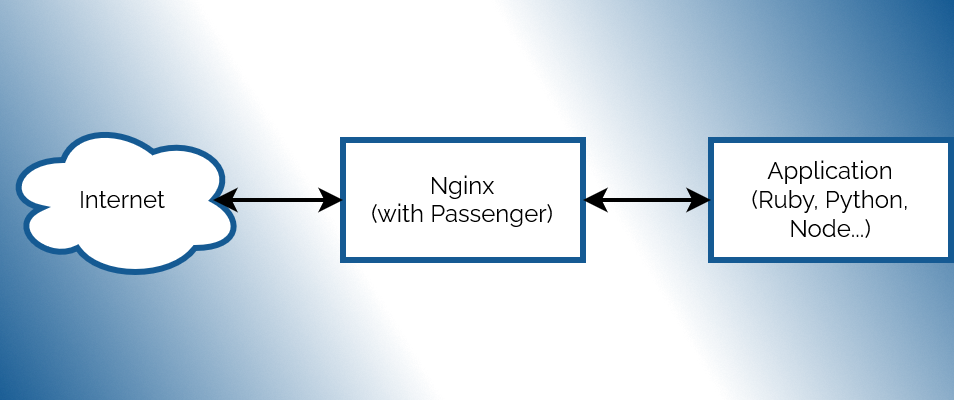
Diagram showing the Internet connecting to an Nginx+Passenger webserver, connecting to an application written for Ruby, Python, or NodeJS.
Not pictured: the rest of the Internet.

Your configuration might look something like this:

1
2
3
4
5
6
7
server {
  # listen, server_name, ssl, logging etc. directives go here
  # ...

  root               /your/application;
  passenger_enabled  on;
}

What you’re looking for is proxy_cache and its sister directives, but you can’t just insert them here because while Passenger does act act like an upstream proxy (with parallels like e.g. passenger_pass_header which mirrors the behaviour of proxy_pass_header), it doesn’t provide any of the functions you need to implement proxy caching of non-static files.

Where you need to be

Instead, what you need to to is define a second server, mount Passenger in that, and then proxy to that second server. E.g.:

 1
 2
 3
 4
 5
 6
 7
 8
 9
10
11
12
13
14
15
16
17
18
19
20
21
22
23
24
25
# Set up a cache
proxy_cache_path /tmp/cache/my-app-cache keys_zone=MyAppCache:10m levels=1:2 inactive=600s max_size=100m;

# Define the actual webserver that listens for Internet traffic:
server {
  # listen, server_name, ssl, logging etc. directives go here
  # ...

  # You can configure different rules by location etc., but here's a simple microcache:
  location / {
    proxy_pass http://127.0.0.1:4863; # Proxy all traffic to the application server defined below
    proxy_cache           MyAppCache; # Use the cache defined above
    proxy_cache_valid     200 3s;     # Treat HTTP 200 responses as valid; cache them for 3 seconds
    proxy_cache_use_stale updating;   # (Optional) send outdated response while background-updating cache
    proxy_cache_lock      on;         # (Optional) only allow one process to update cache at once
  }
}

# (Local-only) application server on an arbitrary port number to act as the upstream proxy:
server {
  listen 127.0.0.1:4863;

  root               /your/application;
  passenger_enabled  on;
}

The two key changes are:

  • Passenger moves to a second server block, localhost-only, on an arbitrary port number (doesn’t need HTTPS, of course, but if your application detects/”expects” HTTPS you might need to tweak your headers).
  • Your main server block proxies to the second as its upstream, and you can add whatever caching directives you like.

Obviously you’ll need to be smarter if you host a mixture of public and private content (e.g. send Vary: headers from your application) and if you want different cache durations on different addresses or types of content, but there are already great guides to help with that. I only wrote this post because I spent some time searching for (nonexistent!) passenger_cache_ etc. rules and wanted to save the next person from the same trouble!

×