One of my favourite parts of my former role at
the Bodleian Libraries was getting to work on exhibitions. Not just because it was varied and interesting work, but because it let me get
up-close to remarkable artifacts that
most people never even get the chance to see.
We also got to play dollhouse, laying out exhibitions in miniature.
A personal favourite of mine are the Herculaneum Papyri. These charred scrolls were part of a private library near
Pompeii that was buried by the eruption of Mount Vesuvius in 79 CE. Rediscovered from 1752, these ~1,800 scrolls were distributed to
academic institutions around the world, with the majority residing in Naples’ Biblioteca Nazionale Vittorio Emanuele III.
The second time I was in an exhibition room with the Bodleian’s rolled-up Herculaneum Papyri was for an exhibition specifically about humanity’s relationship with volcanoes.
As you might expect of ancient scrolls that got buried, baked, and then left to rot, they’re pretty fragile. That didn’t stop Victorian era researchers trying a variety of techniques to
gently unroll them and read what was inside.
Unrolling the scrolls tends to go about as well as you’d anticipate. A few have been deciphered this way. Many others have been damaged or destroyed by unrolling efforts.
Like many others, what I love about the Herculaneum Papyri is the air of mystery. Each could be anything from a lost religious text to, I don’t
know, somebody’s to-do list (“buy milk, arrange for annual service of chariot, don’t forget to renew volcano insurance…”).1
In recent years, we’ve tried “virtually unrolling” the scrolls using a variety of related technologies. And – slowly – we’re getting there.
X-ray tomography is amazing, but it’s hampered by the fact that the ink and paper have near-equivalent transparency to x-rays. Plus, all the other problems.
But new techniques are helping to overcome them.
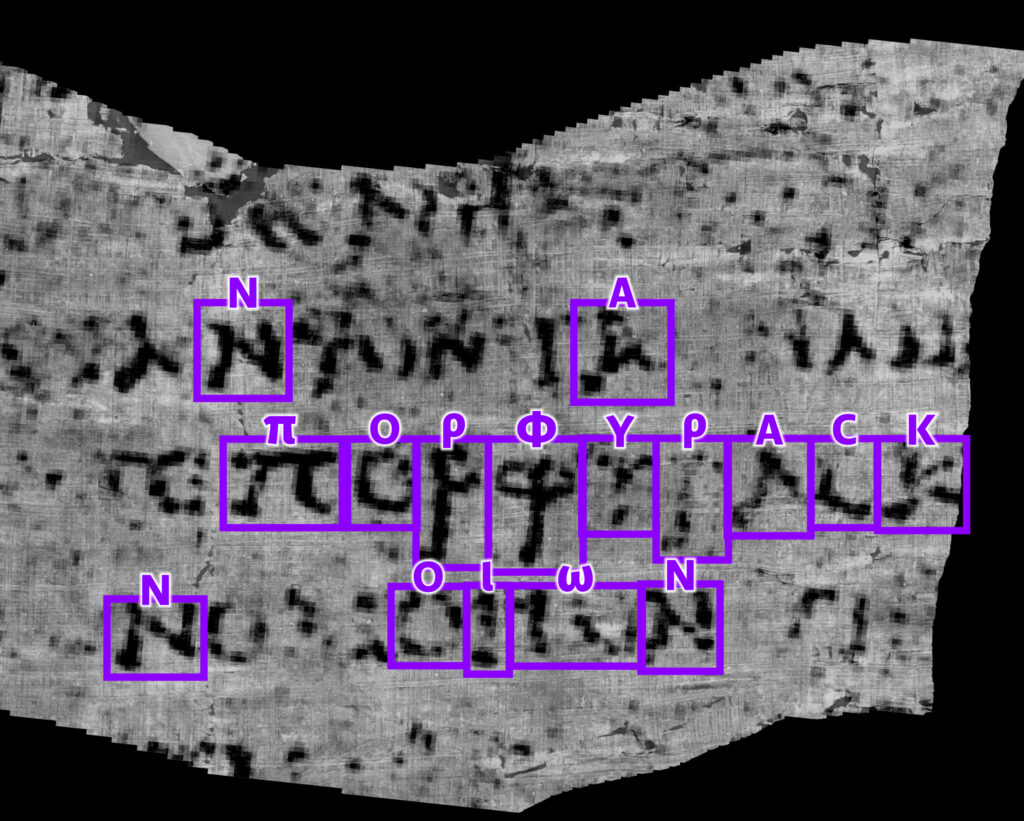
So imagine my delight when this week, for the first time ever, a complete word was extracted from
one of the carbonised, still-rolled-up scrolls from Herculaneum. Something that would have seemed inconceivable to the historians who first discovered and catalogued the scrolls is now
possible, thanks to their careful conservation over the years along with the steady advance of technology.
The word appears to be “purple”: either πορφύ̣ρ̣ας̣ (a noun, similar to how we might say “pass the purple [pen]” or πορφυ̣ρ̣ᾶς̣: if we can decode more words around it then it which
might become clear from the context.
Anyway, I thought that was exciting news so I wanted to share.
I’m probably not going to get you a Christmas present. You probably shouldn’t get me one either.
All I need for Christmas is… a woolly jumper and a dog, apparently. (And I only need the latter if the goose doesn’t get delivered.)
If you’re one of my kids and you’ve decided that maybe my blog isn’t just “boring grown-up stuff” and have come by, then you’re one of the exceptions. Lucky you.
Children get Christmas gifts from me. But if you’re an adult, all you’re likely to get from me is a hug, a glass of wine, and more food than you can possibly eat in a single
sitting.
Turns out the real meaning of Christmas was eating yourself into indigestion all along.
I’ve come to the conclusion – much later than my mother and my sisters, who were clearly ahead of the curve – that Christmas presents are for kids.
Maybe, once, Christmas presents were for adults too, but by now the Internet has broken gift-giving to the extent it’s almost certainly preferable for me and the adults
in my life if they just, y’know, order the thing they want than hoping that I’ll pick it out for them. Especially as so many of us are at a point where we already have a
plethora of “stuff”, and don’t want to add to it unnecessarily at a time of year when, frankly, we’ve got better things to spend our time and money on.
I’ll still be participating fully in my household‘s “book exchange” Christmas Eve tradition, though, because
it’s awesome.
Birthdays are still open season, because they aren’t hampered by the immediate expectation of reciprocity that Christmas carries. And I reserve the right to buy groups of (or
containing) adults gifts at Christmas. But individual adults aren’t getting one this year, and they certainly shouldn’t feel like they need to get me anything either.1
I don’t know to what extent, if at all, Ruth and JTA will be following me in this idea, so
if you’re somebody who might have expected a gift from or wanted to give a gift to one of them… you’re on your own; you work it out!
Here’s to a Merry Christmas full of presents for children, only!
Footnotes
1 If you’ve already bought me a gift for Christmas this year… firstly, that’s way
too organised: you know it’s only October, right? And secondly: my birthday’s only a couple of weeks later…
Foundry is a wonderful virtual tabletop tool well-suited to playing tabletop roleplaying games with your friends, no
matter how far away they are. It compares very favourably to the market leader Roll20, once you get past some of the initial set-up
challenges and a moderate learning curve.
The party of adventurers I’ve been DMing
for since last summer use Foundry to simulate a tabletop
(alongside a conventional video chat tool to let us see and hear one another).
You can run it on your own computer and let your friends “connect in” to it, so long as you’re able to reconfigure your router a little, but you’ll be limited by the speed of your home
Internet connection and people won’t be able to drop in and e.g. tweak their character sheet except when you’ve specifically got the application running.
A generally better option is to host your Foundry server in the cloud. For most of its history, I’ve run mine on Fox, my NAS, but I’ve recently set one up on a more-conventional cloud
virtual machine too. A couple of friends have asked me about how to set up their own, so here’s a quick guide:
I used Linode to spin up a server because I still had a stack of free credits following a recent
project. The instructions will work on any cloud host where you can spin up a Debian 12 virtual machine, and can be adapted for other distributions of Linux.
You will need…
A Foundry license ($50 USD / £48 GBP, one-off payment1)
A domain name for which you control the DNS records; you’ll need to point a domain, like “danq.me” (or a subdomain of it, e.g.
“vtt.danq.me”), at an IP address you’ll get later by creating an “A” record: your domain name registrar can probably help with this –
I mostly use Gandi and, ignoring my frustration with recent changes to their email
services, I think they’re great
An account with a cloud hosting provider: this example uses Linode but you can adapt for any of them
A basic level of comfort with the command-line
1. Spin up a server
Getting a virtual server is really easy nowadays.
Click, click, click, and you’ve got yourself a server.
You’ll need:
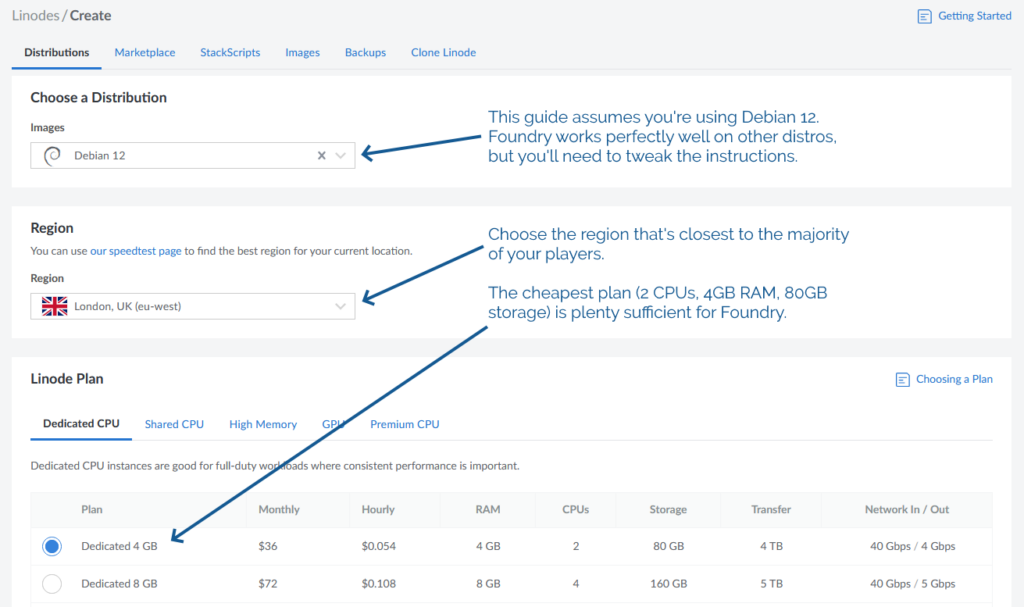
The operating system to be Debian 12 (or else you’ll need to adapt the instructions below)
The location to be somewhere convenient for your players: pick a server location that’s relatively-local to the majority of them to optimise for connection speeds
An absolute minimum of 1GB of storage space, I’d recommend plenty more: The Levellers’ campaign currently uses about 10GB for all of its various maps, art, videos,
and game data, so give yourself some breathing room (space is pretty cheap) – I’ve gone with 80GB for this example, because that’s what comes as standard with the 2
CPU/4GB RAM server that Linode offer
Choose a root password when you set up your server. If you’re a confident SSH user, add your public key so you can log in easily (and then
disable password authentication
entirely!).
For laziness, this guide has you run Foundry as root on your new server. Ensure you understand the implications of this.2
2. Point your (sub)domain at it
DNS propogation can be pretty fast, but… sometimes it isn’t. So get this step underway before you need it.
Your newly-created server will have an IP address, and you’ll be told what it is. Put that IP address into an A-record for your domain.
The interface for adding a new DNS record in Gandi is pretty simple – record type, time to live, name, address – but it’s rarely
more complicated that this with any registrar that provides DNS services.
3. Configure your server
In my examples, my domain name is vtt.danq.me and my server is at 1.2.3.4. Yours will be different!
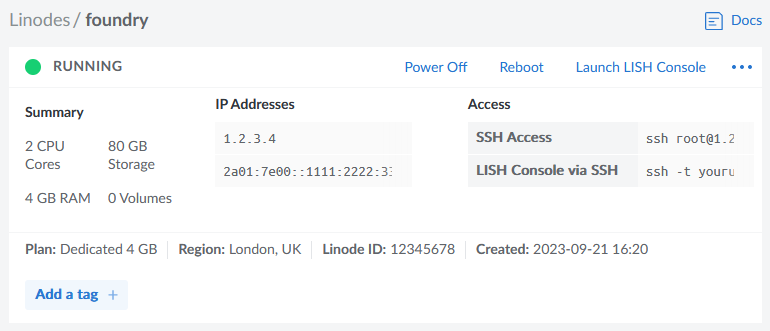
Connect to your new server using SSH. Your host might even provide a web interface if you don’t have an SSH client installed: e.g. Linode’s “Launch LISH Console” button will do pretty-much exactly that for you. Log in as root using the password you chose
when you set up the server (or your SSH private key, if that’s your preference). Then, run each of the commands below in order (the full script is available as a single file if you
prefer).
3.1. Install prerequisites
You’ll need unzip (to decompress Foundry), nodejs (to run Foundry), ufw (a firewall, to prevent unexpected surprises), nginx (a
webserver, to act as a reverse proxy to Foundry), certbot (to provide a free SSL certificate for Nginx),
nvm (to install pm2) and pm2 (to keep Foundry running in the background). You can install them all like this:
By default, Foundry runs on port 30000. If we don’t configure it carefully, it can be accessed directly, which isn’t what we intend: we want connections to go through the webserver
(over https, with http redirecting to https). So we configure our firewall to allow only these ports to be accessed. You’ll also want ssh enabled so we can remotely connect into the
server, unless you’re exclusively using an emergency console like LISH for this purpose:
Putting the domain name we’re using into a variable for the remainder of the instructions saves us from typing it out again and again. Make sure you type your domain name (that
you pointed to your server in step 2), not mine (vtt.danq.me):
DOMAIN=vtt.danq.me
3.4. Get an SSL certificate with automatic renewal
So long as the DNS change you made has propogated, this should Just Work. If it doesn’t, you might need to wait for a bit then try
again.
3.5. Configure Nginx to act as a reverse proxy for Foundry
You can, of course, manually write the Nginx configuration file: just remove the > /etc/nginx/sites-available/foundry from the end of the printf line to see
the configuration it would write and then use/adapt to your satisfaction.
set +H
printf "server {\n listen 80;\n listen [::]:80;\n server_name $DOMAIN;\n\n # Redirect everything except /.well-known/* (used for ACME) to HTTPS\n root /var/www/html/;\n if (\$request_uri !~ \"^/.well-known/\") {\n return 301 https://\$host\$request_uri;\n }\n}\n\nserver {\n listen 443 ssl http2;\n listen [::]:443 ssl http2;\n server_name $DOMAIN;\n\n ssl_certificate /etc/letsencrypt/live/$DOMAIN/fullchain.pem;\n ssl_certificate_key /etc/letsencrypt/live/$DOMAIN/privkey.pem;\n\n client_max_body_size 300M;\n\n location / {\n # Set proxy headers\n proxy_set_header Host \$host;\n proxy_set_header X-Forwarded-For \$proxy_add_x_forwarded_for;\n proxy_set_header X-Forwarded-Proto \$scheme;\n\n # These are important to support WebSockets\n proxy_set_header Upgrade \$http_upgrade;\n proxy_set_header Connection \"Upgrade\";\n\n proxy_pass http://127.0.0.1:30000/;\n }\n}\n" > /etc/nginx/sites-available/foundry
ln -sf /etc/nginx/sites-available/foundry /etc/nginx/sites-enabled/foundry
service nginx restart
3.6. Install Foundry
3.6.1. Create a place for Foundry to live
mkdir {vtt,data}
cd vtt
3.6.2. Download and decompress it
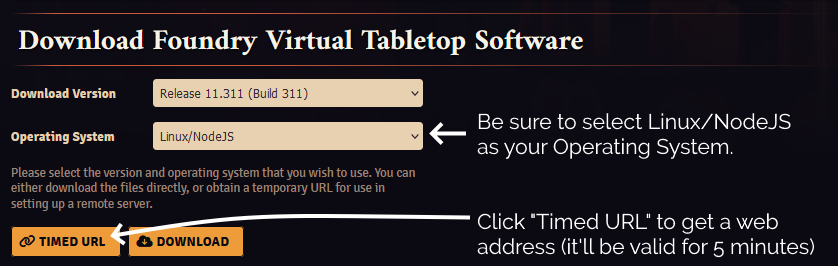
For this step, you’ll need to get a Timed URL from the Purchased Licenses page on your FoundryVTT account.
Substitute in your Timed URL in place of <url from website> (keep the quotation marks – " –
though!):
wget -O foundryvtt.zip "<url from website>"
unzip foundryvtt.zip
rm foundryvtt.zip
3.6.3. Configure PM2 to run Foundry and keep it running
Now you’re finally ready to launch Foundry! We’ll use PM2 to get it to run automatically in the background and keep running:
You can watch the logs for Foundry with PM2, too. It’s a good idea to take a quick peep at them to check it launched okay (press CTRL-C to exit):
pm2 logs 0
4. Start adventuring!
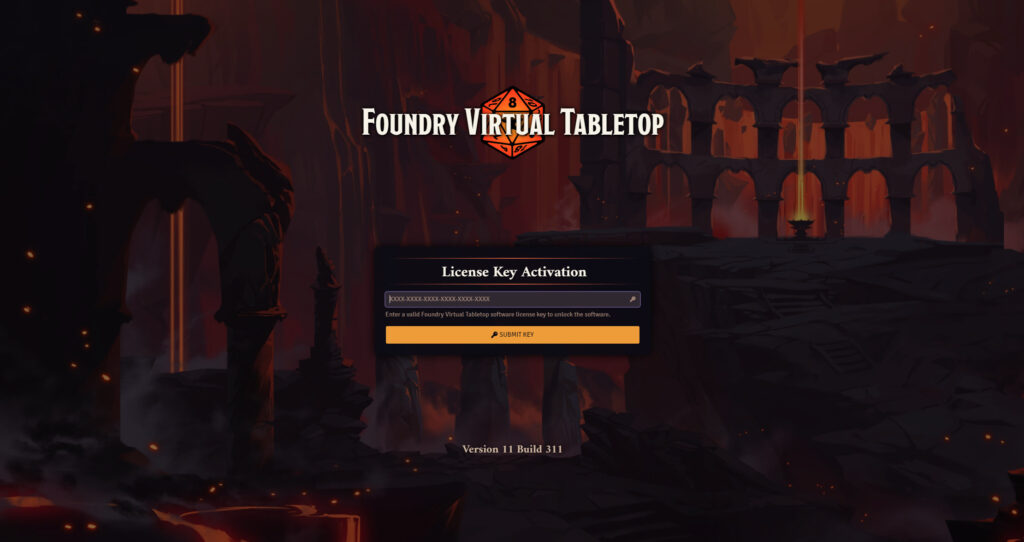
Point your web browser at your domain name (e.g. I might go to https://vtt.danq.me) and you should see Foundry’s first-load page, asking for your license key.
Provide your license key to get started, and then immediately change the default password: a new instance of Foundry has a blank default password, which means that
anybody on Earth can administer your server: get that changed to something secure!
Now you’re running on Foundry!
Footnotes
1Which currency you pay in, and therefore how much you pay, for a Foundry license depends on where in the world you are where
your VPN endpoint says you are. You might like to plan accordingly.
2 Running Foundry as root is dangerous, and you should consider the risks for yourself.
Adding a new user is relatively simple, but for a throwaway server used for a single game session and then destroyed, I wouldn’t bother. Specifically, the risk is that a vulnerability
in Foundry, if exploited, could allow an attacker to reconfigure any part of your new server, e.g. to host content of their choice or to relay spam emails. Running as a non-root user
means that an attacker who finds such a vulnerability can only trash your Foundry instance.
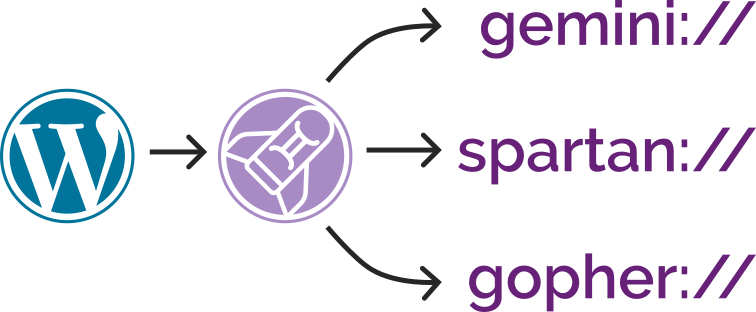
Now I’ve added support for Spartan3 too and, seeing as the implementations shared functionality, I’ve
combined all three – Gemini, Spartan, and Gopher – into a single package: CapsulePress.
CapsulePress is a Gemini/Spartan/Gopher to WordPress bridge. It lets you use WordPress as a CMS for any or all of
those three non-Web protocols in addition to the Web.
For example, that means that this post is available on all of:
It’s also possible to write posts that selectively appear via different media: if I want to put something exclusively on my gemlog, I can, by assigning metadata that
tells WordPress to suppress a post but still expose it to CapsulePress. Neat!
Using Gemini and friends in the 2020s make me feel like the dream of the Internet of the nineties and early-naughties is still alive. But with fewer banner ads.
I’ve open-sourced the whole thing under a super-permissive license, so if you want your own WordPress blog to “feed” your Gemlog… now you can. With a few caveats:
It’s hard to use. While not as hacky as the disparate piles of code it replaced, it’s still not the cleanest. To modify it you’ll need a basic comprehension of all
three protocols, plus Ruby, SQL, and sysadmin skills.
It’s super opinionated. It’s very much geared towards my use case. It’s improved by the use of templates. but it’s still probably only suitable for this
site for the time being, until you make changes.
It’s very-much unfinished. I’ve got a growing to-do list, which should
be a good clue that it’s Not Finished. Maybe it never will but. But there’ll be changes yet to come.
Whether or not your WordPress blog makes the jump to Geminispace4, I hope you’ll came take a look at mine at one of the URLs linked above,
and then continue to explore.
If you’re nostalgic for the interpersonal Internet – or just the idea of it, if you’re too young to remember it… you’ll find it there. (That Internet never actually went away,
but it’s harder to find on today’s big Web than it is on lighter protocols.)
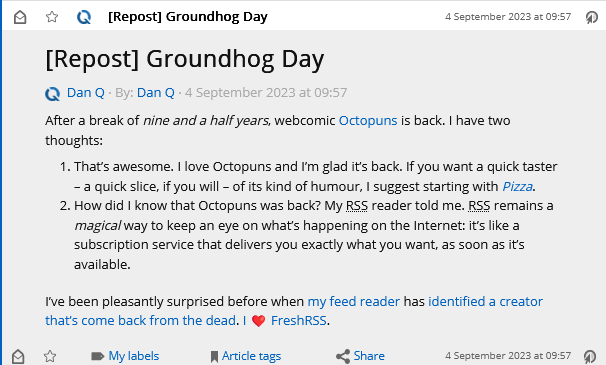
It turns out that by default, WordPress replaces emoji in its feeds (and when sending email) with images of those emoji, using the Tweemoji set, and with the alt-text set to the original emoji. These images are hosted at https://s.w.org/images/core/emoji/…-based
URLs.
I can see why this functionality was added: what if the feed reader didn’t support Unicode or didn’t have a font capable of showing the appropriate emoji?
But I can also see reasons why it might not be desirable to everybody. For example:
Downloading an image will always be slower than rendering an emoji.
The code to include an image is always more-verbose than simply including an emoji.
As seen above: a feed reader which imposes a minimum size on embedded images might well render one “wrong”.
It’s marginally more-verbose for screen reader users to say “Image: heart emoji” than just “heart emoji”, I imagine.
Serving an third-party image when a feed item is viewed has potential privacy implications that I try hard to avoid.
Replacing emoji with images is probably unnecessary for modern feed readers anyway.
That’s all there is to it. Now, my feed reader shows my system’s emoji instead of a huge image:
I’m always grateful to discover that a piece of WordPress functionality, whether core or in an extension, makes proper use of hooks so that its functionality can be changed, extended,
or disabled. One of the single best things about the WordPress open-source ecosystem is that you almost never have to edit somebody else’s code (and remember to re-edit it
every time you install an update).
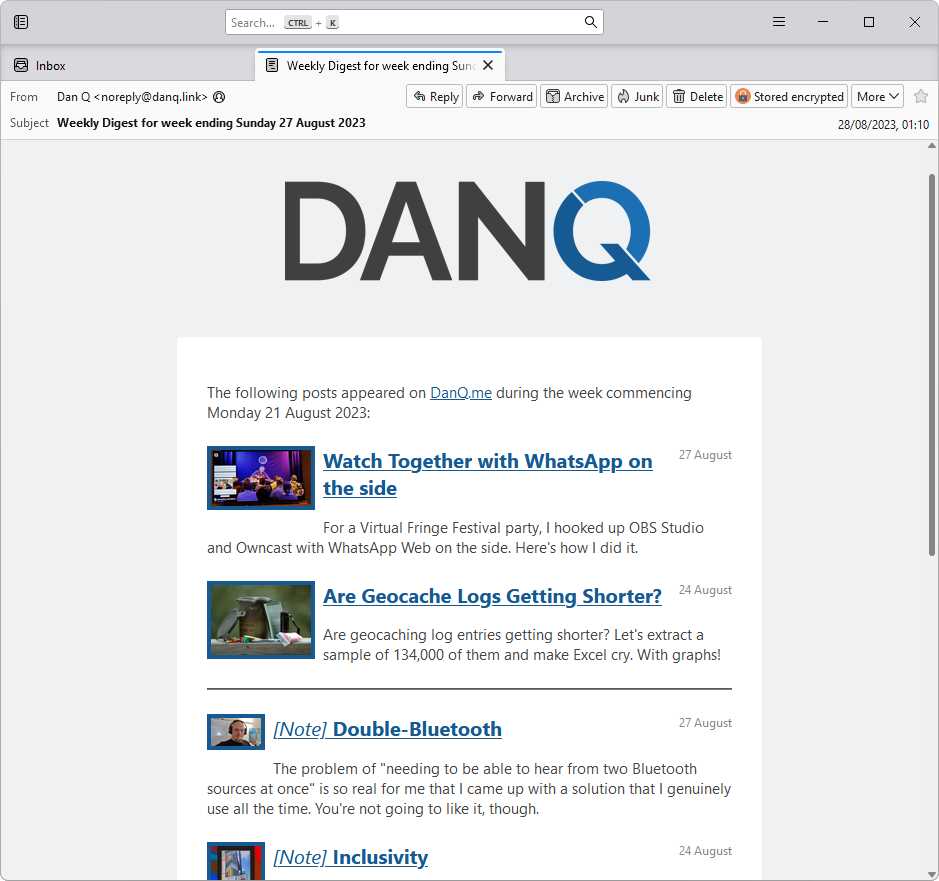
Earlier this year, for reasons of privacy/love of selfhosting, I moved the DanQ.me mailing list from Mailchimp to Listmonk (there’s a blog post about how I set it up), relaying
outbound messages via an SMTP server provided by my domain registrar, Gandi.
I assume that you knew that you can get an email, no more than once per day or once per week (your choice!) of what I get up to online, right? Email not your jam: there are plenty of other options too!
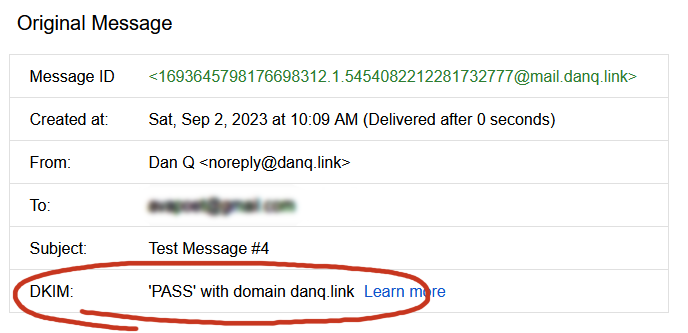
And because I learned a few things while doing so, I wrote this blog post so that next time I have to configure Postfix + DKIM, I’ll know where to find a guide. If it helps you in the meantime, that’s just a bonus.
If the first rule of computing is “never roll your own crypto” (based on Schneier’s Law), the second
rule might be “don’t run your own mailserver”. I don’t have a good picture to illustrate that, so here’s a photo of my dog playing tug-of-war.
Postfix
Running your own mailserver is a pain. I used to do it for all of my email, but – like many other nerds – when spam reached its peak and deliverability became an issue, I gave
up and oursourced it1.
Fun fact: when I’m at my desktop, I use a classic desktop email application for my personal email, like it’s the 90s or something2.
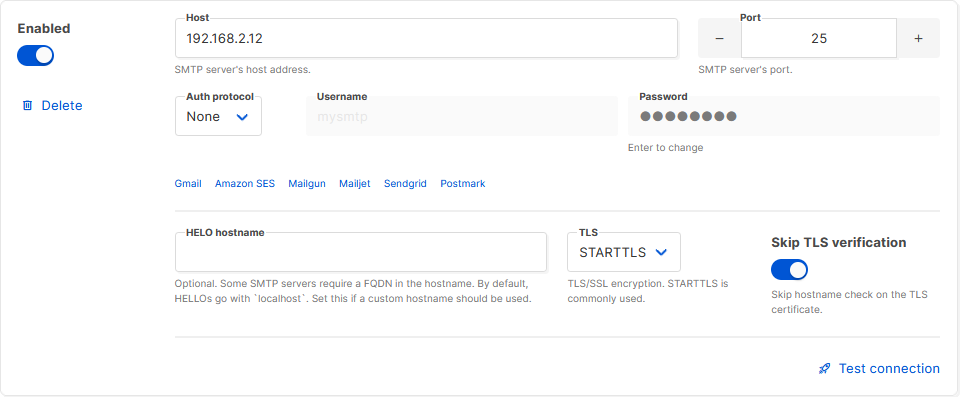
Luckily, I don’t need it to do much. I just need a mail transfer agent with an (unauthenticated, but local-only) SMTP endpoint: something that Listmonk can dump emails into, which will then reach out to the mailservers representing each of the recipients and
relay them on. A default install of Postfix does all that out-of-the-box, so I ran sudo apt install postfix, accepted all the default
options, and put the details into Listmonk.
Listmonk makes adding an SMTP server very easy, and even includes a quick “test connection” link with which you can try
out your settings.
Next, I tweaked my DNS configuration to add an SPF record, and tested it.
This ought to have been enough to achieve approximate parity with what Gandi had been providing me with. Not bad.
You really can’t be doing without an SPF record as a minimum these days.
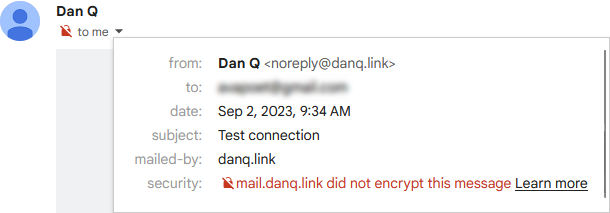
I sent a test email to a Gmail account, where I noticed two problems:
It turns out that since the last time I ran a mailserver “for real”, the use of TLS for inter-server communication has
become… basically mandatory. You don’t strictly have to do it, but if you don’t, some big email providers will put scary security warnings on your messages. This is a good thing.
The first problem was that Postfix on Debian isn’t configured by-default to use opportunistic TLS when talking to other
mailservers. That’s a bit weird, but I’m sure there’s a good reason for it. The solution was to add smtp_tls_security_level = may to my
/etc/postfix/main.cf.
The second problem was that without a valid DKIM signature on them, about half of my test emails were going straight to the
spam folder. Again, it seems that since the last time I seriously ran a mailserver 20 years ago, this has become something that isn’t strictly required… but your emails aren’t
going to get through if you don’t.
I’ve put it off this long, but I think it’s finally time for me to learn some practical DKIM.
Understanding DKIM
What’s DKIM, then?
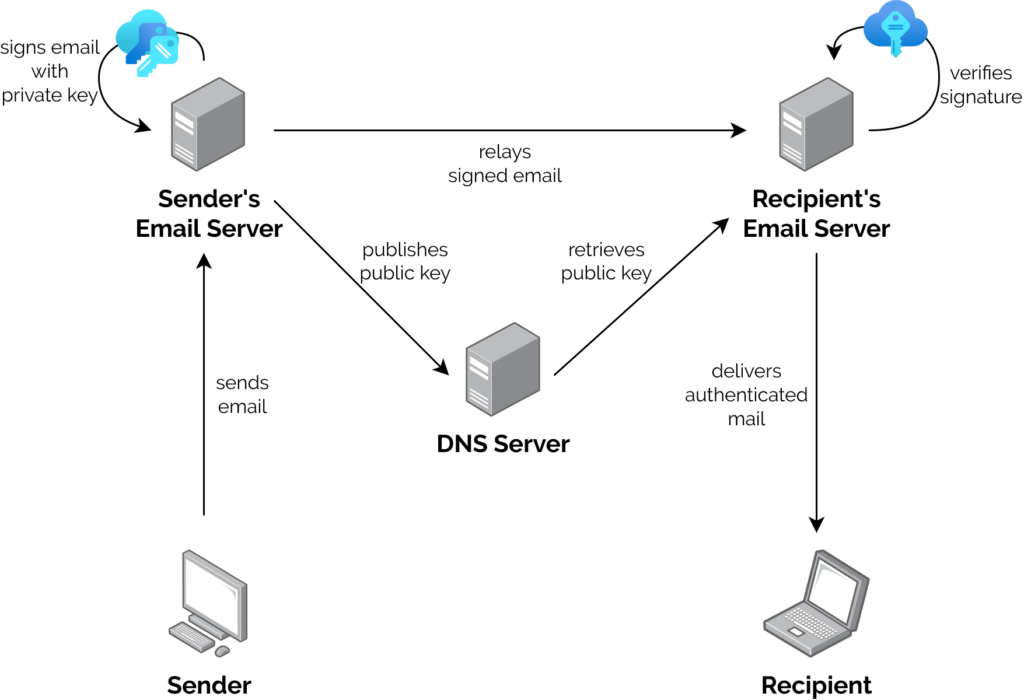
I’ve already got an elementary understanding of how DKIM works, which I’ll summarise below.
A server that wants to send email from a domain generates a cryptographic keypair.
The public part of the key is published using DNS. The private part is kept securely on the server.
When the server relays mail on behalf of a user, it uses the private key to sign the message body and a stated subset of the headers3,
and attaches the signature as an email header.
When a receiving server (or, I suppose, a client) receives mail, it can check the signature by acquiring the public key via DNS and validating the signature.

In this way, a recipient can be sure that an email received from a domain was sent with the authorisation of the owner of that domain. Properly-implemented, this is a strong mitigation
against email spoofing.
OpenDKIM
To set up my new server to sign outgoing mail, I installed OpenDKIM and its keypair generator using sudo apt install opendkim
opendkim-tools. It’s configuration file at /etc/opendkim.conf needed the following lines added to it:
# set up a socket for Postfix to connect to:
Socket inet:12301@localhost
# set up a file to specify which IPs/hosts can send through us without authentication and get their messages signed:
ExternalIgnoreList refile:/etc/opendkim/TrustedHosts
InternalHosts refile:/etc/opendkim/TrustedHosts
# set up a file to specify which selector/domain are used to each incoming email address:
SigningTable refile:/etc/opendkim/SigningTable
# set up a file to specify which signing key to use for each selector/domain:
KeyTable refile:/etc/opendkim/KeyTable
Into /etc/opendkim/TrustedHosts I put a list of local IPs/domains that would have their emails signed by this server. Mine looks like this (in this example I’m using
example.com as my domain name, and default as the selector for it: the selector can be anything you like, it only matters if you’ve got multiple
mailservers signing mail for the same domain). Note that 192.168.0.0/16 is the internal subnet on which my sending VM will
run.
/etc/opendkim/SigningTable maps email addresses (I’m using a wildcard) to the subdomain whose TXT record will hold the public key for the signature. This also goes on to
inform the KeyTable which private key to use:
*@example.com default._domainkey.example.com
And then /etc/opendkim/KeyTable says where to find the private key for that:
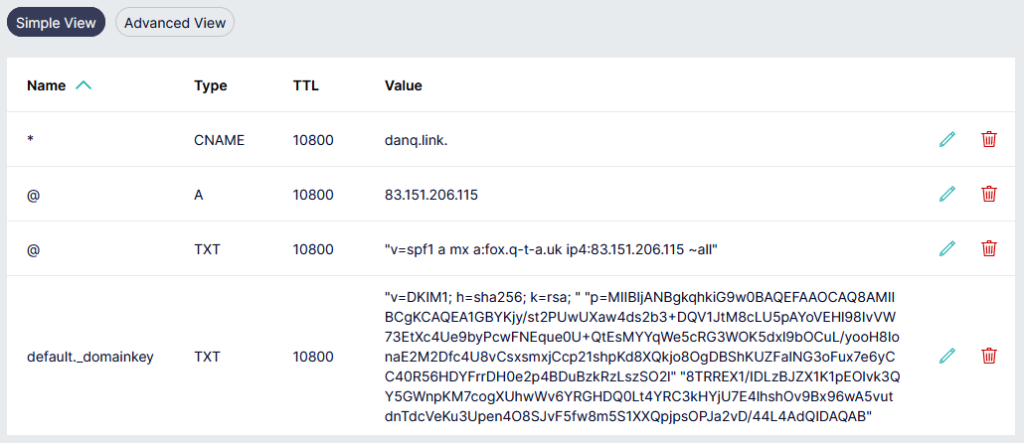
The public key needs publishing via DNS. Conveniently, when you create a keypair using its tools, OpenDKIM provides a sample (in
BIND-style) for you to copy-paste from or adapt: look in /etc/opendkim/keys/example.com/default.txt!
Gandi’s DNS “Simple View” is great for one-off and quick operations, but I really appreciate that they have a BIND-style syntax “Advanced View” for when I’m making bigger and
more-complex DNS configuration changes.
Once we’ve restarted both services (sudo service postfix restart; sudo service opendkim restart), we can test it!
Once the major email providers – who have the worst spam problem to deal with – say that your email signature looks good, you’re good.
So I learned something new today.
If you, too, love to spend your Saturday mornings learning something new, have a look at those subscription
options to decide how you’d like to hear about whatever I get up to next.
Footnotes
1 I still outsource my personal email, and I sing the praises of the excellent folks
behind ProtonMail.
2 My desktop email client also doubles as my newsreader, because, yes, of course
you can still find me on USENET. Which, by the way, is undergoing a mini-revival…
3 Why doesn’t DKIM sign
all the headers in an email? Because intermediary servers and email clients will probably add their own headers, thereby invalidating the signature! DKIM gets used to sign the From: header, for obvious reasons, and ought to be used for other headers whose tampering could be
significant such as the Date: and Subject:, but it’s really up to the signing server to choose a subset.
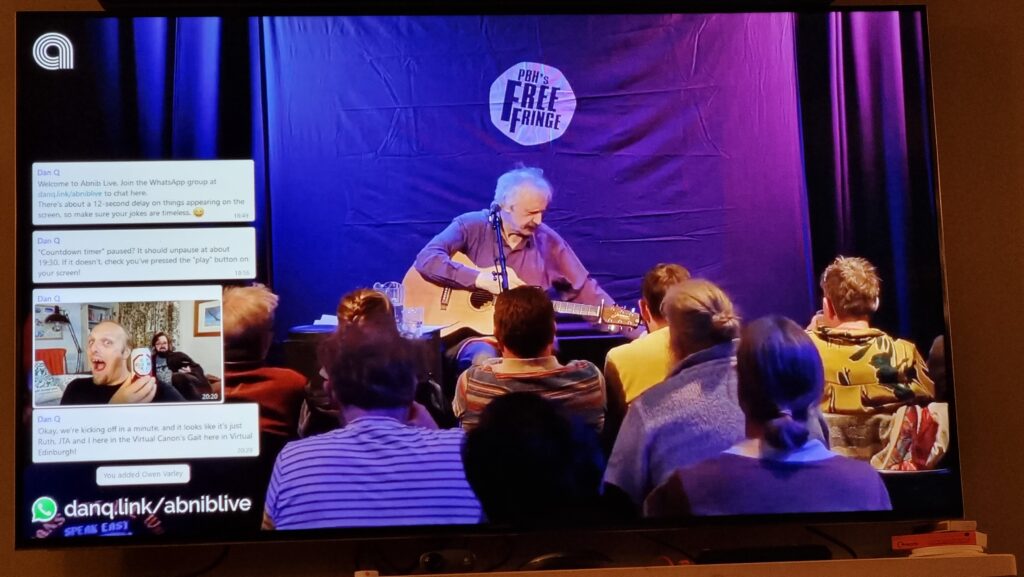
This weekend, I threw a Virtual Free Fringe
party for some friends. The party was under-attended, but it’s fine because I got to experiment
with some tech that I’d been meaning to try.
The Abnibbers and I have experimented with watching things together, but apart, before, but
this is the first time we’ve watched stand-up comedy this way.
If you ever want to run something like this yourself1, here’s how I did it.
My goals were:
A web page at which any attendee could “watch together” a streaming video2,
A “chat” overlay, powered by a WhatsApp group3 (the friend group I
was inviting were all using WhatsApp anyway, so this was an obvious choice), and
To do all the above cheaply or for free.
I’m a big fan of experiments. Contrary to this picture, though, they’re usually software experiments.
There were two parts to this project:
Setting up a streaming server that everybody can connect to, and
Decorating the stream with a WhatsApp channel
Setting up a streaming server
Linode offers a free trial of $100 of hosting credit over 60 days and has a ready-to-go recipe for installing Owncast, an open-source streaming server I’ve used before, so I used their
recipe, opting for a 4GB dedicated server in their London datacentre: at $36/mo, there’d be no risk of running out of my free trial credit even if I failed to shut down and delete the
virtual machine in good time. If you prefer the command-line, here’s the API call for that:
The IP address got assigned before the machine finished booting, so I had time to copy that into my DNS configuration so the domain was already pointing to the machine before it was fully running. This enabled it to get its SSL certificate set up rightaway (if not, I’d have had to finish waiting for the DNS change to propogate and then reboot it).
Out of the box, Owncast is insecure-by-default, so I wanted to jump in and change some passwords. For some reason you’re initially only able to correct this over unencrypted
HTTP! I opted to take the risk on this server (which would only be alive for a few hours) and just configure it with this
limitation, logging in at http://mydomain:8080/admin with the default username and password (admin / abc123), changing the credentials to
something more-secure. I also tweaked the configuration in general: setting the service name, URL, disabling chat features,
and so on, and generating a new stream key to replace the default one.
Now I was ready to configure OBS Studio to stream video to my new Owncast server, which would distribute it to anybody who tuned-in.
Next up, we need to make WhatsApp appear on the stream with a little bit of CSS hackery.
Decorating the stream
I configured OBS Studio with a “Custom…” stream service with server rtmp://mydomain:1935/live and the stream key I chose when configuring Owncast and kicked off a test
stream to ensure that I could access it via https://mydomain. I added a VLC source4
to OBS and fed it a playlist of videos, and added some branding.
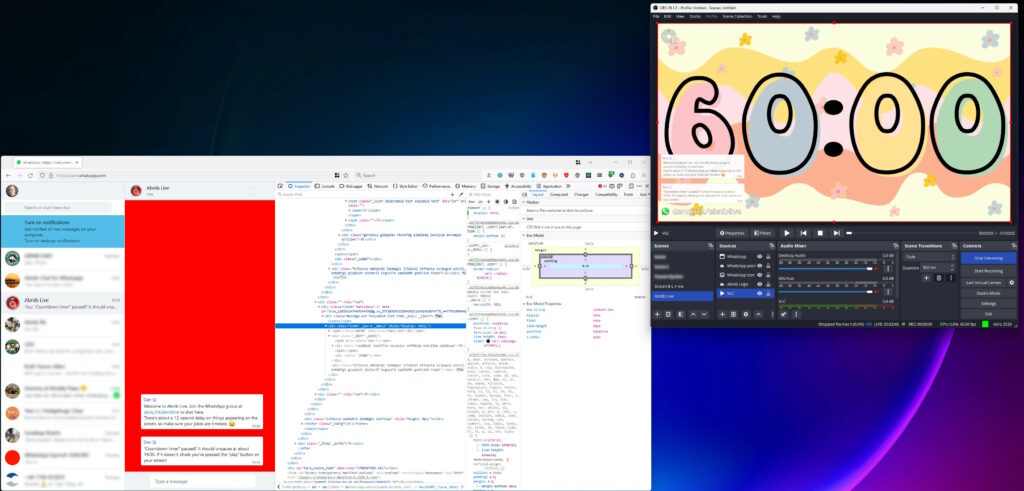
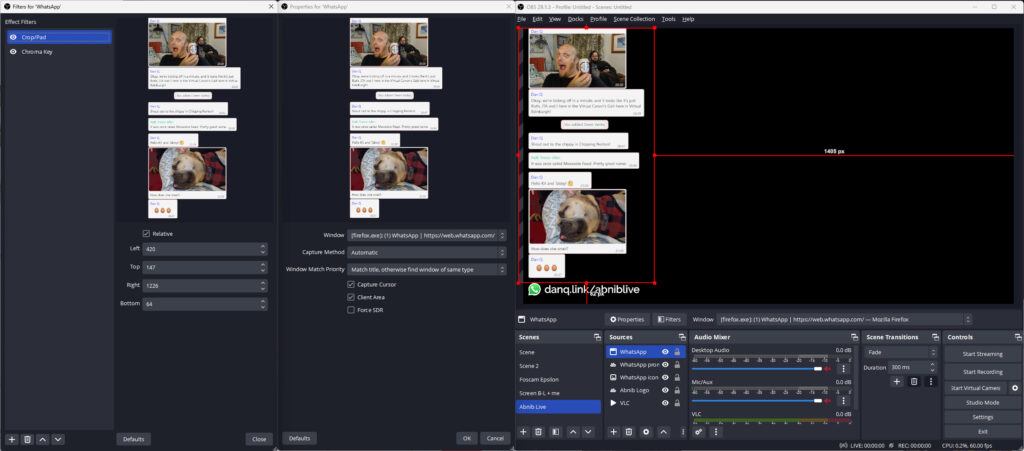
With that all working, I now needed a way to display the WhatsApp chat superimposed over the video.For this, I added a Window Capture source and pointed it at a Firefox window that was
showing a WhatsApp Web view of the relevant channel. I added a Crop/Pad filter to trim off the unnecessary chrome.
The same technique, of course, could be used to superimpose any web page or whatever other content you like onto a stream.
Next, I used the Firefox debugger “Style Editor” to inject some extra CSS into WhatsApp Web. The class names vary frequently, so
there’s no point we re-documenting all of them here, but the essence of the changes were:
Changing the chat background to a solid bright color (I used red) that can then be removed/made transparent using OBS’s Chroma Key filter. Because you have a good
solid color you can turn the Similarity and Smoothness way down.
Making all messages appear the same (rather than making my messages appear different from everybody else’s). To do this, I added:
.message-in, .message-out { align-items: flex-start !important; } to align them all to the left
[aria-label="You:"]::after { content: "Dan Q"; height: 15px !important; display: block; color: #00f !important; padding: 8px 0 0 8px; } to force my name to appear
even on my own messages
[aria-label^="Open chat details for "] { display: none; } to remove people’s avatars
[data-testid="msg-meta"] { display: none !important; } to remove message metadata
A hacky bit of CSS to make the backgrounds all white and to remove the speech bubble “tails”
Removing all the sending/received/read etc. icons with [data-icon] { display: none; }
I aimed where possible to exploit selectors that probably won’t change frequently, like [aria-label]s; this improves the chance that I can use the same code next time. I
also manually removed “old” messages from the channel that didn’t need to be displayed on the big screen. I wasn’t able to consistently remove “X new messages” notifications, but I’ll
probably try again another time, perhaps with the help of an injected userscript.
A little bit of a shame that more people didn’t get to see the results of this experiment, but I’m sure I’ll use the techniques I’ve learned on another ocassion.
Footnotes
1 Or, let’s be honest, if you’re Future Dan and you’re trying to remember how you did it
in last time.
3 This could probably be adapted for any other chat system that has a web interface, so if
you prefer Telegram or Slack or whatever ever, that’s fine.
4 OBS’s VLC source is just amazing: not only can you give it files, but you can give it
URLs, meaning that you can set up a playlist of YouTube videos, or RTSP security camera feeds, or pretty much anything else you feel like (and have the codecs for).
Known Leaders is an open-source
program that combines WikiData with a random generator to come up with almost-invariably inaccurate but sometimes hilarious facts. Jim Kang came up with it during Recurse Center‘s Never Graduate Week. Go have a play, or read more about how and why he made it.
When geocachers find a geocache, they typically “log” their find both in the cache’s paper logbook and on one of the online listing sites on which the cache’s coordinates can be
found.1
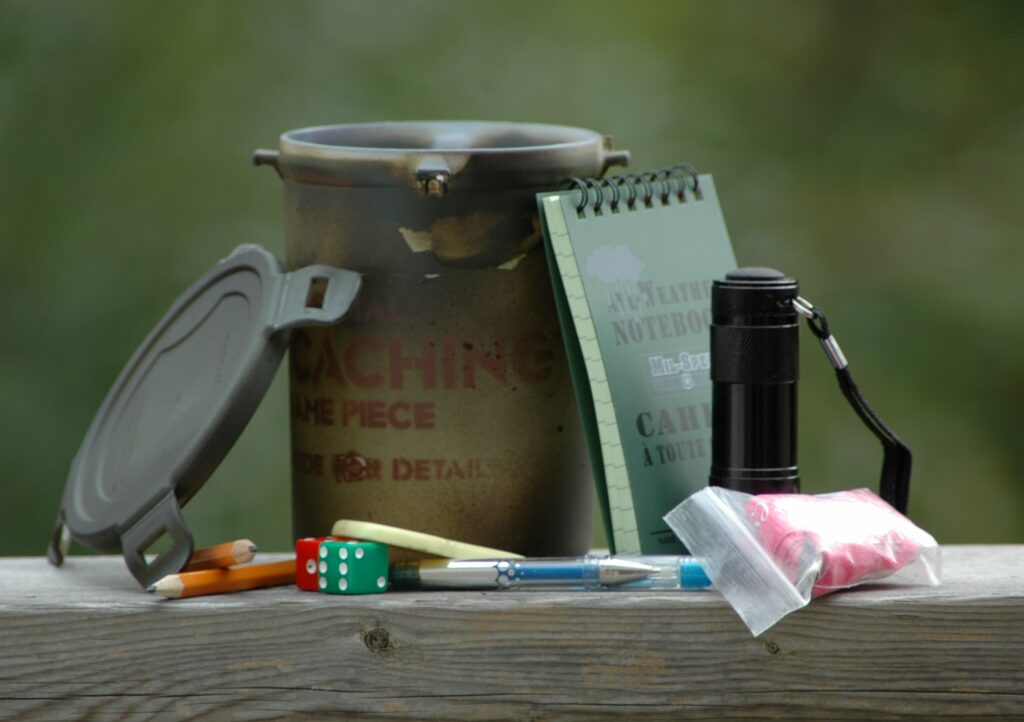
A typical geocacher can find their cache container, logbook, swag, toothbrush, face flannel, soap, tin of biscuits, flask, compass, and most-importantly towel. Hang on, I’ve got my
geekeries crossed again. Photo courtesy cachemania, used under a CC BY-SA license.
I’ve been finding and hiding geocaches for… a long while, so I’ve
seen lots of log entries from people who’ve found my caches (and those of others). And it feels to me like the average length of a
geocaching log entry is getting shorter.
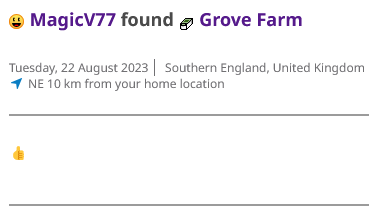
A single emoji is probably the shortest log entry I’ve ever seen. I’m
not claiming that its
cachedeserves a longer log (it’s far from my best work!): just using it as an example of a wider trend towards shorter logs.
“It feels to me like…” isn’t very scientific, though. Let’s see if we can do better.
Getting the data
To test my hypothesis, I needed a decade or so of logs. I didn’t want to compare old caches to new caches (in case people are biased by the logs before them) so I used Geocaching.com’s
own search to open the pages for the 500 caches closest to me that are each at least 10 years old.
My browser hates me right now.
I hacked together a quick
userscript to save all of the logs in a way that was easier than copy-pasting each of them but still didn’t involve hitting Geocaching.com’s API or automating bulk-scraping (which would violate their terms of service). Clicking each of several hundred tabs once every few minutes in
the background while I got on with other things wasn’t as much of an ordeal as you might think… but it did take a while.
Needless to say I only had to go through the cycle a couple of times before I set up a keyboard shortcut.
I mashed that together into a CSV file and for the first time looked at the size of my sample data: ~134,000 log entries,
spanning 20 years. I filtered out everything over 10 years old (because some of the caches might have no logs that old) and stripped out everything that wasn’t a “found it” or “didn’t
find it” log.
That gave me a far more-reasonable ~80,000 records with which I could make Excel cry.2
Results
It looks like my hunch is right. The wordcount of “found” logs on traditional and multi-stage caches has generally decreased over time:
“Found” logs are great for cache owner morale: a simple “TFTC” is a lot less-inspiring that hearing about your adventure to get
to that point.
“Did not find” logs, which can be really helpful for cache owners to diagnose problems with their caches, have an even more-pronounced dip:
Geocachers are just typing “Didn’t find it” and moving on. Without an indication of the conditions at the GZ, how long they spent
looking, or an indication of whether the hint was followed, that doesn’t give a cache owner much to work with.
When I first saw that deep dip on the average length of “did not find” logs, my first thought was to wonder whether the sample might not be representative because the did-not-find rate
itself might have fallen over time. But no: the opposite is true:
A higher proportion than ever of geocachers are logging that they couldn’t find the cache, but they’re simultaneously saying less than ever about it.
Strangely, the only place that the trend is reversed is in “found” logs of virtual caches, which have seen a slight increase in verbosity.
I initially assumed that this resulted from “virtual
rewards” from 2017 onwards3
but this doesn’t make any sense because all of the caches in my study are 10+ years old: none of them can be “virtual rewards”.
Conclusion
Within the limitations of my research (80,000 logs from 500 caches each 10+ years old, near me), there are a handful of clear trends over the last decade:
Geocachers are leaving increasingly concise logs when they find geocaches.
That phenomenon is even more-pronounced when they don’t find them.
And they’re failing-to-find caches and giving up with significantly greater frequency.
Are these trends a sign of shortening attention spans? Increased use of mobile phones for logging? Use of emoji and acronyms to pack more detail into shorter messages? I don’t know.
I’d love to see some wider research, perhaps by somebody at Geocaching.com HQ (who has database access and is thus able to easily extract
enough data for a wider analysis!). I’m also very interested in whether the identity of the cache finder has an impact on log length: is it impacted by how long ago they
started ‘caching? Whether or not they have hidden caches of their own? How many caches they’ve found?
But personally, I’m just pleased to have been able to have a question in the back of my mind and – through a little bit of code and a little bit of data-mashing – have a pretty good go
at answering it.
Footnotes
1 I have a dream that someday cache logging could be powered by Webmentions or ActivityPub or some similar decentralised-Web technology, so that cachers can log their finds on any site on which a cache is listed or
even on their own site and have all the dots joined-up… but that’s pretty far-fetched I’m afraid. It’s not stopping some of us from experimenting with possible future standards,
though…
2 Just for fun, try asking Excel to extrapolate a second-order polynomial trendline across
80,000 pairs of datapoints. Just don’t do it if you’re hoping to use your computer for anything in the next quarter hour.
3 With stricter guidelines on how a “virtual rewards” virtual caches should work than
existed for original pre-2005 virtuals, these new virtuals are more-likely than their predecessor to encourage or require longer logs.
The week before last, Katie shared with me that article from last month, Who killed Google Reader? I’d read it before so I
didn’t bother clicking through again, but we did end up chatting about RSS a bit1.
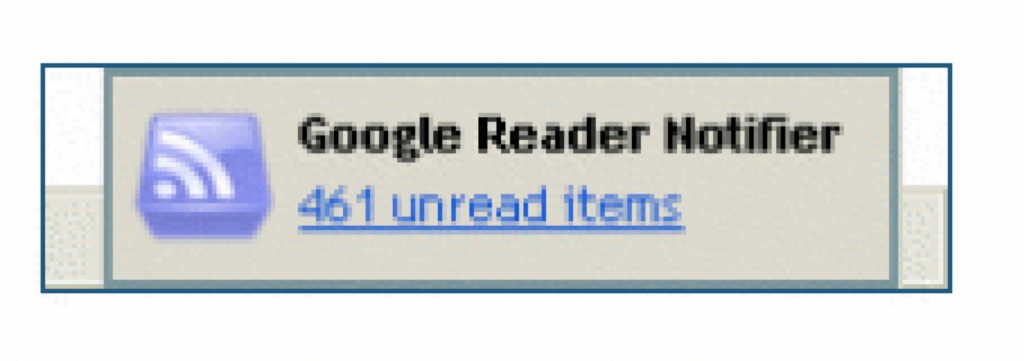
I ditched Google Reader several years before its untimely demise, but I can confirm “461 unread items” was a believable message.
Katie “abandoned feeds a few years ago” because they were “regularly ending up with 200+ unread items that felt overwhelming”.
Conversely: I think that dropping your feed reader because there’s too much to read is… solving the wrong problem.
About half way through editing this image I completely forgot what message I was trying to convey, but I figured I’d keep it anyway and let you come up with your own
interpretation.
I think that he, like Katie, might be looking at his reader in a different way than I do mine.
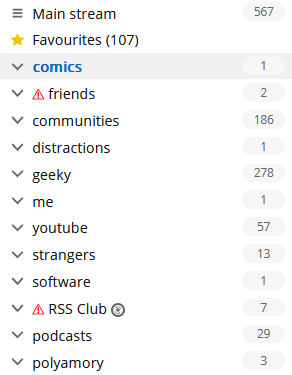
At time of writing, I’ve got 567 unread items. And that’s fine.
RSS is not email!
I’ve been in the position that Katie and David describe: of feeling overwhelmed by the sheer volume of unread items. And I know others have, too. So let me share something I’ve learned
sooner:
There’s nothing special about reaching Inbox Zero in your feed reader.
It’s not noble nor enlightened to get to the bottom of your “unread” list.
Your 👏 feed 👏 reader 👏 is 👏 not 👏 an 👏 email 👏 client. 👏
The idea of Inbox Zero as applied to your email inbox is about productivity. Any message in your email might be something that requires urgent action, and you
won’t know until you filter through and categorise .
But your RSS reader doesn’t (shouldn’t?) be there to add to your to-do list. Your RSS reader is a list of things you might like to read. In an ideal world, reaching “RSS Zero” would mean that you’ve seen everything on the Internet that you might
enjoy. That’s not enlightened; that’s sad!
Google Reader understood this, although the word “congratulations” was misplaced.
Use RSS for joy
My RSS reader is a place of joy, never of stress. I’ve tried to boil down the principles that makes it so, and here they are:
Zero is not the target.
The numbers are to inspire about how much there is “out there” for you, not to enumerate how much work need have to do.
Group your feeds by importance.
Your feed reader probably lets you group (folder, tag…) your feeds, so you can easily check-in on what you care about and leave other feeds for a rainy day.2 This is good.
Don’t read every article.
Your feed reader gives you the convenience of keeping content in one place, but you’re not obligated to read every single one. If something doesn’t interest you, mark it
as read and move on. No judgement.
Keep things for later.
Something you want to read, but not now? Find a way to “save for later” to get it out of your main feed so you. Don’t have to scroll past it every day! Star it or tag
it3 or push it to your link-saving or note-taking app. I use a
link shortener which then feeds back into my feed reader into a “for later” group!
Let topical content expire.
Have topical/time-dependent feeds (general news media, some social media etc.)? Have reader “purge” unread articles after a time. I have my subscription to BBC News headlines expire after 5 days: if I’ve taken that long to
read a headline, it might as well disappear.4
Use your feed reader deliberately.
You don’t need popup notifications (a new article’s probably already up to an hour stale by the time it hits your reader). We’re all already slaves to
notifications! Visit your reader when it suits you. I start and end every day in mine; most days I hit it again a couple
of other times. I don’t need a notification: there’s always new content. The reader keeps track of what I’ve not looked at.
It’s not just about text.
Don’t limit your feed reader to just text. Podcasts are nothing more than RSS feeds with
attached audio files; you can keep track in your reader if you like. Most video platforms let you subscribe to a feed of new videos on a channel or playlist basis, so you can e.g.
get notified about YouTube channel updates without having to fight with The
Algorithm. Features like XPath Scraping in FreshRSS let you subscribe to services that
don’t even have feeds: to watch the listings of dogs on local shelter websites when you’re looking to adopt, for example.
Do your reading in your reader.
Your reader respects your preferences: colour scheme, font size, article ordering, etc. It doesn’t nag you with newsletter signup popups, cookie notices, or ads. Make
the most of that. Some RSS feeds try to disincentivise this by providing only summary content, but a good feed reader can
work around this for you, fetching actual content in the background.5
Use offline time to catch up on your reading.
Some of the best readers support offline mode. I find this fantastic when I’m on an aeroplane, because I can catch up on all of the interesting articles I’d not
had time to yet while grounded, and my reading will get synchronised when I touch down and disable flight mode.
Make your reader work foryou.
A feed reader is a tool that works for you. If it’s causing you pain, switch to a different tool6,
or reconfigure the one you’ve got. And if the way you find joy from RSS is different from me, that’s fine: this is
a personal tool, and we don’t have to have the same answer.
2 If your feed reader doesn’t support any kind of grouping, get a better reader.
3 If your feed reader doesn’t support any kind of marking/favouriting/tagging of articles,
get a better reader.
4 If your feed reader doesn’t support customisable expiry times… well that’s not too
unusual, but you might want to consider getting a better reader.
5 FreshRSS calls the feature that fetches actual post content from the resulting page
“Article CSS selector on original website”, which is a bit of a mouthful, but you can see what it’s doing. If your feed reader doesn’t support fetching full content… well, it’s
probably not that big a deal, but it’s a good nice-to-have if you’re shopping around for a reader, in my opinion.
6 There’s so much choice in feed readers, and migrating between them is (usually)
very easy, so everybody can find the best choice for them. Feedly, Inoreader, and The Old Reader are popular, free, and easy-to-use if you’re looking to get started. I prefer a selfhosted tool so I use the amazing FreshRSS (having migrated from Tiny Tiny RSS). Here’s some more tips on getting started. You might prefer a desktop or mobile tool, or even something
exotic: part of the beauty of RSS feeds is they’re open and interoperable, so if for example you love using Slack, you can use Slack to push feed updates to you and get almost all the features you need to do everything in my list,
including grouping (using channels) and saving for later (using Slackbot/”remind me about this”). Slack’s a perfectly acceptable feed reader for some people!
We’d intended to actually go to the Isle of Man, even turning up at Gatwick Airport six hours before our flight and working at Pret in order to optimally fit around our
workdays.
It’s (approximately) our 0x10th anniversary1,
and, struggling to find a mutually-convenient window in our complex work schedules, we’d opted to spend a few days exploring the Isle of Man. Everything was fine, until we were aboard
the ‘plane.
As the last few passengers were boarding, putting their bags into overhead lockers, and finding their seats, Ruth observed that out on the tarmac, bags were being removed
from the aircraft.
Once everybody was seated and ready to take off, the captain stood up at the front of the ‘plane and announced that it had been cancelled2.
The Isle of Man closes, he told us (we assume he just meant the airport) and while they’d be able to get us there before it did, there wouldn’t be sufficient air traffic
control crew to allow them to get back (to, presumably, the cabin crews’ homes in London).
To add insult to injury: even though the crew clearly knew that the ‘plane would be cancelled before everybody boarded, they waited until we were all aboard to tell us then
made us wait for the airport buses to come back to take us back to the terminal.
Back at the terminal we made our way through border control (showing my passport despite having not left the airport, never mind the country) and tried to arrange a rebooking,
only to be told that they could only manage to get us onto a flight that’d be leaving 48 hours later, most of the way through our mini-break, so instead we opted for a refund and gave
up.3
After dinner at the reliably-good Ye Old Six
Bells in Horley, down the road from Gatwick Airport, we grumpily made our way back home.
We resolved to try to do the same kinds of things that we’d hoped to do on the Isle of Man, but closer to home: some sightseeing, some walks, some spending-time-together. You know the
drill.
There’s evidence on the Isle of Man of Roman occupation from about the 1st century BCE through the 5th century CE, so we found a
local Roman villa and went for a look around.
A particular highlight of our trip to the North Leigh Roman Villa – one of those “on your doorstep so you never go” places – was when the audio tour advised us to beware of the
snails when crossing what was once the villa’s central courtyard.
At first we thought this was an attempt at humour, but it turns out that the Romans brought with them to parts of Britain a variety of large edible snail – helix pomatia –
which can still be found in concentration in parts of the country where they were widely farmed.4
Once you know you’re looking for them, these absolute unit gastropods are easy to spot.
There’s a nice little geocache near the ruin, too, which we were able to find on our way back.
Before you think that I didn’t get anything out of my pointless hours at the airport, though, it turns out I’d brought home a souvenier… a stinking cold! How about that for efficiency:
I got all the airport-germs, but none of the actual air travel. By mid-afternoon on Tuesday I was feeling pretty rotten, and it only got worse from then on.
I felt so awful on Wednesday that the most I was able to achieve was to lie on the sofa feeling sorry for myself, between sessions of The Legend of Zelda: Tears of the
Kingdom.
I’m confident that Ruth didn’t mind too much that I spent Wednesday mostly curled up in a sad little ball, because it let her get on with applying to a couple of jobs she’s interested
in. Because it turns out there was a third level of disaster to this week: in addition to our ‘plane being cancelled and me getting sick, this week saw Ruth made redundant as her
employer sought to dig itself out of a financial hole. A hat trick of bad luck!
Sniffle. Ugh.
As Ruth began to show symptoms (less-awful than mine, thankfully) of whatever plague had befallen me, we bundled up in bed and made not one but two abortive attempts at watching a film
together:
Spin Me Round, which looked likely to be a simple comedy that wouldn’t require much effort
by my mucus-filled brain, but turned out to be… I’ve no idea what it was supposed to be. It’s not funny. It’s not dramatic. The characters are, for the most part, profoundly
uncompelling. There’s the beginnings of what looks like it was supposed to be a romantic angle but it mostly comes across as a creepy abuse of power. We watched about half and gave
up.
Ant-Man and the Wasp:
Quantumania, because we figured “how bad can a trashy MCU sequel be anyway; we know what to expect!” But we
couldn’t connect to it at all. Characters behave in completely unrealistic ways and the whole thing feels like it was produced by somebody who wanted to be making one of the
new Star Wars films, but with more CGI. We watched about half and gave up.
As Thursday drew on and the pain in my head and throat was replaced with an unrelenting cough, I decided I needed some fresh air.
The dog needed a walk, too, which is always a viable excuse to get out and about.
I find myself wondering if (despite three jabs and a previous infection) I’ve managed to contract covid again, but I haven’t found the inclination to take a test. What would I do differently if I do have it, now,
anyway? I feel like we might be past that point in our lives.
All in all, probably the worst anniversary celebration we’ve ever had, and hopefully the worst we’ll ever have. But a fringe benefit of a willingness to change bases is that we can
celebrate our 10th5 anniversary next year, too.
Here’s to that.
Footnotes
1 Because we’re that kind of nerds, we count our anniversaries in base 16
(0x10 is 16), or – sometimes – in whatever base is mathematically-pleasing and gives us a nice round number. It could be our 20th anniversary, if you prefer octal.
2 I’ve been on some disastrous aeroplane journeys before, including one just earlier this
year which was supposed to take me from Athens to Heathrow, got re-arranged to go to Gatwick, got
delayed, ran low on fuel, then instead had to fly to Stansted, wait on the tarmac for a couple of hours, then return to Gatwick (from which I travelled – via Heathrow –
home). But this attempt to get to the Isle of Man was somehow, perhaps, even worse.
3 Those who’ve noticed that we were flying EasyJet might rightly give a knowing nod at
this point.
4 The warning to take care not to tread on them is sound legal advice: this particular
variety of snail is protected under the Wildlife and Countryside Act 1981!
5 Next year will be our 10th anniversary… in base 17. Eww, what the hell is base 17 for
and why does it both offend and intrigue me so?
There’s a perception that a blog is a long-lived, ongoing thing. That it lives with and alongside its author.1
But that doesn’t have to be true, and I think a lot of people could benefit from “short-term” blogging. Consider:
Photoblogging your holiday, rather than posting snaps to social media
You gain the ability to add context, crosslinking, and have permanent addresses (rather than losing eveything to the depths of a feed). You can crosspost/syndicate to your favourite
socials if that’s your poison..
Photoblog your holiday and I might follow it, and I’ll do so at my convenience. Put your snaps on Facebook and I almost certainly won’t bother. Photo courtesy ArtHouse Studio.
Blogging your studies, rather than keeping your notes to yourself
Writing what you learn helps you remember it; writing what you learn in a public space helps others learn too and makes it easy to search for your discoveries later.2
Recording your roleplaying, rather than just summarising each session to your fellow players
My D&D group does this at levellers.blog! That site won’t continue to be updated forever – the party will someday retire or, more-likely, come to a
glorious but horrific end – but it’ll always live on as a reminder of what we achieved.
One of my favourite examples of such a blog was 52 Reflect3 (now integrated into its successor The Improbable Blog). For 52 consecutive weeks my partner‘s brother Robin
blogged about adventures that took him out of his home in London and it was amazing. The project’s finished, but a blog was absolutely the right medium for it because now it’s got a
“forever home” on the Web (imagine if he’d posted instead to Twitter, only for that platform to turn into a flaming turd).
I don’t often shill for my employer, but I genuinely believe that the free tier on WordPress.com is an excellent
way to give a forever home to your short-term blog4.
Did you know that you can type new.blog (or blog.new; both work!) into your browser to start one?
What are you going to write about?
Footnotes
1This blog is, of course, an example of a long-term blog. It’s been going in
some form or another for over half my life, and I don’t see that changing. But it’s not the only kind of blog.
2 Personally, I really love the serendipity of asking a web search engine for the solution
to a problem and finding a result that turns out to be something that I myself wrote, long ago!
4 One of my favourite features of WordPress.com is the fact that it’s built atop the
world’s most-popular blogging software and you can export all your data at any time, so there’s absolutely no lock-in: if you want to migrate to a competitor or even host your own
blog, it’s really easy to do so!