Edge Blink and Progressive Web Apps

As I’ve previously mentioned (sadly), Microsoft Edge is to drop its own rendering engine EdgeHTML and replace it with Blink, Google’s one (more of my and others related sadness here, here, here, and here). Earlier this month, Microsoft made available the first prerelease versions of the browser, and I gave it a go.

Edge Canary 75.0.131.0 dev
At a glance, it looks exactly like you’d expect a Microsoft reskin of Chrome to look, right down to the harmonised version numbers.

All of the Chrome-like features you’d expect are there, including support for Chrome plugins, but Microsoft have also clearly worked to try to integrate as much as possible of the important features that they felt were distinct to Edge in there, too. For example, Edge Blink supports SmartScreen filtering and uses Microsoft accounts for sync, and Incognito is of course rebranded InPrivate.

But what really interested me was the approach that Edge Dev has taken with Progressive Web Apps.
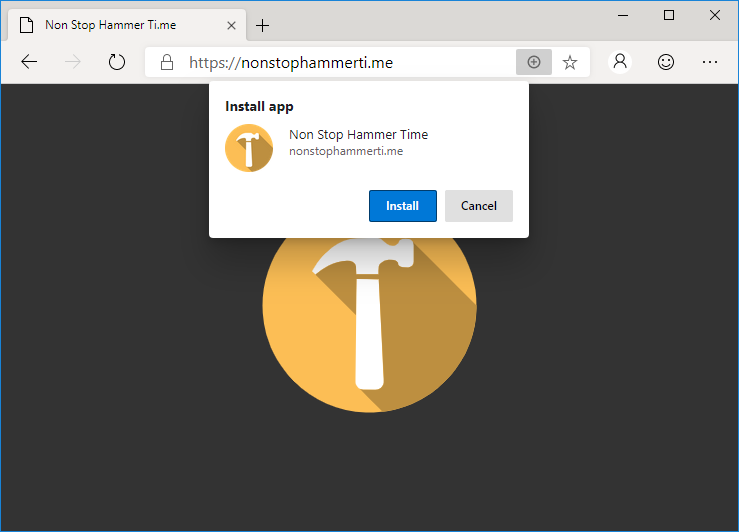
Installing NonStopHammerTi.me as a standalone PWA in Edge
NonStopHammerTi.me might not be the best PWA in the world, but it’s the best one linked from this blog post.

Edge Dev may go further than any other mainstream browser in its efforts to make Progressive Web Apps visible to the user, putting a plus sign (and sometimes an extended install prompt) right in the address bar, rather than burying it deep in a menu. Once installed, Edge PWAs “just work” in exactly the way that PWAs ought to, providing a simple and powerful user experience. Unlike some browsers, which make installing PWAs on mobile devices far easier than on desktops, presumably in a misguided belief in the importance of mobile “app culture”, it doesn’t discriminate against desktop users. It’s a slick and simple user experience all over.
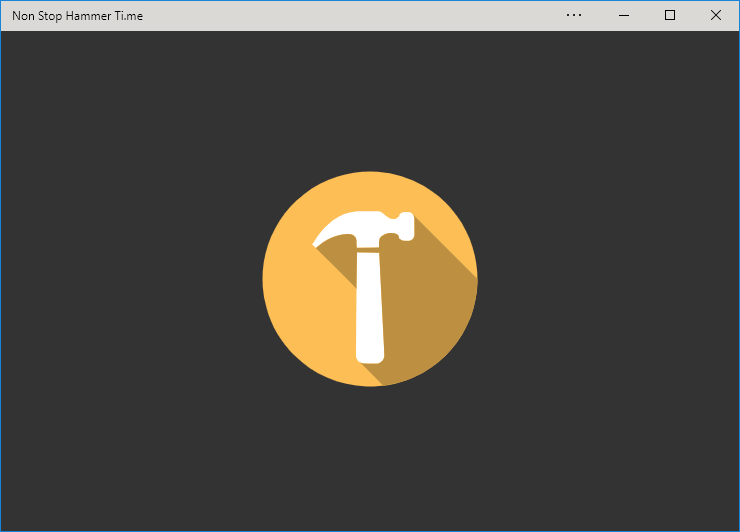
NonStopHammerTi.me running as a standalone PWA in Edge Dev.
Once installed, Edge immediately runs your new app (closing the tab it formerly occupied) and adds shortcut icons.

Feature support is stronger than it is for Progressive Web Apps delivered as standalone apps via the Windows Store, too, with the engine not falling over at the first sign of a modal dialog for example. Hopefully (as I support one of these hybrid apps!) these too will begin to be handled properly when Edge Dev eventually achieves mainstream availability.
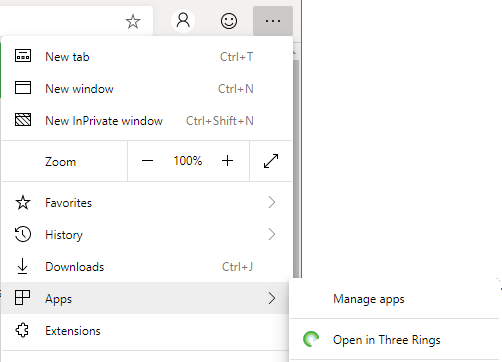
Edge provides an option to open a page in its sites' associated PWA, if installed.
If you’ve got the “app” version installed, Edge provides a menu option to switch to that from any page on the conventional site (and cookies/state is retained across both).

But perhaps most-impressive is Edge Dev’s respect for the importance of URLs. If, having installed the progressive “app” version of a site you subsequently revisit any address within its scope, you can switch to the app version via a link in the menu. I’d rather have seen a nudge in the address bar, where the user might expect to see such things (based on that being where the original install icon was), but this is still a great feature… especially given that cookies and other state maintainers are shared between the browser, meaning that performing such a switch in a properly-made application will result in the user carrying on from almost exactly where they left off.
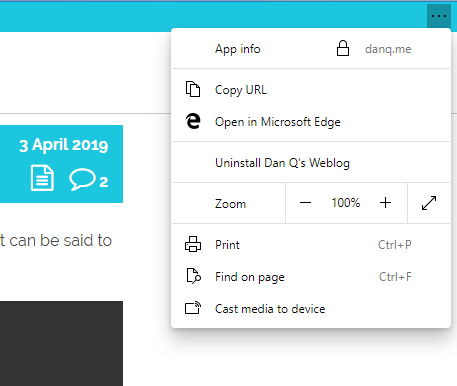
An Edge PWA showing its "Copy URL" feature.
Unlike virtually every other PWA engine, Edge Dev’s provides a “Copy URL” feature even to apps without address bars, which is a killer feature for sharability.

Similarly, and also uncommonly forward-thinking, Progressive Web Apps installed as standalone applications from Edge Dev enjoy a “copy URL” option in their menu, even if the app runs without an address bar (e.g. as a result of a "display": "standalone" directive in the manifest.json). This is a huge boost to sharability and is enormously (and unusually) respectful of the fact that addresses are the Web’s killer feature!  Furthermore, it respects the users’ choice to operate their “apps” in whatever way suits them best: in a browser (even a competing browser!), on their mobile device, or wherever. Well done, Microsoft!

I’m still very sad overall that Edge is becoming part of the Chromium family of browsers. But if the silver lining is that we get a pioneering and powerful new Progressive Web App engine then it can’t be all bad, can it?

× × × × ×

I Used The Web For A Day On Internet Explorer 8

This is a repost promoting content originally published elsewhere. See more things Dan's reposted.

Who In The World Uses IE8?

Before we start; a disclaimer: I am not about to tell you that you need to start supporting IE8.

There’s every reason to not support IE8. Microsoft officially stopped supporting IE8, IE9 and IE10 over three years ago, and the Microsoft executives are even telling you to stop using Internet Explorer 11.

But as much as we developers hope for it to go away, it just. Won’t. Die. IE8 continues to show up in browser stats, especially outside of the bubble of the Western world.

Sure, you aren’t developing for IE8 any more. But you should be developing with progressive enhancement, and if you do that right, you get all kinds of compatibility, accessibility, future- and past-proofing built-in. This isn’t just about supporting the (many) African countries where IE8 usage remains at over 1%… it’s about supporting the Web’s openness and archivibility and following best-practice in your support of new technologies.

Firefox Finally Appeals

As you may all know, I’m a die-hard supporter of the Opera web browser, despite many of my friends now claiming that Firefox is superior. I’ve been following the Mozilla project for a long while (haven’t we all), and on the many occasions I’ve tried Firefox (and it’s grandparents) I’ve always been unimpressed. It’s always been the little things that Opera did that kept me coming back to it, time and time again.

With the full release of Firefox 1.0 (download Firefox here), there’s been an explosion in the number of Firefox extensions that have become available, so I decided to try to find a combination of extensions that would at long last give Firefox the capabilities that always kept me coming back to Opera. The theory is – if I can find enough extensions to give me the functionality I need in a web browser (which Opera very-nearly perfectly provides) in Firefox, it’ll make a convert out of me. Here goes –

    • Mouse Gestures 1.0 – One of the great things about Opera is that it really pioneered mouse gestures (waving your cursor in strange patterns in order to facilitate shortcuts), and led the way for years thereafter. Mouse gestures are infectious – once you’ve used them and you get the hang of “doing things faster” (particularly mouse-intensive activities like web browsing), you end up trying to do it elsewhere – I’ve frequently used friends computers (with Internet Exploder, or similar) and tried to do a gesture before remembering that I can’t.The Mouse Gestures extension for Firefox is fully-featured and highly-configurable. I found the original settings a little unresponsive, and had to increase the “diagonal tolerance” (slippage permitted in a non-cardinal direction) to bring it back in line with the speed at which I execute gestures, and of course I’ve customised some of my own gestures. Apart from that, it’s wonderful.

Firefox Downloads Window In Sidebar

    • Download Manager Tweak 0.6.3 – One thing I loved about my customised Opera configuration was that pretty much everything not directly related to browsing – my RSS-feed subscriptions (that let me keep an eye on all my friends’ weblogs in realtime), my downloads, etc. – were set up to all appear in the wonderful “sidebar”: a non-invasive way of keeping information “to hand”. Firefox’s download windows are chunky and ugly, only a little better than the hideous ones provided by Internet Exploder. This plugin allows you to move the download window to the sidebar – a far more sensible place for it – and manage all your transfers from there.
    • Web Developer 0.8 and Nuke Anything 0.2 – As a web developer, I love the web developer tools in Opera. The ability to switch stylesheets, emulate other browsers, change and test content on the fly, and manipulate cookies is invaluable when debugging large, complex web projects. Combining these two excellent extensions gives me all of this, and more. The Web Developer tools can do things like manipulate form data on the fly, edit offline HTML and CSS on-the-fly, simulate different screen resolutions, and validate source code – it’s fantastic. Nuke Anything allows content to be ‘removed’ from the page: a great way of digging through complicated source code to find how a particular trick is being achieved.

Sage Extension For Firefox

  • Sage 1.3 – Now here’s a stunning piece of software. Thanks to Jon for suggesting this one.A great feature of Opera is it’s use as an RSS reader. RSS is a wonderful way to “subscribe” to news sources, weblogs, and the like, and be notified when they’re updated or even have the new content delivered directly to your desktop. It’s so good, that I rarely use Abnib or my friends page any more. Opera makes it easy to set up and manage your subscriptions, and delivers them in the way that suits you best.Now Firefox does natively support syndication, but it doesn’t do a very good job of it. It’s system – “Active Bookmarks”, relies on use of it’s bookmarks list, lots of scrolling, etc. Plus – and here’s the big problem – it doesn’t pass your browser cookies when picking up the feeds – this means that you can’t have it, for example, pick up restricted “friends only” feeds from your friends’ weblogs. Without this feature, there was no way I’d be leaving Opera behind.But Sage pulls it off. It pulls in the feeds and presents them in a brilliant way. It’s default options are a little weird, and it doesn’t support automatic “timed” feed collection, but it still does a great job of this newsfeed lark. I think everybody with Firefox should install Sage.
  • Session Saver – Simply put, this allows Firefox to remember what tabs you had open when it was last closed (even if it crashed or there was a power cut), and re-open them when you run it again, in a very Opera-esque way.
  • MiniT 0.4 – A pet annoyance, but one that would have really annoyed me, is the inability to re-order the tabs while using Firefox’s tabbed browsing. I mean: why wasn’t this included with the program? Most other programs that use the dynamic “document” tab metaphor allow the user to click-drag-reorder them, including my beloved Opera. But no, you need a plug-in like MiniT to do this. It’s good: not as “fluid” as Opera, but quite satisfactory.
  • TabBrowser Preferences 1.1.1 – It didn’t take long of playing with Firefox, particularly on the EasyNews web site, to find another thing which, to me, is a big problem. When people (very rudely) make hyperlinks that request to be opened in “a new window”, Firefox does exactly that: opens them in a new window, rather than in a new tab in the current window (fitting with the tabbed browsing metaphor). I tried a couple of plug-ins to prevent this from happening, but none of them worked consistently (for example, catching JavaScript pop-up windows and tabbing them, for example), as Opera does, until I found this lovely little extension. TabBrowser Preferences has all kind of options I don’t use, but for this one, which I do, it’s wonderful.
  • LastTab 1.1 – By this point, I had very few quirks left unsatisfied on my “web browser wish list”. One was that, in Opera, pressing CTRL-TAB takes you first to your most-recently used other tab, and then (if you keep pressing tab) through the others you have open. This makes sense to me, because you can then use CTRL-TAB as a two-tab “flicker” (like the “last channel” button on a TV remote): perfect for use as a “boss key” (if you don’t know, you don’t need to know). Satisfied.

This only leave one “big” niggle that still pisses me off – I can’t find a plug-in that will allow me to hold down a particular key (e.g. shift) and click on a tab, to close it (really useful for closing multiple tabs at once, after running and completing a multi-tab information seek). If anybody can suggest an extension that does this, let me know!

So; I guess I’m a Firefox convert. I knew it would happen someday, but I’m just surprised it happened so soon.

Online Banking

NatWest phoned me today in response to my complaint the other day that their online banking service refused to support Opera, my web browser of choice, seemingly for no good reason. I threatened to take my account elsewhere. Regardless, they’ve promised to look into it and try to make the site Opera-compatible, and I’ve said I’ll give them ’til Christmas.

Let your feet do the talking, people. It’s the only way that big companies (and banks) pay any attention at all.