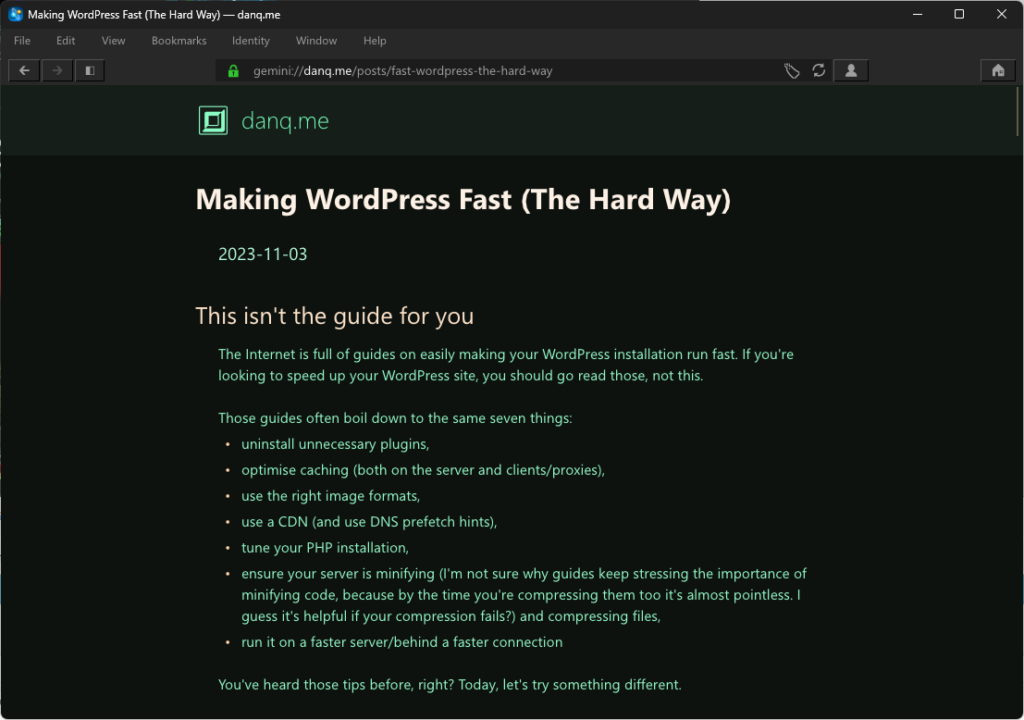
<link rel="alternate" type="application/rss+xml"> is fine, but I feel like there should be a standard for a site, not a page, to share a “list of
feeds associated with a site”.
Last night, I dreamed about a way to achieve that: ./well-known/feeds as an OPML document. Here’s mine, and here’s a draft spec.
There’s a perception that a blog is a long-lived, ongoing thing. That it lives with and alongside its author.1
But that doesn’t have to be true, and I think a lot of people could benefit from “short-term” blogging. Consider:
Photoblogging your holiday, rather than posting snaps to social media
You gain the ability to add context, crosslinking, and have permanent addresses (rather than losing eveything to the depths of a feed). You can crosspost/syndicate to your favourite
socials if that’s your poison..
Photoblog your holiday and I might follow it, and I’ll do so at my convenience. Put your snaps on Facebook and I almost certainly won’t bother. Photo courtesy ArtHouse Studio.
Blogging your studies, rather than keeping your notes to yourself
Writing what you learn helps you remember it; writing what you learn in a public space helps others learn too and makes it easy to search for your discoveries later.2
Recording your roleplaying, rather than just summarising each session to your fellow players
My D&D group does this at levellers.blog! That site won’t continue to be updated forever – the party will someday retire or, more-likely, come to a
glorious but horrific end – but it’ll always live on as a reminder of what we achieved.
One of my favourite examples of such a blog was 52 Reflect3 (now integrated into its successor The Improbable Blog). For 52 consecutive weeks my partner‘s brother Robin
blogged about adventures that took him out of his home in London and it was amazing. The project’s finished, but a blog was absolutely the right medium for it because now it’s got a
“forever home” on the Web (imagine if he’d posted instead to Twitter, only for that platform to turn into a flaming turd).
I don’t often shill for my employer, but I genuinely believe that the free tier on WordPress.com is an excellent
way to give a forever home to your short-term blog4.
Did you know that you can type new.blog (or blog.new; both work!) into your browser to start one?
What are you going to write about?
Footnotes
1This blog is, of course, an example of a long-term blog. It’s been going in
some form or another for over half my life, and I don’t see that changing. But it’s not the only kind of blog.
2 Personally, I really love the serendipity of asking a web search engine for the solution
to a problem and finding a result that turns out to be something that I myself wrote, long ago!
4 One of my favourite features of WordPress.com is the fact that it’s built atop the
world’s most-popular blogging software and you can export all your data at any time, so there’s absolutely no lock-in: if you want to migrate to a competitor or even host your own
blog, it’s really easy to do so!
This is an alternate history of the Web. The premise is true, but the story diverges from our timeline and looks at an alternative “Web that might have been”.
Prehistory
This is the story of P3P, one of the greatest Web standards whose history has been forgotten1, and how the abject failure of its first versions paved the
way for its bright future decades later. But I’m getting ahead of myself…
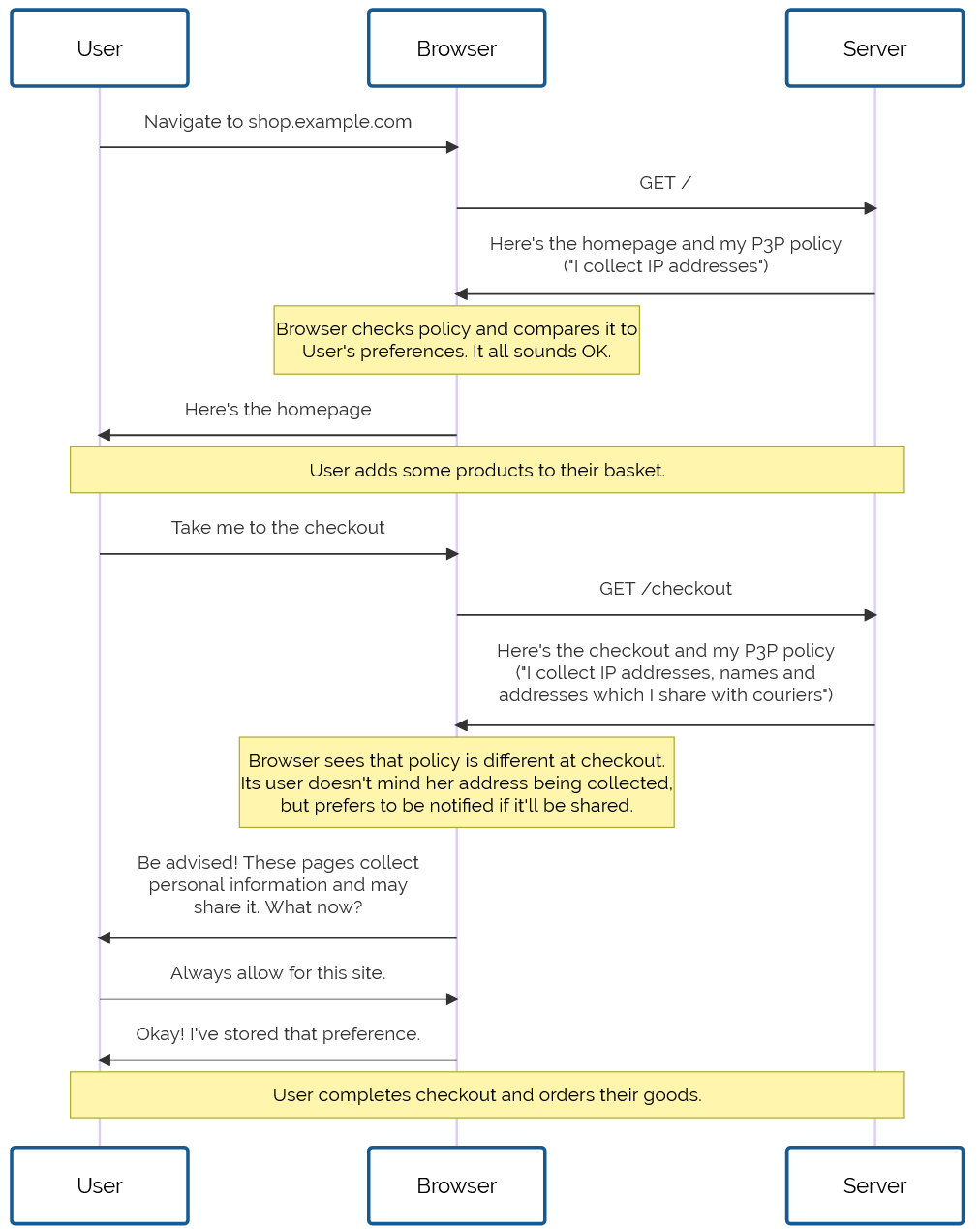
Drafted in 2002 in the wake of growing concern about the death of privacy on the Internet, P3P 1.0 aimed to make the collection of personally-identifiable data online transparent. Hurrah, right?
Initially, the principle was sound. The specification was weak. The implementation was apalling. But P3P 1.1
could have worked well.
Developers are lazy3 and soon converged on the simplest possible solution: add a garbage HTTP header like P3P: CP="See our website for our privacy policy." and your cookies work just fine! Ignore the problem, ignore the
proposed solution, just do what gets the project shipped.
Without any meaningful enforcement it also perfectly feasible to, y’know, just lie about how well you treat user data. Seeing the way the wind was blowing, Mozilla dropped
support for P3P, and Microsoft’s support – which had always been half-baked and lacked even the most basic user-facing
controls or customisation options – languished in obscurity.
For a while, it seemed like P3P was dying. Maybe, in some alternate timeline, it did die: vanishing into
nothing like VRML, WAP, and XBAP.
But fortunately for us, we don’t live in that timeline.
Revival
In 2009, the European Union revisited the Privacy and Electronic Communications
Directive. The initial regulations, published in 2002, required that Web users be able to opt-out of tracking cookies, but the amendment required that sites ensure that
users opted-in.
As-written, this confusing new regulation posed an
immediate problem: if a user clicked the button to say “no, I don’t want cookies”, and you didn’t want to ask for their consent again on every page load… you had to give them a cookie
(or use some other technique
legally-indistinguishable from cookies). Now you’re stuck in an endless cookie-circle.4
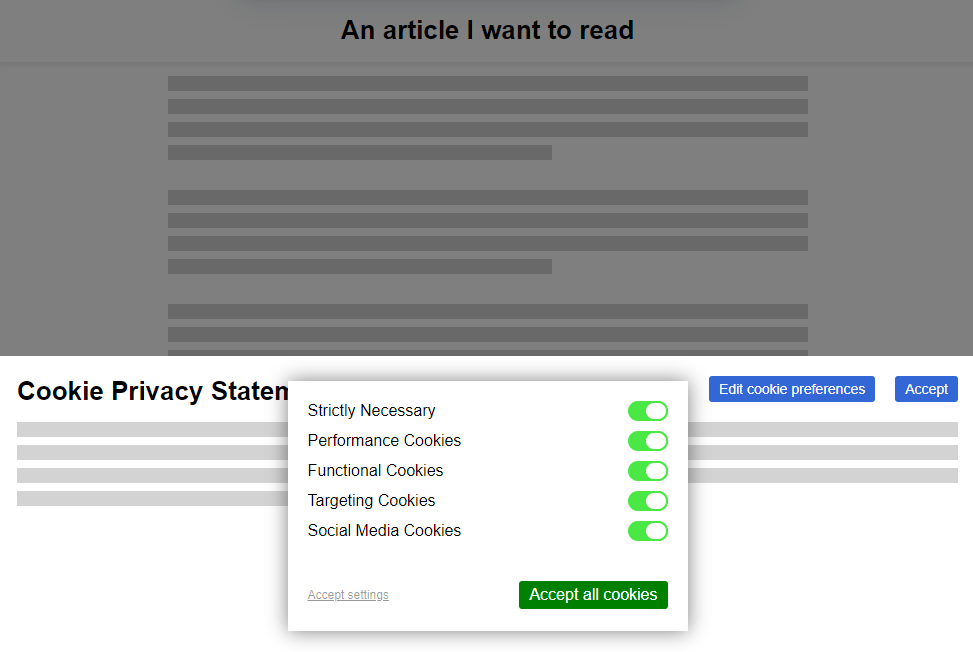
This, and other factors of informed consent, quickly introduced a new pattern among those websites that were fastest to react to the legislative change:
The cookie consent banner, with all its confusing language and dark patterns, looked like it was going to become the new normal for web users in the early 2010s. But thankfully, our
saviour had been waiting in the wings all along.
Web users rebelled. These ugly overlays felt like a regresssion to a time when popup ads and splash pages were commonplace. “If only,” people cried out, “There were a better way to do
this!”
It was Professor Lorie Cranor, one of the original authors of the underloved P3P specification and a respected champion of usable privacy and security, whose rallying cry gave us hope. Her CNET article, “Why
the EU Cookie Directive is a solved problem”5, inspired a new generation of development on what would become known as P3P 2.0.
While maintaining backwards compatibility, this new standard:
deprecated those horrible XML documents in favour of HTTP
headers and <link> tags alone,
removing support for Set-Cookie2: headers, which nobody used anyway, and
added features by which the provenance and purpose of cookies could be stated in a way that dramatically simplified adoption in browsers
Internet Explorer at this point was still used by a majority of Web users. It still supported the older
version of the standard, and – as perhaps the greatest gift that the much-maligned browser ever gave us – provided a reference implementation as well as a stepping-stone to wider
adoption.
Opera, then Firefox, then “new kid” Chrome each adopted P3P 2.0; Microsoft finally got on board with IE 8 SP 1. Now the latest versions of all the mainstream browsers had a solid
implementation6
well before the European data protection regulators began fining companies that misused tracking cookies.
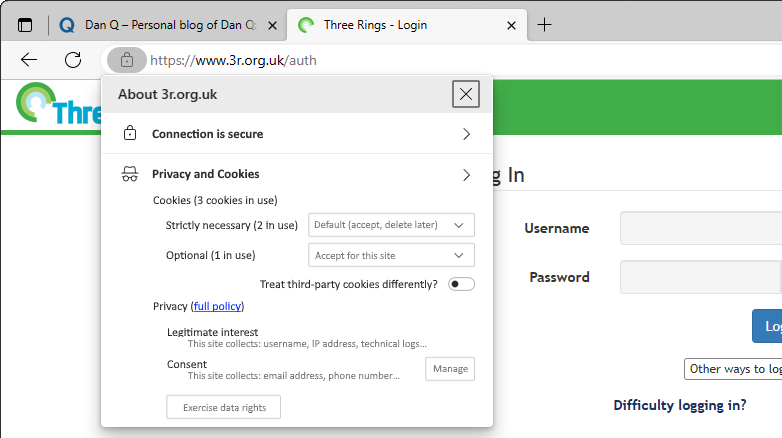
Nowadays, we’ve pretty-well standardised on the address bar being the place where all cookie and privacy information and settings are stored. Can you imagine if things had
gone any other way?
But where the story of P3P‘s successes shine brightest came in 2016, with the passing of the GDPR. The W3C realised that P3P could simplify both the expression and understanding of privacy policies for users, and formed a group to work on version 2.1. And that’s
the version you use today.
When you launch a new service, you probably use one of the many free wizard-driven tools to express your privacy policy and the bases for your data processing, and it spits out a
template privacy policy. You need the human-readable version, of course, since the 2020 German court ruling that you cannot rely on a machine-readable privacy policy alone, but
the real gem is the P3P: 2.1 header version.
Assuming you don’t have any unusual quirks in your data processing (ask your lawyer!), you can just paste the relevant code into your server configuration and you’re good to go. Site
users get a warning if their personal data preferences conflict with your data policies, and can choose how to act: not using your service, choosing which of your
features to opt-in or out- of, or – hopefully! – granting an exception to your site (possibly with caveats, such as sandboxing your cookies or clearing them immediately after closing
the browser tab).
Sure, what we’ve got isn’t perfect. Sometimes companies outright lie about their use of information or use illicit methods to track user behaviour. There’ll always be bad guys out there. That’s what laws are there to deal with.
But what we’ve got today is so seamless, it’s hard to imagine a world in which we somehow all… collectively decided that the correct solution to the privacy problem might have been to
throw endless popovers into users’ faces, bury consent-based choices under dark patterns, and make humans do the work that should from the outset have been done by machines. What a
strange and terrible timeline that would have been.
Footnotes
1 If you know P3P‘s
history, regardless of what timeline you’re in: congratulations! You win One Internet Point.
2 Techbros have been trying to solve political problems using technology since long before
the word “techbro” was used in its current context. See also: (a) there aren’t enough mental health professionals, let’s make an AI app? (b) we don’t have enough ventilators for this
pandemic, let’s 3D print air pumps? (c) banks keep failing, let’s make a cryptocurrency? (d) we need less carbon in the atmosphere or we’re going to go extinct, better hope direct
carbon capture tech pans out eh? (e) we have any problem at all, lets somehow shoehorn blockchain into some far-fetched idea about how to solve it without me having to get out of my
chair why not?
3 Note to self: find a citation for this when you can be bothered.
4 I can’t decide whether “endless cookie circle” is the name of the New Wave band I want
to form, or a description of the way I want to eventually die. Perhaps both.
6 Implementation details varied, but that’s part of the joy of the Web. Firefox favoured
“conservative” defaults; Chrome and IE had “permissive” ones; and Opera provided an ultra-configrable matrix of options by which a user could specify exactly which kinds of cookies to
accept, linked to which kinds of personal data, from which sites, all somehow backed by an extended regular expression parser that was only truly understood by three people, two of
whom were Opera developers.
It all started when I saw no-ht.ml, Terence Eden‘s hilarious response to Salma
Alam-Naylor‘s excellent HTML is all you need to make a website. The latter is an
argument against both the silly amount of JavaScript with which websites routinely burden their users, but also even against depending on CSS. As a fan of CSS Naked Day and a firm
believer in using JS only for progressive enhancement, I’m obviously in favour.
Obviously no-ht.ml is to be taken as tongue-in-cheek, but as you’re about to see: it caught my interest and got me thinking: how could I go even further.
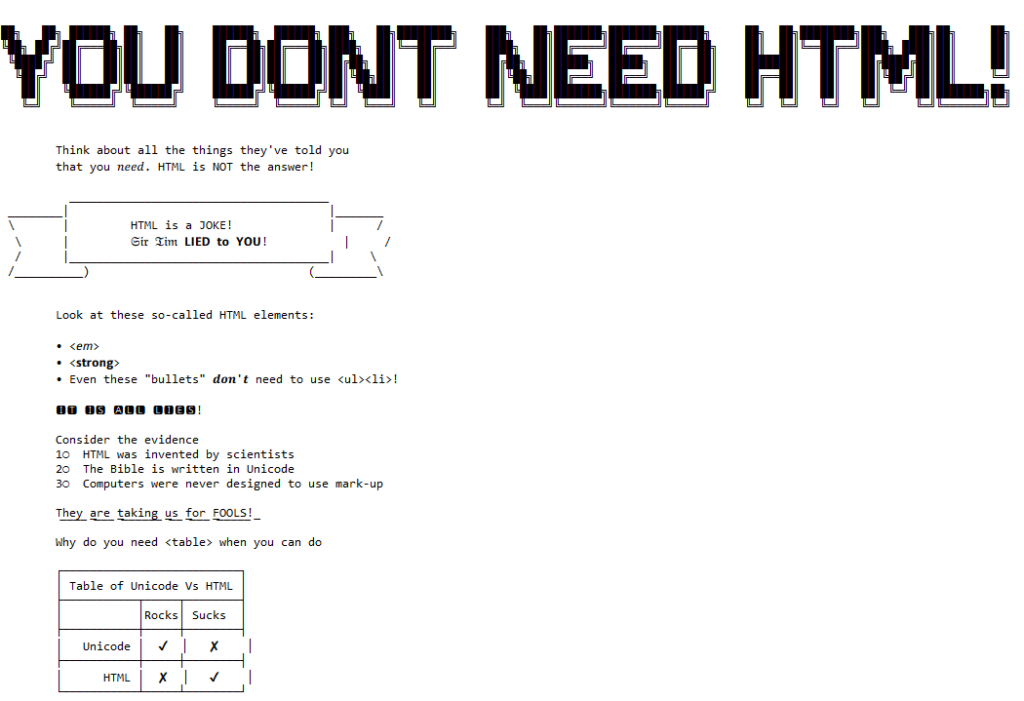
Terence’s site works by delivering a document with a
claimed MIME type of text/html, but which contains only the (invalid) “HTML” code
<!doctype UNICODE><meta charset="UTF-8"><plaintext> (to work around browsers’ wish to treat the page as HTML). This is followed by a block of UTF-8 plain text making use of spacing
and emoji to illustrate and decorate the content. It’s frankly very silly, and I love it.1
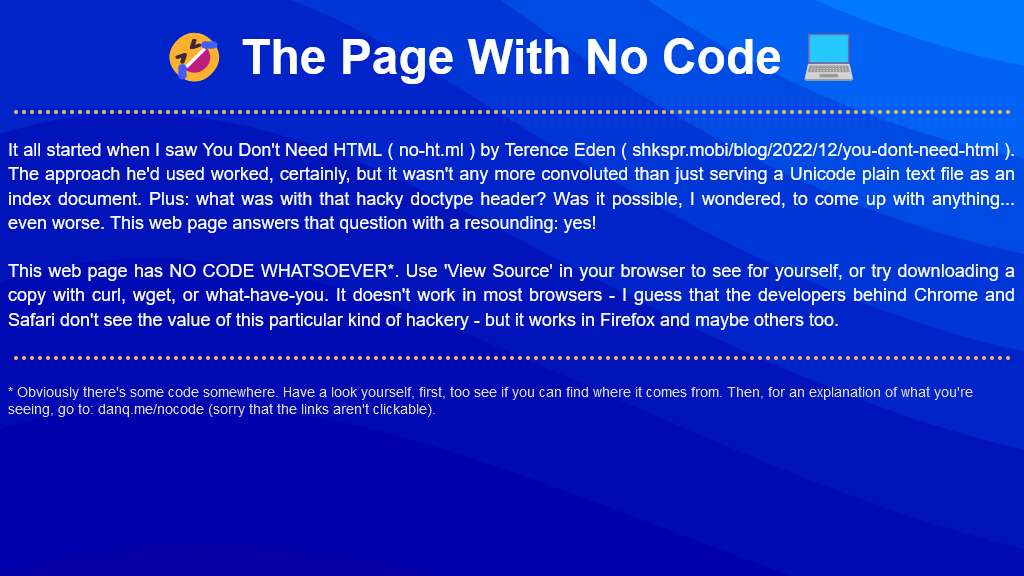
I think it’s possible to go one step further, though, and create a web page with no code whatsoever. That is, one that you can read as if it were a regular web page, but where
using View Source or e.g. downloading the page with curl will show you… nothing.
I present: The Page With No Code! (It’ll probably only work if you’re using Firefox, for reasons that will become apparent later.)
I’d encourage you to visit The Page With No Code, use View Source to confirm for yourself that it truly has no code, and see if you can work out for yourself how it manages
this feat… before coming back here for an explanation. Again: probably Firefox-only.
Once you’ve had a look for yourself and had a chance to form an opinion, here’s an explanation of the black magic that makes this atrocity possible:
The page is blank. It’s delivered with Content-Type: text/html. Your browser interprets a completely-blank page as faulty and corrects it to a functionally-blank
minimal HTML page: <html><head></head><body></body></html>.
<body> and <html> elements can be styled with CSS; this includes the ability to add
content:::before and ::after each
element. If only we could load a stylesheet then content injection is possible.
We use the fourth way to inject
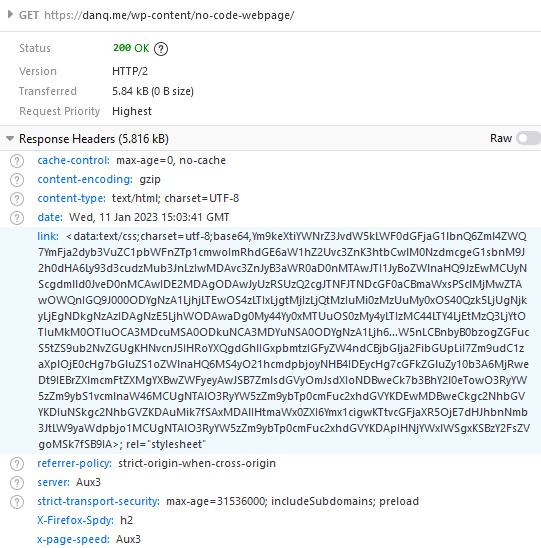
CSS – a Link: HTTP header – to deliver a CSS payload (this, unfortunately, only works in Firefox). To further obfuscate what’s happening and remove the need for a round-trip, this is encoded
as a data: URI.
The stylesheet – and all the page content – is right there in the Link: header if you just care to decode it! Observe that while 5.84kB of
data are transferred, the browser rightly states that the page is zero bytes in size.
My server-side implementation of this broke in 2023 after I upgraded Nginx; my new version doesn’t support the super-long Link: header needed
to make this hack work, so I’ve updated the page to use the Link: to reference the CSS file rather than embed it via a data URI. It’s not as cool, but it at least means you can
still see the page. Thanks to Thomas Bradshaw for pointing out the problem.
Footnotes
1 My first reaction was “why not just deliver something with Content-Type:
text/plain; charset=utf-8 and dispense with the invalid code, but perhaps that’s just me overthinking the non-existent problem.
This is a reply to a post published elsewhere. Its content might be duplicated as a traditional comment at the original source.
In his blog post “The ethics of syndicating comments using WebMentions”, Terence Eden said:
…
I want to see what people are writing in public about my posts. I also want to direct people to the conversations which are happening elsewhere on the web. But people – quite
rightly – might not want their content permanently stored by my site.
So I think I have a few options.
Do nothing. My site; my rules. If you don’t want me to grab your hot takes, don’t post them in public. (Feels a bit rude, TBQH.)
Be reactive. If someone asks me to remove their content, do so. (But, of course, how will they know I’ve made a copy?)
Stop syndicating comments. (I don’t wanna!)
Replace the verbatim comments with a link saying “Fred mentioned this article on Twitter” . (A bit of a disruptive experience for readers.)
Use oEmbed to capture the user’s comment and dynamically load it from the 3rd party site. That would update automatically if the user changes their name or deleted the
comment. (A massive faff to set up.)
…
Terence describes a problem that I’ve wrestled with myself. If somebody comments directly on my blog using the form at the bottom of a post, that’s a pretty strong indicator of
them giving their consent for their comment to be published at the bottom of that post (at my discretion). If somebody publicly replies somewhere my post is syndicated, that’s
less-obvious, but still pretty clear. If somebody merely mentions my post publicly, writing their own post and linking to mine… that’s a real fuzzy area.
I take a minimal approach; only capturing their full content if it’s short and otherwise trying to extract a snippet that contains the bit that mentioned my content, and I think that
works great. But Terence points out an important follow-up: what if the commenter deletes that content?
My approach so far has always been a reactive one – the second in Terence’s list – and I think it’s a morally-acceptable stance for a personal blogger. But I’m not sure it scales. I
find myself asking: what if a news outlet did this, taking my self-published feedback to their story and publishing it on their site, even if I later amended, retracted, or deleted it
on my own? If somebody’s making money out of my content, that feels different: I’ve always been clear that what I write on my blog is permissively-licensed, but that permissiveness is based on the prohibition of
commercial use of my content.
Perhaps down the line this can be solved technologically: something machine-readable akin to the <link rel="license" ...> tag could state an author’s preference for
how their content is syndicated by third parties they’ve mentioned, answering questions like:
Can you quote me, or just link to me? Who do these rules apply to? (Should we be attaching metadata to individual links?)
Should you inform me that you’ve done so, and if so: how (WebMention, etc.)?
If you (or your site) observe that my content has disappeared or changed for an extended time, should that be taken as revokation of consent to syndicate it?
Right now, the relevant technologies are not well-established enough to even begin this kind of work, but if a modern interconected federated web of personal websites takes off, it’s
the kind of question we might one day have to answer.
For now my gut feeling is that option #2 (reactive moderation of syndicated comments) is ethically-sufficient for personal websites. But I’ll be watching the feedback Terence (who
probably gets many more readers than I) receives in case my gut doesn’t represent the majority!
103: Early Hints (“I’m not sure this can last forever.”)
300: Multiple Choices (“There are so many ways I can do better than you.”)
303: See Other (“You should date other people.”)
304: Not Modified (“With you, I feel like I’m stagnating.”)
402: Payment Required (“I am a prostitute.”)
403: Forbidden (“You don’t get this any more.”)
406: Not Acceptable (“I could never introduce you to my parents.”)
408: Request Timeout (“You keep saying you’ll propose but you never do.”)
409: Conflict (“We hate each other.”)
410: Gone (ghosted)
411: Length Required (“Your penis is too small.”)
413: Payload Too Large (“Your penis is too big.”)
416: Range Not Satisfied (“Our sex life is boring and repretitive.”)
425: Too Early (“Your premature ejaculation is a problem.”)
428: Precondition Failed (“You’re still sleeping with your ex-!?”)
429: Too Many Requests (“You’re so demanding!”)
451: Unavailable for Legal Reasons (“I’m married to somebody else.”)
502: Bad Gateway (“Your pussy is awful.”)
508: Loop Detected (“We just keep fighting.”)
With thanks to Ruth for the conversation that inspired these pictures, and apologies to the rest of the Internet for creating them.
I’m off work sick today: it’s just a cold, but it’s had a damn good go at wrecking my lungs and I feel pretty lousy. You know how when you’ve got too much of a brain-fog to trust
yourself with production systems but you still want to write code (or is that just me?), so this morning I threw together a really, really stupid project which you can play online here.
It’s a board game. Well, the digital edition of one. Also, it’s not very good.
It’s inspired by a toot by Mason”Tailsteak” Williams (whom I’ve mentioned before once or
twice). At first I thought I’d try to calculate
the odds of winning at his proposed game, or how many times one might expect to play before winning, but I haven’t the brainpower for that in my snot-addled brain. So instead I threw
together a terrible, terrible digital implementation.
Go play it if, like me, you’ve got nothing smarter that your brain can be doing today.
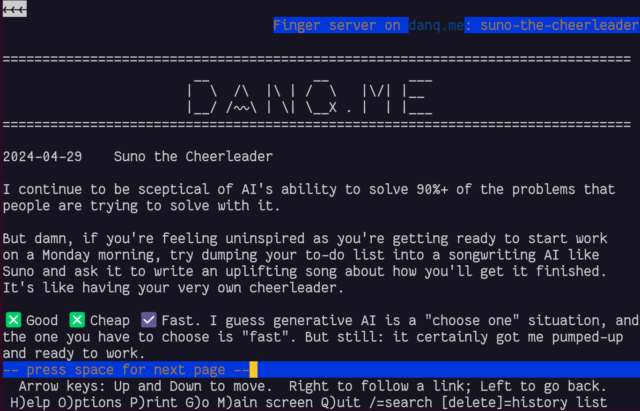
Just in time for Robin Sloan to give up on Spring ’83, earlier this month I finally got aroud to launching STS-6 (named for the first mission of the Space Shuttle Challenger in Spring 1983), my experimental Spring ’83 server. It’s
been a busy year; I had other things to do. But you might have guessed that something like this had been under my belt when I open-sourced a keygenerator for the protocol the other day.
If you’ve not played with Spring ’83, this post isn’t going to make much sense to you. Sorry.
My server is, as far as I can tell, very different from any others in a few key ways:
It does not allow third-party publishing at all. Some might argue that this undermines the aim of the exercise, but I disagree. My IndieWeb inclinations lead me to
favour “self-hosted” content, shared from its owners’ domain. Also: the specification clearly states that a server must implement a denylist… I guess my denylist simply includes all keys that are
not specifically permitted.
It’s geared towards dynamic content.My primary board self-publishes whenever I produce a new blog post, listing the most recent blog posts published. I have
another half-implemented which shows a summary of the most-recent post, and another which would would simply use a WordPress page as its basis – yes, this was content
management, but published over Spring ’83.
It provides helpers to streamline content production. It supports internal references to other boards you control using the format {{board:123}}which are
automatically converted to addresses referencing the public key of the “current” keypair for that board. This separates the concept of a board and its content template from that
board’s keypairs, making it easier to link to a board. To put it another way, STS-6 links are self-healing on the server-side (for local boards).
It helps automate content-fitting. Spring ’83 strictly requires a maximum board size of 2,217 bytes. STS-6 can be configured to fit a flexible amount of dynamic
content within a template area while respecting that limit. For my posts list board, the number of posts shown is moderated by the size of the resulting board: STS-6 adds more and
more links to the board until it’s too big, and then removes one!
It provides “hands-off” key management features. You can pregenerate a list of keys with different validity periods and the server will automatically cycle through
them as necessary, implementing and retroactively-modifying <link rel="next"> connections to keep them current.
I’m sure that there are those who would see this as automating something that was beautiful because it was handcrafted; I don’t know whether or not I agree, but had Spring ’83
taken off in a bigger way, it would always only have been a matter of time before somebody tried my approach.
From a design perspective, I enjoyed optimising an SVG image of my header so it could meaningfully fit into the board. It’s
pretty, and it’s tolerably lightweight.
If you want to see my server in action, patch this into your favourite Spring ’83 client:
https://s83.danq.dev/10c3ff2e8336307b0ac7673b34737b242b80e8aa63ce4ccba182469ea83e0623
A dead end?
Without Robin’s active participation, I feel that Spring ’83 is probably coming to a dead end. It’s been a lot of fun to play with and I’d love to see what ideas the experience of it
goes on to inspire next, but in its current form it’s one of those things that’s an interesting toy, but not something that’ll make serious waves.
In his last lab essay Robin already identified many of the key issues with the system (too complicated, no interpersonal-mentions, the challenge of keys-as-identifiers, etc.) and while
they’re all solvable without breaking the underlying mechanisms (mentions might be handled by Webmention, perhaps, etc.), I
understand the urge to take what was learned from this experiment and use it to help inform the decisions of the next one. Just as John Postel’s Quote of the Day protocol doesn’t see much use any more (although maybe if my
finger server could support QotD?) but went on to inspire the direction of many subsequent “call-and-response” protocols,
including HTTP, it’s okay if Spring ’83 disappears into obscurity, so long as we can learn what it did
well and build upon that.
Meanwhile: if you’re looking for a hot new “like the web but lighter” protocol, you should probably check out Gemini. (Incidentally, you
can find me at gemini://danq.me, but that’s something I’ll write about another day…)
This weekend I was experimentally reimplenting how my blog displays comments. For testing I needed to find an old post with both trackbacks and pingbacks on it. I found my post that you linked, here, and was delighted to be reminded that despite both of our blogs changing domain name (from photomatt.net to ma.tt
and from blog.scatmania.org to danq.me, respectively), all the links back and forth still work perfectly because clearly we share an apporopriate dedication to the principle that
Cool URIs Don’t Change, and set up our redirects accordingly. 🙌
Incidentally, this was about the point in time at which I first thought to myself “hey, I like what Matt’s doing with this Automattic thing; I should work there someday”. It took me
like a decade to a decade-and-a-half to get around to applying, though… 😅
Anyway: thanks for keeping your URIs cool so I could enjoy this trip down memory lane (and debug an experimental wp_list_comments callback!).
That’s a really useful thing to have in this new age of the web, where Refererer: headers are no-longer commonly passed cross-domain and Google Search no longer provides the link: operator. If you want to know if I’ve ever
linked to your site, it’s a bit of a drag to find out.
To nobody’s surprise whatsoever, I’ve made a so many links to Wikipedia that I might be single-handedly responsible for their PageRank.
So, obviously, I’ve written an implementation for WordPress. It’s really basic right now, but the source code can be
found here if you want it. Install it as a plugin and run wp outbound-links to kick it off. It’s fast: it takes 3-5 seconds to parse the entirety of danq.me,
and I’ve got somewhere in the region of 5,000 posts to parse.
You can see the results at https://danq.me/.well-known/links – if you’ve ever wondered “has Dan ever linked to my site?”, now you can find the
answer.
If this could be useful to you, let’s collaborate on making this into an actually-useful plugin! Otherwise it’ll just languish “as-is”, which is good enough for my purposes.
[Nilay:]It is fashionable to run around saying the web is dead and that apps shape the world, but in my mind, the web’s pretty healthy for at least two things: news
and shopping.
[Matt:] I think that’s your bubble, if I’m totally honest. That’s what’s cool about the web: We can live in a bubble and that can seem like the whole thing. One thing I would
explicitly try to do in 2022 is make the web weirder.
…
The Verge interviewed Matt Mullenweg, and – as both an Automattician and a fan of the Web as
a place for fun and weirdness – I really appreciated the direction the interview went in. I maintain that open web standards and platforms (as opposed to closed social media silos)
are inspirational and innovative.
Emilie Reed‘s Anything a Maze lives on itch.io, and (outside of selfhosting) that’s
clearly the best place for it: you couldn’t tell that story the same way on Medium; even less-so on Facebook or Twitter.
Suppose you’re running an application on a Passenger + Nginx powered server and you want to add caching.
Perhaps your application has a dynamic, public endpoint but the contents don’t change super-frequently or it isn’t critically-important that the user always gets up-to-the-second
accuracy, and you’d like to improve performance with microcaching. How would you do that?
Where you’re at
Not pictured: the rest of the Internet.
Your configuration might look something like this:
1
2
3
4
5
6
7
server {
# listen, server_name, ssl, logging etc. directives go here# ...root/your/application;
passenger_enabledon;
}
What you’re looking for is proxy_cache and its sister directives, but you can’t just
insert them here because while Passenger does act act like an upstream proxy (with parallels like e.g. passenger_pass_header which mirrors the behaviour of proxy_pass_header), it doesn’t provide any of the functions you need to implement proxy caching
of non-static files.
Where you need to be
Instead, what you need to to is define a second server, mount Passenger in that, and then proxy to that second server. E.g.:
# Set up a cacheproxy_cache_path/tmp/cache/my-app-cachekeys_zone=MyAppCache:10mlevels=1:2inactive=600smax_size=100m;
# Define the actual webserver that listens for Internet traffic:server {
# listen, server_name, ssl, logging etc. directives go here# ...# You can configure different rules by location etc., but here's a simple microcache:location/ {
proxy_passhttp://127.0.0.1:4863; # Proxy all traffic to the application server defined belowproxy_cacheMyAppCache; # Use the cache defined aboveproxy_cache_valid2003s; # Treat HTTP 200 responses as valid; cache them for 3 secondsproxy_cache_use_staleupdating; # (Optional) send outdated response while background-updating cacheproxy_cache_lock on; # (Optional) only allow one process to update cache at once
}
}
# (Local-only) application server on an arbitrary port number to act as the upstream proxy:server {
listen 127.0.0.1:4863;
root/your/application;
passenger_enabledon;
}
The two key changes are:
Passenger moves to a second server block, localhost-only, on an arbitrary port number (doesn’t need HTTPS, of course, but if your application detects/”expects” HTTPS you
might need to tweak your headers).
Your main server block proxies to the second as its upstream, and you can add whatever caching directives you like.
Obviously you’ll need to be smarter if you host a mixture of public and private content (e.g. send Vary: headers from your application) and if you want different cache
durations on different addresses or types of content, but there are already great guides to help with that. I only wrote this post because I spent some time searching for (nonexistent!)
passenger_cache_ etc. rules and wanted to save the next person from the same trouble!
Different games in the same style (absurdle plays adversarially like my cheating hangman
game, crosswordle involves reverse-engineering a wordle colour grid into a crossword, heardle
is like Wordle but sounding out words using the IPA…)
I’m sure that by now all your social feeds are full of people playing Wordle. But the cool nerds are playing something new…
Now, a Wordle clone for D&D players!
But you know what hasn’t been seen before today? A Wordle clone where you have to guess a creature from the Dungeons & Dragons (5e) Monster Manual by putting numeric values into a
character sheet (STR, DEX, CON, INT, WIS, CHA):
Just because nobody’s asking for a game doesn’t mean you shouldn’t make it anyway.
What are you waiting for: go give DNDle a try (I pronounce it “dindle”, but you can pronounce it however you like). A new monster
appears at 10:00 UTC each day.
And because it’s me, of course it’s open source and works offline.
The boring techy bit
Like Wordle, everything happens in your browser: this is a “backendless” web application.
I’ve used ReefJS for state management, because I wanted something I could throw together quickly but I didn’t want to drown myself (or my players)
in a heavyweight monster library. If you’ve not used Reef before, you should give it a go: it’s basically like React but a tenth of the footprint.
A cache-first/background-updating service worker means that it can run completely offline: you can install it to your homescreen in the
same way as Wordle, but once you’ve visited it once it can work indefinitely even if you never go online again.
I don’t like to use a buildchain that’s any more-complicated than is absolutely necessary, so the only development dependency is rollup. It
resolves my import statements and bundles a single JS file for the browser.
What happens when you give Gutenberg and Elementor to complete Beginners? In this challenge, Meg and Lily (two of my daughters) are tasked with re-creating a webpage. They’ve never
used Elementor or Gutenberg before, and I only gave them 30 minutes each.
…
Jamie of Pootlepress challenged his daughters – who are presumably both digital natives, but have no WordPress experience – to build a page to a specific design using both Gutenberg and Elementor. In 30 minutes.
Regardless of what you think about the products under test or the competitors in the challenge (Lily + Gutenberg clearly seems to be the fan favourite, which I’d sort-of expect because
IMO Gutenberg’s learning curve is much flatter that Elementor’s), this is a fantastic example of “thinking aloud” (“talkalong”)
UX testing. And with (only) a £20 prize on offer, it’s possibly the best-value testing of its type I’ve ever seen too! Both the
participants do an excellent job of expressing their praise of and frustration with different parts of the interface of their assigned editing platform, and the developers of both – and
other systems besides – could learn a lot from watching this video.
Specifically, this video shows how enormous the gulf is between how developers try to express concepts that are essential to web design and how beginner users assume things will work.
Concepts like thinking in terms of “blocks” that can resize or reposition dynamically, breakpoints, assets as cross-references rather than strictly embedded within documents, style as
an overarching concept by preference to something applied to individual elements, etc… some as second nature once you’re sixteen levels deep into the DOM and you’ve been doing it for years! But they’re rarely intuitive… or, perhaps, not expressed in a way that makes them intuitive… to new users.